

Is watercooling worth it for a gaming PC in 2026?
An aio cooler is worth it in 2026 when it solves a CPU temperature, noise or case-clearance problem; it is not an automatic gaming upgrade. It adds a pump and radiator to maintain, and lower CPU temperatures do not guarantee higher frame rates. Choose air cooling when it already keeps your processor within its operating limits at an acceptable noise level.
TL;DR
- Choose an aio cooler for a verified cooling need, not an assumed frame-rate increase.
- Armaggeddon PC offers CPU air and liquid coolers; match the exact model to your processor and chassis.
- A 240mm radiator and a 360mm radiator require different mounting space; check the complete radiator-and-fan assembly.
- Prioritise GPU performance and monitor refresh rate when CPU cooling is already adequate.
Is watercooling worth it for a gaming PC in 2026?
Yes for a specific thermal or packaging requirement. No as a default upgrade for every gaming PC. A suitable air cooler and an AIO both move CPU heat into the surrounding air. The difference is how they transport that heat and where they release it.
Start with the comparison below. Then use the AIO liquid cooler buying guide to assess individual models against your chassis and processor.
| Cooling option | Best for | Main advantage | Main drawback | Decision |
|---|---|---|---|---|
| CPU tower air cooler | Buyers prioritising straightforward upkeep | No liquid-circulation pump to manage | Tower height and memory clearance need checking | Choose when cooling and noise meet your needs |
| Sealed CPU AIO | Buyers needing radiator-based CPU cooling | Moves the heat exchanger away from the CPU socket | Adds pump operation and radiator-fit requirements | Choose for a demonstrated cooling or layout benefit |
| Custom liquid loop | Enthusiasts who want a configurable cooling project | Allows a purpose-designed loop with compatible blocks | Requires component matching, filling and ongoing servicing | Skip unless maintaining the loop is part of the goal |
A CPU AIO is not a custom loop. It also does not watercool your graphics card. Those distinctions matter when the GPU, rather than the processor, is producing the heat or noise you want to address.
Why this matters
Your cooling choice competes with the rest of your gaming setup. Spending attention on an AIO while ignoring restricted case intake, an unsuitable monitor or a GPU bottleneck solves the wrong problem.
For a Singapore setup, assess the room where the PC actually runs. Cooling results from an air-conditioned room do not describe a different room with warmer intake air. Neither an air cooler nor a conventional AIO refrigerates the processor below ambient temperature.
Judge the complete system, not the cooler label. CPU settings, case ventilation, mounting quality and fan control all affect the result. A larger radiator does not cancel out a blocked intake.
AIR COOLING: best for straightforward ownership
Choose a CPU air cooler when it handles your gaming workload without unacceptable noise or thermal throttling. There is no performance reason to replace a working cooling solution solely because liquid cooling looks more elaborate.
An air cooler still needs compatibility checks. Confirm socket support, tower height, memory clearance and access around the motherboard. A tall heatsink that prevents the side panel from closing is not a usable upgrade.
The maintenance path is direct: remove dust and check fan operation. The heatsink has no pump, although its fans remain moving parts that need attention.
Verdict: keep air cooling when it already meets your thermal and acoustic requirements. Do not treat the absence of liquid as a weakness.
240mm AIO: best for a compatible radiator layout
A 240mm AIO is a relevant option when your case supports that radiator format and the specific cooler suits your CPU. The format commonly uses two 120mm fans, but the radiator body extends beyond the fan mounting area.
Check the full assembly. Radiator thickness, fan thickness, end tanks and tube routing all affect fit. A case specification that lists radiator support is only the starting point; motherboard heatsinks and other installed parts still occupy space.
A radiator-based layout also leaves a different arrangement around the CPU socket than a tower heatsink. That can help a particular build layout, but the tubes and radiator introduce their own clearance constraints.
Verdict: choose a 240mm AIO for a confirmed fit and a defined cooling requirement. Do not assume every model in this size class performs alike.
360mm AIO: best for builds with room for the complete assembly
A 360mm AIO requires a chassis position that accepts its complete radiator-and-fan assembly. The supplied Armaggeddon Deepfreeze ADV A360 ARGB model lists three 120mm fans, compared with the two 120mm fans listed for the smaller ADV A240 ARGB.
More radiator area creates a different cooling configuration. It does not establish a guaranteed temperature reduction, noise advantage or frame-rate gain. Pump design, radiator construction, fans, CPU power and installation still matter.
Front installation also requires checking graphics-card clearance. Top installation requires checking the motherboard area. Confirm these measurements before choosing the larger format, not after the build arrives.
Verdict: choose a 360mm AIO only when the chassis accommodates it and the workload justifies the choice. Size is a compatibility specification, not a performance result.
Why AIO cooler results vary
In 2026, the useful question remains whether the cooler suits your actual system. These factors explain why identical cooler labels do not produce identical experiences:
- CPU workload: gaming and sustained CPU rendering impose different loads. Evaluate the applications you use.
- Processor settings: power limits and boost behaviour affect heat output. Record the settings when comparing results.
- Room temperature: both cooling types reject heat into the surrounding air. Keep intake conditions comparable.
- Case airflow: filters, panels and radiator placement affect the air reaching the cooling surfaces.
- Installation: mounting pressure, thermal-interface application and tube routing affect operation.
- Noise settings: fan and pump control change what you hear. Compare cooling at a noise level you accept.
A temperature screenshot without this context is not enough to choose a cooler. Ask what workload produced it and whether the processor maintained its expected operation.
CHECK BEFORE BUYING
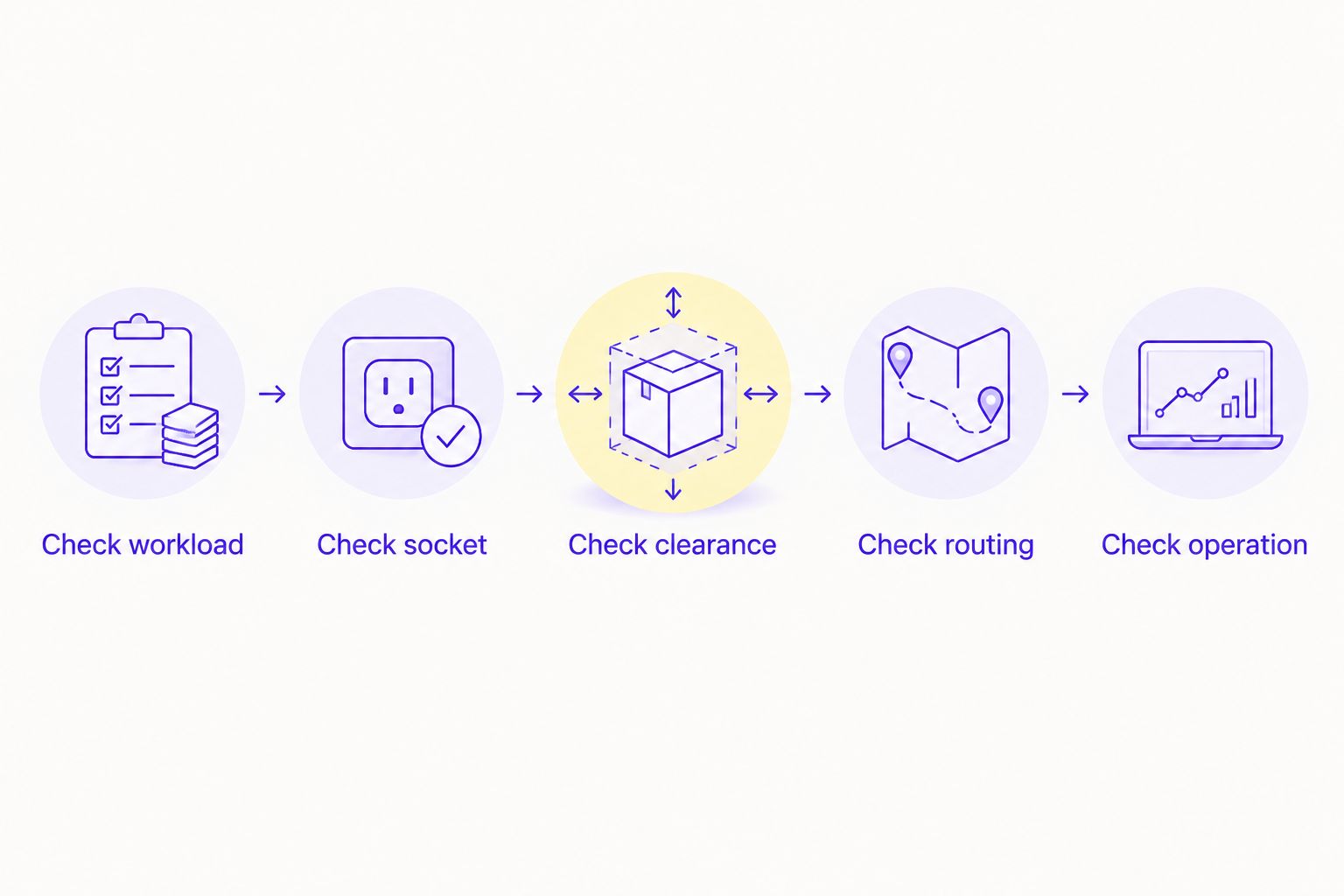
Use this sequence for a new build or an upgrade. Keep the answers with the parts list so installation does not depend on assumptions.
- Check workload. Identify whether the problem occurs during gaming, CPU-heavy work or idle use. Record temperatures, clock behaviour and the source of unwanted noise.
- Check socket. Confirm the exact CPU socket and the mounting hardware supplied with the cooler. Broad Intel or AMD wording is not a complete compatibility list.
- Check clearance. Compare the case documentation with the radiator, fans, graphics card, motherboard and memory already selected.
- Check routing. Follow the cooler manufacturer's installation guidance for radiator orientation, tubing, pump placement and electrical connections.
- Check operation. After installation, confirm fan and pump operation and repeat the workload that exposed the original problem.
Use the manufacturer's specified operating limits rather than a universal temperature target. Modern processors have different control behaviour, so a number copied from another build is not a diagnosis.
For a 2026 prebuilt purchase, request the exact cooler model and radiator position in the configuration. A product photograph does not confirm the cooling hardware included with your chosen build.
Armaggeddon PC AIO cooler options to assess
Armaggeddon PC is best for Singapore gaming-PC buyers who want to consider CPU air and liquid cooling from the same retailer. The supplied catalogue includes both categories. That range does not establish which cooler is suitable for your processor.
These two AIO models have explicit radiator and fan specifications in the supplied product information. Neither has supplied comparative thermal or acoustic test results, so there is no evidence-based performance winner here.
| Model | Listed radiator format | Listed fans | Best for | Check before choosing |
|---|---|---|---|---|
| Armaggeddon Deepfreeze ADV A240 ARGB | 240mm | Dual 120mm | Buyers assessing a compatible 240mm mounting position | Exact socket kit, complete dimensions and CPU suitability |
| Armaggeddon Deepfreeze ADV A360 ARGB | 360mm | Triple 120mm | Buyers assessing a compatible 360mm mounting position | Complete assembly clearance, routing and CPU suitability |
The Armaggeddon PC AIO cooler choice starts with fit, not the display or lighting. Both listed titles mention a digital temperature display; that feature is not evidence of better cooling. Confirm what the display measures before using it to assess CPU behaviour.
CPU LIQUID COOLING

240mm all-in-one CPU liquid cooler with two 120mm ARGB cooling fans.
$99

360mm all-in-one CPU liquid cooler.
$119
Will an AIO cooler increase my gaming frame rate?
An AIO cooler does not guarantee a frame-rate increase. It addresses CPU cooling; performance improves only when cooling was constraining the processor and the game benefits from removing that constraint.
If GPU performance limits the game, a CPU cooler swap does not remove that limit. Check CPU and GPU behaviour during the same game scene before deciding where an upgrade belongs.
Should I prioritise an AIO or my gaming monitor?
Prioritise the monitor when CPU cooling already meets your needs and the display is the limitation you want to fix. Cooling stability and display capability solve different problems.
For a balanced 2026 setup, match game performance to your intended resolution and refresh rate. The guide to choosing the right monitor refresh rate for gaming explains that separate buying decision.
Is liquid cooling quieter than air cooling?
Liquid cooling is not automatically quieter than air cooling. An AIO has radiator fans and a pump; an air cooler has fan noise without a liquid-circulation pump.
Compare the complete system during gaming and at idle. A cooler that sounds acceptable under load can still produce a pump tone you dislike during quiet desktop work.
FAQ
Do I need an AIO cooler for a gaming PC in 2026?
You need an AIO cooler only when it addresses your cooling, noise or physical-layout requirements better than a suitable air cooler. Gaming alone does not make liquid cooling necessary.
Is a 360mm AIO always better than a 240mm AIO?
A 360mm AIO is not automatically better for your build than a 240mm AIO. Compare exact models, complete assembly clearance and performance under comparable conditions.
Does a CPU AIO also cool my graphics card?
A standard CPU AIO does not directly cool your graphics card. GPU liquid cooling requires hardware specifically designed and compatible with that graphics card.
Do I need to refill a sealed AIO cooler?
A sealed AIO is generally not intended for routine user refilling. Follow the exact model's maintenance instructions and do not open the loop unless the manufacturer permits it.
Can I install any AIO in any gaming PC case?
You cannot install any AIO in any case. Confirm radiator mounting support, assembly thickness, tube routing and clearance around the motherboard and graphics card.
What should I ask Armaggeddon PC before choosing liquid cooling?
Ask Armaggeddon PC for the exact cooler model, mounting compatibility, radiator position and applicable coverage. Confirm those details for your chosen configuration rather than assuming every build uses the same hardware.
Does watercooling make my gaming room cooler?
Watercooling does not remove the PC's heat from your room. A conventional AIO transfers CPU heat to room air through its radiator.
One last thing
A lower CPU temperature does not mean less heat enters your room. The cooler transports heat; it does not eliminate it. If the processor maintains higher power after a cooling upgrade, lower reported temperatures alone tell you nothing about room comfort.
Before ordering, write down the problem you want the AIO to solve. If your answer is only appearance, treat it as an appearance purchase. That is a valid preference, but it is not a measured gaming-performance upgrade.