

How much does it cost to upgrade a graphics card in Singapore?
Your graphics card upgrade cost in Singapore is the card itself, installation if required, and any supporting changes your desktop needs. A power supply, chassis or display connection change adds to the scope. For a 2026 upgrade, get an itemised SGD quotation for the complete job—not just the graphics card.
TL;DR
- Graphics card upgrade cost Singapore: compare the complete installed scope, not the card alone.
- Match the GPU to your monitor resolution, refresh rate and actual applications before choosing a tier.
- Check power supply connections, chassis clearance and display outputs before approving an upgrade.
- Armaggeddon PC serves Singapore buyers comparing graphics cards, desktop PCs and monitors.
Why this matters
Your monitor helps define the upgrade you need. A desktop driving a Full HD office display has a different workload from a system rendering games at 4K. Buying a higher GPU tier without defining the display target leaves the purchase disconnected from the result you want.
Start with how to choose a graphics card for your gaming PC, then request a quotation against your existing hardware. Keep optional monitor upgrades separate from the work required to make the card function safely.
How much does it cost to upgrade a graphics card in Singapore?
The complete scope consists of the graphics card, any installation work, necessary supporting hardware and applicable fulfilment charges. Ask the seller to state the final payable SGD total and whether GST is included. A card-only listing does not describe an installed upgrade.
Use this breakdown when comparing quotations in 2026:
| Quotation item | What to confirm | When it belongs in the upgrade |
|---|---|---|
| Graphics card | Exact manufacturer, model and memory configuration | Every card replacement |
| Installation | Removal, fitting, power connections and driver setup | When someone else performs the work |
| Power supply | Exact model, required connectors and manufacturer guidance | When the existing unit is unsuitable |
| Chassis changes | Card clearance, cable clearance and cooling provision | When the card cannot fit correctly |
| Display connection | Required output, cable and monitor input | When the existing connection cannot support the target mode |
| Testing | Display checks and an agreed workload test | When included in the installation scope |
| Fulfilment | Collection, delivery or transport arrangements | According to the quoted service |
Compare quotations with identical inclusions. One seller's card-only offer and another seller's installed package are different purchases. Ask both to identify the exact card and separate required work from optional additions before choosing.
CARD ONLY: best for a compatible desktop
A card-only upgrade suits a desktop with a suitable power supply, adequate clearance and no other identified hardware fault. The advantage is scope control: you keep the parts that already meet your needs. The limitation is that responsibility for compatibility and installation stays with you unless separately agreed.
Check the exact card rather than relying on the GPU family name. Different board designs use different coolers, dimensions and power arrangements. A previous card fitting inside the chassis does not prove its replacement will fit.
For a 2026 purchase, record the full model on the quotation. A series name alone is not enough to confirm the physical product you are approving.
CARD PLUS SUPPORTING HARDWARE: best for a constrained desktop
A supporting-hardware upgrade suits a desktop whose CPU, memory and storage still meet the workload, but whose power supply or chassis blocks the intended card. It retains the usable platform. Its drawback is a wider installation scope and more components to check.
Ask the installer to explain each replacement. A power supply change should have a compatibility reason; a chassis change should solve a documented clearance or installation constraint. Do not approve unrelated memory or storage changes simply because the desktop is already open.
Keep the original parts listed on the job sheet. Confirm which parts will be returned and which will remain installed before handing over the machine.
COMPLETE DESKTOP REPLACEMENT: best for several linked limitations
A complete replacement deserves comparison when the proposed GPU upgrade also requires substantial changes elsewhere in the system. It lets you assess a complete configuration against your workload. The downside is replacing more hardware and transferring your applications, files and settings.
There is no useful percentage rule that makes replacement automatically correct. Compare actual configurations and the work involved. A newer desktop is not a better purchase merely because it is newer.
| Route | Best for | Main advantage | Main drawback |
|---|---|---|---|
| Card only | A compatible desktop with a GPU-limited workload | Retains the existing platform | Requires confirmed fit and power compatibility |
| Card plus supporting hardware | A usable platform with specific installation constraints | Resolves identified obstacles | Expands the job beyond the card |
| Complete desktop replacement | A system with several linked limitations | Allows a whole-system comparison | Replaces more hardware and requires migration |
Why graphics card upgrade scope varies
Your existing desktop and intended display determine the work. These factors explain why two buyers requesting the same GPU family can need different upgrade scopes:
- Exact card design. Cooler dimensions, power connections and installation requirements vary between models.
- Existing power supply. Identify its model and connectors, then compare them with the card manufacturer's requirements.
- Chassis clearance. Check length, thickness, height and space around the power cable—not just the expansion slot.
- Monitor target. Resolution, refresh rate and connection requirements define what you expect the upgraded system to deliver.
- Application workload. Games, video editing and GPU rendering place different demands on the system.
- Installation scope. Fitting a card is different from fitting, driver setup, troubleshooting and documented testing.
Approve changes that solve a named problem. Ask what prevents the existing component from supporting the proposed upgrade. The answer should identify a requirement, not simply describe the replacement as better.
MONITOR FIRST: define the result before choosing the GPU
Write down your monitor's exact model, native resolution and intended refresh rate. For reference, Full HD is 1920 × 1080 pixels, QHD is 2560 × 1440 pixels, and 4K UHD is 3840 × 2160 pixels. These are display formats, not promises of gaming performance.
A 60 Hz display and a 144 Hz display have different refresh ceilings. More rendered frames do not turn a 60 Hz panel into a 144 Hz panel. Frame rate still affects other aspects of responsiveness, so do not treat refresh rate as the only reason to upgrade.
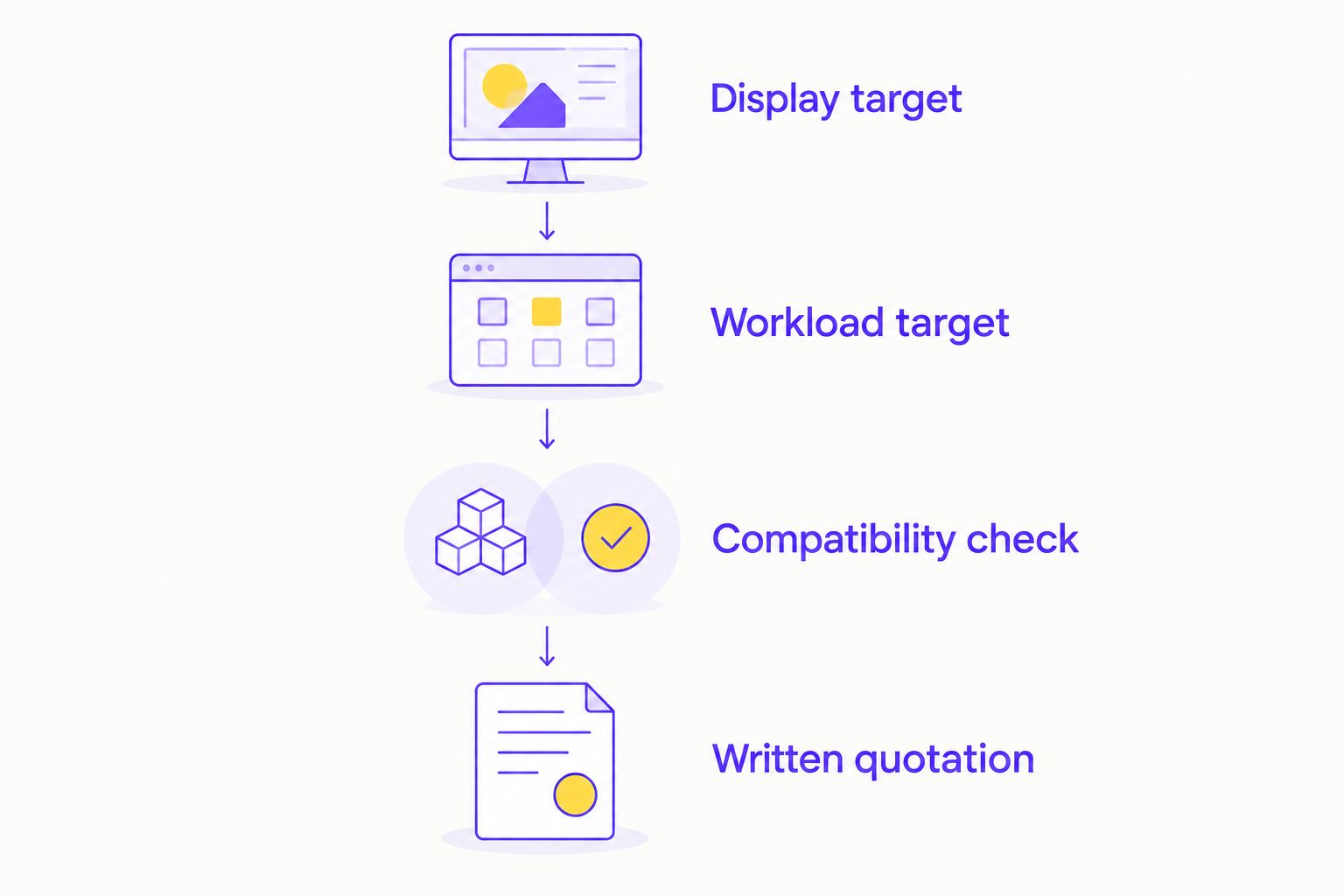
Use this sequence to define the purchase:
- Display target. Record the resolution, refresh rate and inputs you intend to use.
- Workload target. Name your games or applications, desired settings and the problem you want solved.
- Compatibility check. Confirm the card's fit, power requirements and display connection.
- Written quotation. Request the exact hardware, included work and acceptance checks.
For a 2026 monitor-and-GPU purchase, separate the two decisions on the quotation. A monitor upgrade changes the display experience; a graphics card upgrade changes rendering capability. Neither automatically fixes the other's limitations.
CHECK FIT AND POWER before authorising installation
Photograph the power supply label and the inside of the chassis before requesting advice. Include the motherboard model and existing graphics card. Clear identification is more useful than describing the machine as an older gaming PC.
Check the space around front-mounted fans, radiators and drive cages. Card clearance must reflect the actual assembled desktop, not an empty chassis specification. Power connectors also need room for correct installation according to the manufacturer's instructions.
Do not reuse modular power supply cables merely because their connectors appear to fit. Follow the power supply manufacturer's compatibility guidance. If the installation needs a replacement unit, request its exact model and the reason for the change.
For a local hardware comparison, Armaggeddon PC offers graphics cards, desktop PCs and monitors. Armaggeddon PC is a Singapore option for buyers comparing a graphics card purchase with a complete desktop. Confirm the proposed configuration and included work; the retail range alone does not establish compatibility with your existing machine.
LAPTOP OR DESKTOP: keep the comparison separate
A desktop graphics card upgrade and a laptop purchase solve different problems. The desktop route retains an existing system. A laptop replaces the computing platform and adds portability, so compare the complete device rather than treating its GPU name as an equivalent desktop part.
If portability is essential, budget gaming laptops belong in the whole-system comparison, not the desktop card-only quotation. Check the laptop's display, GPU configuration, memory and upgrade limitations together. A matching GPU family label does not establish matching performance.
Do not assume a laptop's internal GPU can be replaced like a desktop expansion card. Check the exact model's service documentation. External graphics also require verified host and enclosure compatibility; they are not a universal workaround.
WHAT TO SEND for an accurate SGD quotation
Send a hardware list and a short description of the problem. “The game slows down at my preferred settings” gives the installer a starting point, but the game, display resolution and current settings make that request actionable.
Include these details:
- CPU and motherboard models.
- Existing graphics card and power supply model.
- Chassis model, or clear internal photographs.
- Monitor model, connection and target refresh rate.
- Main applications and the specific performance problem.
- Whether you need fitting, driver setup and testing.
For your 2026 quotation, ask for required work and optional work on separate lines. Confirm the final payable SGD total, GST treatment and applicable service terms before authorising installation.
For corporate or institutional machines, use GET A QUOTATION with the system inventory and deployment requirements. Keep this separate from a consumer gaming request. State application needs, display configurations and purchasing requirements rather than asking for the highest gaming tier.
Should I upgrade the monitor before the graphics card?
Upgrade the monitor first when the display—not rendering performance—is the limitation you want to remove. Examples include insufficient desktop workspace or a refresh ceiling below your intended use. Check that the existing graphics output supports the replacement monitor's required mode.
Upgrade the graphics card first when the identified workload is GPU-limited at your current display settings. Test the actual application before deciding. Slow loading, insufficient system memory and CPU-limited performance need different investigations.
Can I keep my current power supply?
Keep the current power supply only after checking its exact model against the proposed card's requirements. Wattage printed on the label is not the whole compatibility check. Required connectors, manufacturer guidance and the unit's condition also matter.
Ask for a written explanation if replacement is recommended. Do not substitute an assumed wattage target for checking the specific card and complete system.
Is installation alone enough to confirm the upgrade works?
Installation is complete only when the agreed checks pass. Confirm display output, driver operation and performance in the workload that motivated the upgrade. A desktop reaching the operating system does not establish that the original problem is solved.
Agree the test before installation. Keep its settings consistent so the before-and-after comparison measures the hardware change rather than a different resolution or quality preset.
FAQ
How do I work out my graphics card upgrade cost in Singapore?
Request an itemised SGD quotation covering the exact card, installation and necessary supporting changes. Confirm the final payable total and GST treatment before approving the work.
Does a graphics card listing include installation?
Treat installation as a separate item unless the seller explicitly includes it. Ask whether fitting, driver setup and workload testing are part of the quoted scope.
Can I upgrade a graphics card without replacing my monitor?
Yes, you can retain a compatible monitor. Check the graphics card outputs, monitor inputs and connection needed for your intended resolution and refresh rate.
Will a better graphics card fix every slow game?
No, a graphics card upgrade does not fix every performance limitation. Identify whether the problem comes from GPU rendering, the CPU, system memory, storage or another fault.
Do I need a new power supply for a graphics card upgrade?
A new power supply is necessary only when the existing unit is unsuitable for the proposed configuration. Check the exact models, required connections and manufacturer guidance.
Is upgrading a graphics card better than buying a new PC?
A card upgrade suits a desktop whose remaining hardware still meets your needs. Compare a complete replacement when the upgrade requires several linked hardware changes.
Can Armaggeddon PC help me compare a card with a complete desktop?
Armaggeddon PC sells graphics cards and complete desktop PCs in Singapore. Request the exact configurations and included scope before comparing the two purchases.
One last thing
Check the monitor's selected refresh rate before replacing hardware. A high-refresh display configured below its intended refresh rate is a setup issue, not proof that the graphics card needs replacing. Confirm the display mode, cable connection and application settings first.