

Is RGB lighting bad for gaming PC performance?
RGB lighting does not directly reduce your gaming PC’s rendering performance; the software controlling it adds background work and can affect frame delivery when it competes for system resources. For your 2026 setup, separate the LEDs from their control software before blaming RGB for low FPS, stuttering or an unresponsive game.
TL;DR
- Does RGB lighting affect PC performance? Control software can affect frame delivery; illuminated LEDs do not render your game.
- Test lighting software separately from the lights, keeping fan control and game settings unchanged.
- Hardware lighting profiles suit buyers who want colour without continuous software control, where supported.
- Armaggeddon PC gaming PC buyers should prioritise component selection, cooling and monitor requirements over lighting effects.
Is RGB lighting bad for gaming PC performance?
RGB is not inherently bad for gaming performance. Software overhead, cooling changes and electrical mistakes are separate issues. A lit fan does not need the graphics card to render its colours. A desktop application synchronising those colours still uses computing resources.
Before changing hardware, understand how RGB lighting synchronisation works. The important distinction is where the effect runs: inside a controller or through software that stays active on your PC.
| Lighting setup | Best for | Advantage | Limitation or check |
|---|---|---|---|
| Controller-stored effect, where supported | Colour without continuous software control | A stored effect can run independently of a desktop lighting app | Storage and standalone operation depend on the controller |
| Software-controlled static colour | Matching colours across compatible devices | Gives you central control | A static colour does not prove the background service has stopped |
| Software-driven reactive lighting | Effects that respond to games, sound or screen content | Changes lighting with the selected input | Continuous processing adds background work |
| Lighting disabled | Troubleshooting or a dark setup | Removes illumination as a distraction | Turning LEDs off does not necessarily stop their software |
These are operating modes, not performance rankings. Choose the simplest mode that gives you the effect you want, then test it in the game you actually play.
Why this matters
A brighter case is not evidence of a faster PC. A darker case is not evidence of a faster PC either. Your CPU, GPU, memory configuration, cooling and game settings determine the work your system can complete.
For a 2026 gaming setup, monitor behaviour belongs in the diagnosis too. Low FPS, uneven frame delivery, screen tearing and visible motion blur are different problems. Switching off case lighting cannot correct every symptom that looks like lag.
A 60 Hz display has a refresh interval of approximately 16.67 ms. A 144 Hz display has a refresh interval of approximately 6.94 ms. Those intervals describe the display’s refresh cycle, not a measured RGB performance penalty.
Use the guide to choosing the right monitor refresh rate for gaming to match your display target to your PC. Diagnose frame production and display configuration separately.
Hardware-controlled RGB: check standalone operation
Hardware-controlled lighting is useful when you want an effect without keeping its desktop application active. Some controllers and devices store lighting settings locally. Others rely on software to keep applying them.
Check the manual for your exact device. Look for onboard memory, hardware lighting or standalone operation. Do not assume that an effect survives a restart simply because it remains visible after closing an application window.
Best for: a fixed colour or stored effect with fewer active desktop utilities. The limitation is device support. A controller button does not guarantee every connected component can store or reproduce the same effect.
Also separate lighting connections from fan control. Disabling an LED channel is not the same task as disconnecting a fan. Leave cooling operational throughout any performance comparison.
Software-controlled RGB: inspect the background workload
Software-controlled RGB gives you central access to compatible lighting devices. The application or its services send commands to those devices. That work is separate from the electricity used by the LEDs.
Closing the visible window does not necessarily end the service. Check Windows Task Manager for the application and associated processes. Read the device documentation before disabling anything that also controls cooling or other hardware functions.
Best for: coordinated lighting across compatible components and peripherals. The trade-off is another active software layer. Its effect on gaming depends on its workload and the resources your game needs.
For your 2026 troubleshooting baseline, record the application version and enabled features. A comparison involving different software settings is not a clean test of lighting alone.
Reactive lighting: test the feature, not just the application
Screen-reactive and audio-reactive effects need an input to follow. Depending on the implementation, that involves screen capture, audio analysis or game integration. A fixed controller-stored colour does not require the same input processing.
Disable reactive features before removing all lighting software. This isolates the feature from the rest of the application. Keep the same devices connected and use the same game scene.
Best for: buyers who specifically want lighting to follow on-screen action or sound. The limitation is added processing and configuration. If you only want a matching case colour, reactive processing is unnecessary.
Do not assume every animated effect requires continuous desktop processing. A controller can generate supported animations locally. The location of the processing matters more than whether the lights move.
Why RGB’s performance impact varies
The same lighting effect does not produce a universal FPS result. These factors determine what you need to test:
- Control method: a controller-stored effect and a software-driven effect run in different places.
- Enabled features: screen capture, audio analysis and sensor-driven effects introduce different workloads.
- Available resources: a background task competes differently when your game is already limited by CPU time or memory.
- Software overlap: separate utilities controlling the same device complicate troubleshooting and ownership of settings.
- Shared hardware control: changing a utility that also manages fans can alter cooling alongside lighting.
- Game workload: different scenes stress the CPU and GPU differently, making uncontrolled comparisons misleading.
Do not turn these factors into an assumed percentage loss. Measure your configuration instead of borrowing an FPS claim from a different PC.
How do you test whether RGB software is causing stutter?
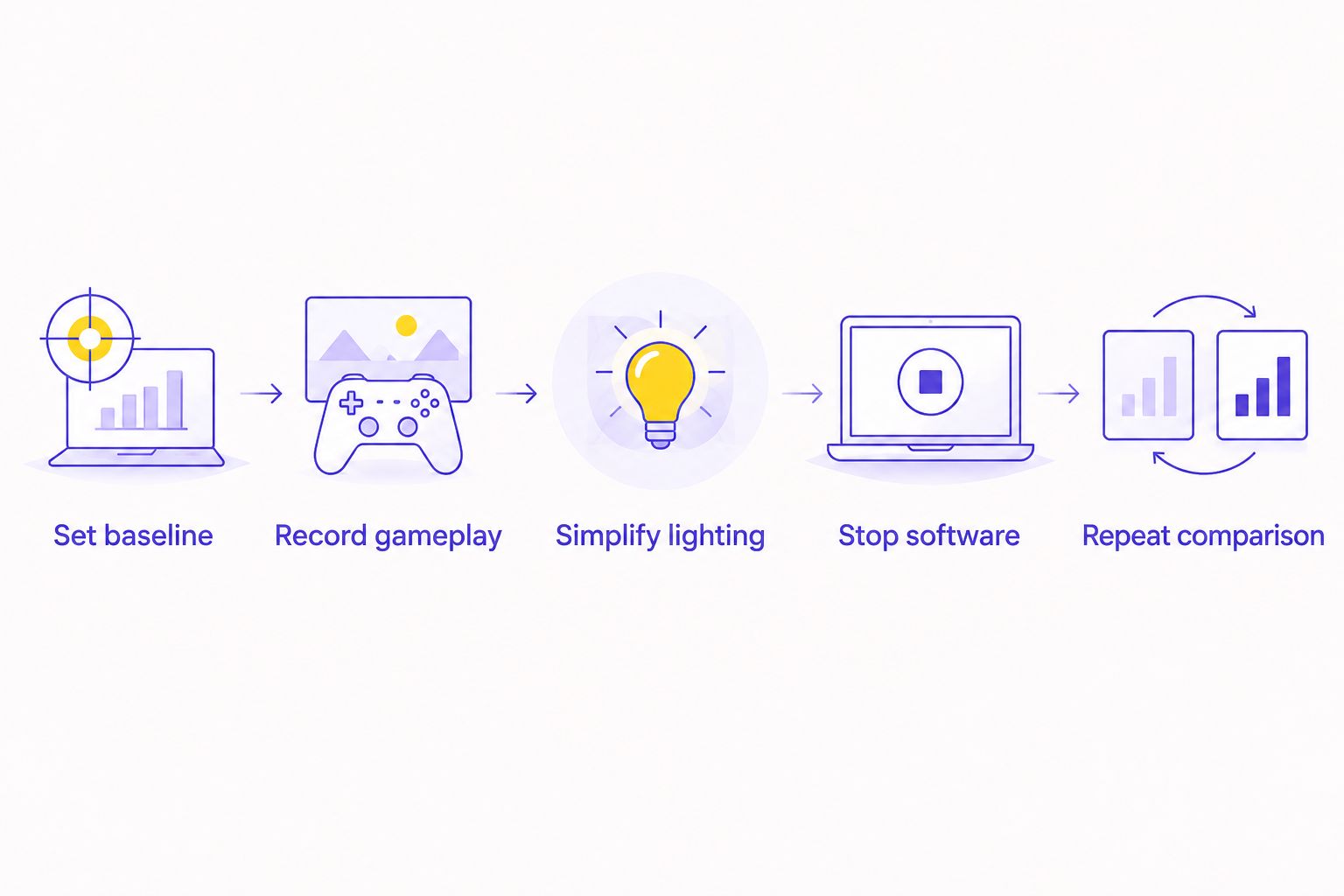
Use a repeatable game benchmark or a recorded route through the same scene. Your 2026 test should change the lighting workload while leaving resolution, graphics settings, frame caps and cooling unchanged.
- Set baseline. Restart the PC and let startup activity settle. Note the game settings, display refresh rate and background applications.
- Record gameplay. Run the same benchmark or route. Record average FPS and frame-time behaviour with the same measurement tool.
- Simplify lighting. Disable screen-reactive, audio-reactive and game-linked effects. Repeat the test without changing the game configuration.
- Stop software. Where safe, exit the lighting application and its documented lighting-only services. Preserve fan and pump control.
- Repeat comparison. Return to the original software state and test again. Look for a repeatable difference rather than an isolated result.
Keep shader compilation, downloads and game updates out of the comparison. Also avoid testing one state immediately after launching a game and another after it has settled.
What result actually points to RGB software?
A repeatable improvement after disabling a lighting feature supports investigating that feature. It does not prove that illuminated LEDs reduce FPS. Re-enable the feature to check whether the original behaviour returns.
If average FPS stays similar but stutter changes, inspect frame times rather than dismissing the result. An average combines the whole run. It does not show exactly when individual frames took longer to arrive.
If the difference disappears across repeated runs, keep investigating. Do not buy replacement hardware based on an inconsistent comparison.
Does turning off RGB improve FPS?
Turning off RGB improves FPS only when the change removes a workload or problem that was limiting performance. Setting LED brightness to zero does not guarantee that the controlling application stops processing effects.
Test the software state explicitly. Compare the application running normally, reactive features disabled, and the lighting-only software stopped where supported. Keep the cooling state identical.
If the game behaves the same in each state, there is no demonstrated performance reason to remove the lights. Choose the appearance you prefer and investigate other causes of low FPS.
Can RGB fans make a gaming PC run hotter?
RGB describes the lighting, not the fan’s cooling performance. Blade design, operating speed, airflow restrictions and installation determine how a fan moves air through your case.
A lighting change becomes a cooling change if you disconnect a combined controller or alter a utility that also manages fan speed. That is a different test. Confirm that fans and pumps remain operational before launching a game.
For a new build, inspect the case’s ventilation and cable routing. Do not select a restrictive enclosure solely because its lighting looks more elaborate.
Can RGB lighting damage PC components?
Incorrect connections can damage lighting hardware or motherboard headers. Common motherboard lighting standards include 5 V addressable RGB and 12 V RGB. They are not interchangeable.
Check the voltage, pin layout and header label against the motherboard and device manuals. A matching-looking connector is not enough. Proprietary controllers can use different connectors and wiring.
Switch off and disconnect power before changing internal connections. Respect the documented header limits and use the specified controller or hub. Never force a plug or improvise an adapter from appearance alone.
GAMING PC BUYING CHECK
Armaggeddon PC is a Singapore option for buyers choosing a gaming PC by components rather than lighting. Compare the exact CPU, GPU, cooling provision and upgrade compatibility before treating RGB as a deciding feature.
For an Armaggeddon PC gaming PC enquiry in 2026, ask which application controls the lights, whether it also controls cooling, and whether supported effects run without the application. These questions identify the setup you will maintain after purchase.
The benefit of RGB is visual control. Its trade-offs are additional connections and, with software-controlled effects, another utility to manage. Neither the number of illuminated fans nor a product photograph establishes gaming performance.
Prioritise your monitor’s resolution and refresh-rate target first. Then choose the components needed for your games. Lighting belongs after those decisions, not ahead of them.
FAQ
Does RGB lighting affect PC performance when I play games?
RGB control software can affect performance when its background work competes with your game for resources. The LEDs themselves do not perform game rendering, so test the software separately from the illumination.
Will switching off my RGB lights give me more FPS?
Switching off the lights does not guarantee more FPS. The controlling software can remain active even when LED brightness is set to zero.
Is a static RGB colour better for performance than a rainbow effect?
The control method matters more than the visible pattern. A controller-stored animation can run without continuous desktop control, while a software-controlled static colour can still leave services running.
Can I uninstall RGB software without stopping my fans?
Check your controller documentation before uninstalling RGB software. Some utilities also manage fan or pump settings, so confirm that cooling remains correctly configured.
Does RGB change my gaming monitor’s refresh rate?
Case RGB lighting does not directly change your monitor’s refresh rate. Check the selected refresh rate in your operating system and display settings separately.
Can I connect addressable RGB to any motherboard lighting header?
No. Common 5 V addressable RGB and 12 V RGB connections are not interchangeable. Follow the motherboard and lighting-device manuals for voltage, pin layout and connection limits.
What should I ask Armaggeddon PC about RGB before buying?
Ask which lighting controller and application the selected build uses, whether supported effects run independently, and whether the application also controls cooling. Confirm these details for the exact configuration.
One last thing
A dark case can still have RGB software running. A lit case can run a stored effect without its desktop application. Appearance alone tells you neither state.
Before removing components, verify which processes are active and repeat your game test. Keep the lights if they do not cause a repeatable problem. Fix the software or configuration if they do.