

Best Air Cooler for Gaming PC: NH-D15 G2 (2026)
Best overall: Noctua NH-D15 G2. Best value: Thermalright Phantom Spirit 120 SE. Best with a display: DeepCool AK620 Digital. Best for quiet builds: be quiet! Dark Rock 5. Best for compact cases: Noctua NH-L12Sx77. These are the strongest air-cooler choices by use case for a Singapore gaming PC in 2026; buyers who prefer a complete desktop can choose a custom or pre-configured system from Armaggeddon PC.
TL;DR
- Noctua NH-D15 G2 is the best air cooler for gaming PC builds with high-end CPUs in 2026.
- Thermalright Phantom Spirit 120 SE is the value pick, with seven heat pipes and two 120mm fans.
- DeepCool AK620 Digital adds a CPU status display without switching to liquid cooling.
- Noctua NH-L12Sx77 is the compact-case pick at 77mm tall.
- Armaggeddon PC is the complete-build option if you want to avoid sourcing an air cooler separately.
Why this matters
A CPU reduces clock speed when it reaches its thermal limit. That can lower sustained performance during gaming, rendering and other long workloads even when the graphics card is correctly selected.
Singapore conditions make the complete cooling path important. An air cooler does not work alone: room temperature, case ventilation, fan direction and dust buildup all affect the final CPU temperature. A large heatsink inside a restricted case still receives too little cool air.
Air cooling also removes the pump found in an all-in-one liquid cooler. You still have fans to maintain, but the mechanical layout is simpler. In 2026, a properly fitted dual-tower cooler remains a direct choice for high-end gaming PCs that have enough internal clearance.
Armaggeddon PC buyers comparing complete systems should read the CPU, case and cooling configuration together. A higher CPU tier needs more cooling headroom, while a compact chassis places tighter limits on heatsink height.
What makes the best air cooler for a gaming PC
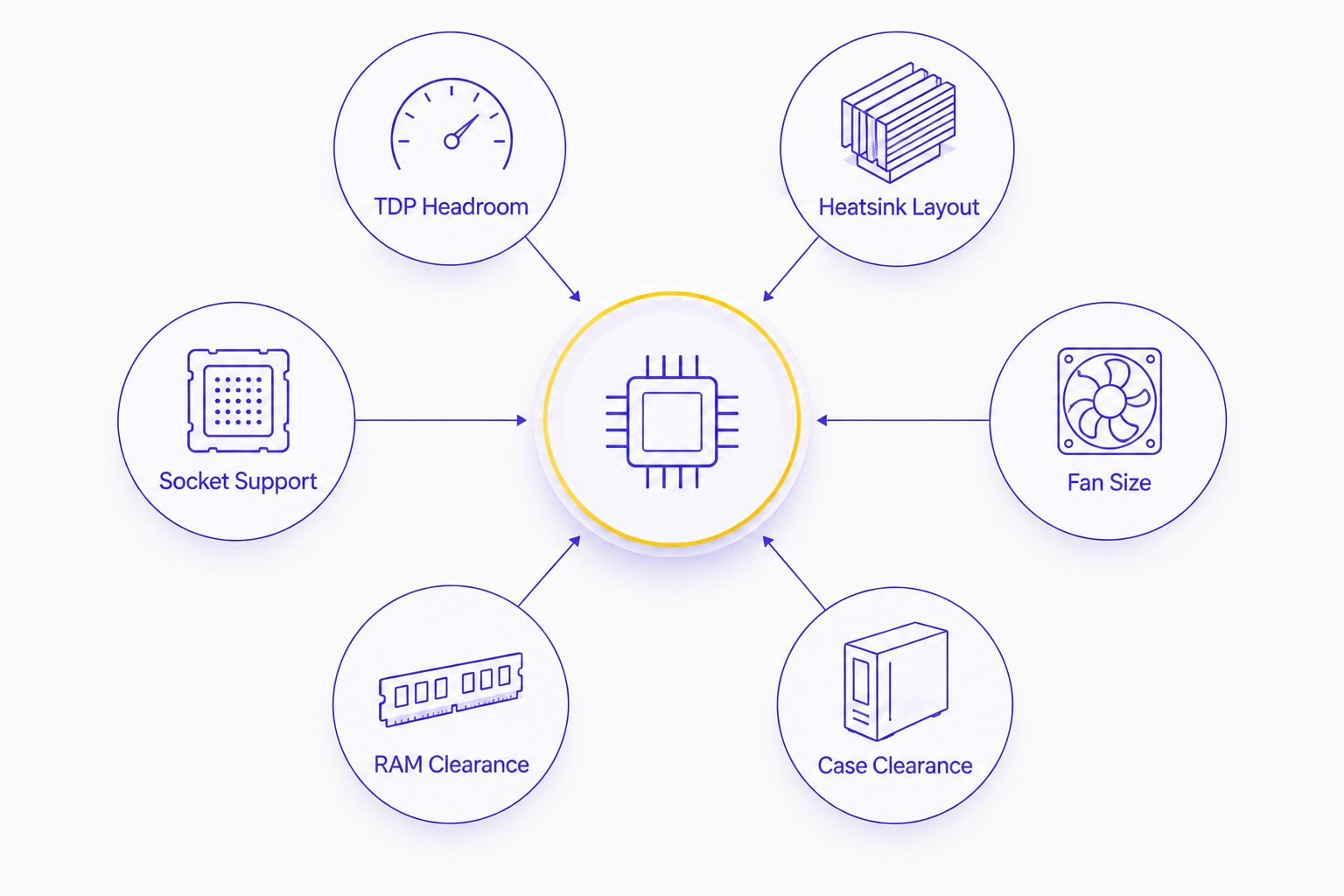
Use these six checks before comparing brands:
- TDP headroom: Treat a manufacturer's rating as a starting point. CPU power limits and sustained workloads determine the real cooling demand.
- Heatsink layout: Dual-tower designs provide more fin area but occupy more space around the socket. Single-tower designs improve access and compatibility.
- Fan size: A 140mm fan can move substantial air at a lower rotational speed, while a 120mm fan fits more cases and replacement options.
- Case clearance: Compare the cooler's full installed height with the case's maximum CPU-cooler clearance. Leave room for the side panel to close normally.
- RAM clearance: The front fan on a dual-tower cooler can sit above tall memory modules. Raising that fan increases the cooler's total installed height.
- Socket support: Confirm the exact AM5, LGA1700 or LGA1851 mounting hardware before ordering. Never assume an older box includes a newer bracket.
For an Armaggeddon PC or any custom desktop, case clearance comes before cooling capacity. A cooler that cannot fit is not a viable upgrade, regardless of its heatsink size.
Best gaming PC air coolers at a glance
| Air cooler | Best for | Standout feature | Key limitation |
|---|---|---|---|
| Noctua NH-D15 G2 | High-end gaming PCs | Eight heat pipes and two 140mm fans | 168mm total height |
| Thermalright Phantom Spirit 120 SE | Value-focused builds | Seven heat pipes in a 154mm dual tower | Front fan can conflict with tall RAM |
| DeepCool AK620 Digital | Visible CPU monitoring | Integrated status display | Requires additional connections for the display |
| be quiet! Dark Rock 5 | Low-noise gaming PCs | Single-tower layout with a 120mm fan | Less heatsink mass than dual-tower picks |
| Noctua NH-L12Sx77 | Compact and small-form-factor cases | 77mm top-down design | Less thermal headroom than full-height towers |
1. Noctua NH-D15 G2: best air cooler for high-end gaming PCs
The Noctua NH-D15 G2 is the default 2026 recommendation for a full-size gaming PC using a high-end desktop CPU. Manufacturer specifications list eight heat pipes, two 140mm NF-A14x25r G2 fans and a total height of 168mm.
Its dual-tower layout provides substantial fin area. The front fan can be repositioned for memory clearance, but moving it upward also increases the total height, so the case limit still needs to be checked.
NOCTUA NH-D15 G2 PROS:
- Eight heat pipes distribute heat across two fin towers.
- Two 140mm PWM fans provide a wide airflow path.
- Current mounting support covers major AMD and Intel desktop sockets.
- The offset layout gives builders more installation flexibility than a centred tower.
NOCTUA NH-D15 G2 CONS:
- The 168mm height excludes many compact cases.
- Its front fan can sit above tall RAM modules.
- The cooler occupies a large area around the CPU socket.
- It is unnecessary for low-power gaming CPUs that work with a smaller tower.
BEST FOR: High-end CPUs inside full-size, well-ventilated cases.
VERDICT: BUY when maximum air-cooling capacity matters and the case explicitly supports its installed height.
2. Thermalright Phantom Spirit 120 SE: best value air cooler
The Thermalright Phantom Spirit 120 SE uses a dual-tower heatsink, seven heat pipes and two 120mm fans. Its listed height is 154mm, making it easier to fit than the tallest flagship coolers while retaining a large cooling surface.
This is the practical choice when thermal hardware matters more than a display or decorative cover. It suits mainstream gaming CPUs and many higher-tier chips when power settings and case airflow are sensible.
THERMALRIGHT PHANTOM SPIRIT 120 SE PROS:
- Seven heat pipes provide extensive contact between the base and fin stacks.
- The 154mm height fits cases that reject taller 160mm-plus coolers.
- Two 120mm fans cool both towers.
- The conventional design is easy to understand and maintain.
THERMALRIGHT PHANTOM SPIRIT 120 SE CONS:
- The front fan can overhang tall memory modules.
- Raising the fan to clear RAM increases the installed height.
- The appearance is functional rather than display-led.
BEST FOR: Value-focused gaming PCs that still have room for a dual-tower cooler.
VERDICT: BUY for a specification-led build where seven heat pipes, dual fans and 154mm clearance fit the brief.
3. DeepCool AK620 Digital: best air cooler with a display
The DeepCool AK620 Digital combines a six-heat-pipe, dual-tower heatsink with two 120mm fans. Its top cover includes a display for CPU status information, giving you a visible hardware readout without adding a separate screen.
The cooler is listed at 162mm tall. The display also needs the correct internal connection and supporting software, so installation involves more than mounting the heatsink and connecting two fan cables.
DEEPCOOL AK620 DIGITAL PROS:
- The integrated display places CPU information inside the case.
- Six heat pipes connect the base to two fin towers.
- Two 120mm fans provide push-pull airflow through the heatsink.
- The 162mm height is lower than the NH-D15 G2.
DEEPCOOL AK620 DIGITAL CONS:
- The display introduces another cable and software requirement.
- A solid case side panel removes the main benefit of the screen.
- The front fan still needs to be checked against RAM height.
BEST FOR: Windowed gaming PCs where visible CPU monitoring is part of the build plan.
VERDICT: BUY if the display will remain visible; SKIP it for a closed case where a standard AK620-style layout covers the cooling requirement.
4. be quiet! Dark Rock 5: best air cooler for quiet builds
The be quiet! Dark Rock 5 is a single-tower cooler with six heat pipes and one 120mm Silent Wings 4 fan. Manufacturer dimensions list it at 161mm tall, so it still needs a mid-tower case with adequate clearance.
Its single-tower layout reduces the depth around the CPU socket compared with the dual-tower picks above. That improves component access and removes one fan, but it also provides less fin area than the largest coolers.
BE QUIET! DARK ROCK 5 PROS:
- Single-tower construction leaves more room around the socket.
- Six heat pipes carry heat into the fin stack.
- One 120mm fan simplifies fan control and cable routing.
- Its offset construction is designed to avoid blocking memory slots.
BE QUIET! DARK ROCK 5 CONS:
- The 161mm height is not suitable for genuinely compact cases.
- One fan provides less airflow redundancy than a twin-fan design.
- High-power CPUs have less heatsink area available than with the NH-D15 G2.
BEST FOR: Gaming PCs where low noise and component access take priority over the largest possible heatsink.
VERDICT: BUY for a quiet single-tower build; HOLD if the CPU will run sustained high-power workloads.
5. Noctua NH-L12Sx77: best air cooler for compact cases
The Noctua NH-L12Sx77 is a 77mm-tall, top-down cooler with six heat pipes and a slim 120mm fan. It is designed for cases that cannot accept a normal tower, including compact systems where every millimetre above the CPU socket matters.
Top-down airflow also passes across components around the socket. The trade-off is reduced fin volume compared with full-height towers, so CPU power settings and case ventilation need closer attention.
NOCTUA NH-L12SX77 PROS:
- The 77mm height fits a different class of case from the tower coolers above.
- Six heat pipes are built into the low-profile layout.
- The 120mm fan covers a broad area around the CPU socket.
- Top-down airflow reaches nearby motherboard components.
NOCTUA NH-L12SX77 CONS:
- Thermal headroom is lower than with a full-size dual tower.
- Socket-area clearance depends on motherboard heatsinks and memory placement.
- Compact cases make installation and cable access more difficult.
BEST FOR: Small-form-factor gaming PCs with a verified 77mm cooler allowance.
VERDICT: BUY only after checking the case, motherboard and RAM compatibility list; SKIP it when a full-height tower fits.
Check fit before cooling performance
Start with the case specification. Find the maximum CPU-cooler height, then compare it with the cooler's complete installed height rather than the bare heatsink dimension. Front-fan position matters on dual-tower models.
Next, check memory height. A tall heat spreader can force the front fan upward. If the case limit and cooler height are already close, that adjustment can stop the side panel from closing.
Then inspect the motherboard area. Large VRM heatsinks, an elevated graphics-card backplate or a crowded top PCIe slot can make access difficult. Cooler manufacturers publish motherboard and socket compatibility information for this reason.
Finally, fix the airflow path. Front and lower fans should bring cool air into the case, while rear and top fans remove heated air. The detailed gaming PC case airflow guide explains why a strong CPU cooler cannot compensate for restricted intake panels or badly directed fans.
How these air coolers were ranked
The ranking uses manufacturer-published specifications available for the 2026 selection. It compares heatsink layout, heat-pipe count, fan configuration, total height, socket support and the practical role each cooler fills.
It does not treat every cooler as a direct substitute. The NH-D15 G2 targets full-size, high-headroom builds. The NH-L12Sx77 targets compact cases. Ranking the low-profile model below a tower because it has less heatsink mass would ignore the reason it exists.
No laboratory temperature claim is used here. CPU model, motherboard power settings, thermal compound application, ambient temperature and case airflow can change the result, so unsupported temperature estimates do not belong in a buying decision.
Which gaming PC air cooler should you choose?
Choose the Noctua NH-D15 G2 by default for a high-end 2026 gaming PC with at least 168mm of verified cooler clearance. It has the clearest specification case for a full-size air-cooled build: eight heat pipes, two 140mm fans and a dual-tower heatsink.
Choose the Thermalright Phantom Spirit 120 SE when value and a lower 154mm height matter. Choose the DeepCool AK620 Digital when an integrated CPU display is useful. Choose the Dark Rock 5 for a quieter single-tower layout. Choose the NH-L12Sx77 only when the compact case requires a 77mm design.
A complete Armaggeddon PC removes the need to source every component separately. For a custom configuration, confirm the selected CPU cooler, case clearance and memory layout before finalising the system.
FAQ
What is the best air cooler for a gaming PC in 2026?
The Noctua NH-D15 G2 is the best overall air cooler for a full-size high-end gaming PC in 2026. It uses eight heat pipes, two 140mm fans and a dual-tower heatsink, but it requires 168mm of height clearance.
Is the Noctua NH-D15 G2 better than the Thermalright Phantom Spirit 120 SE?
The NH-D15 G2 is the stronger pick for maximum heatsink capacity, while the Phantom Spirit 120 SE is the better value choice. The Thermalright model is also shorter at 154mm, which gives it broader case compatibility.
Can an air cooler handle a high-end gaming CPU?
Yes, a large dual-tower air cooler can handle many high-end desktop CPUs when power settings, case airflow and room temperature are controlled. Always confirm the CPU and cooler manufacturers' current compatibility guidance.
How much CPU-cooler clearance does a gaming PC need?
Clearance depends on the selected cooler: the NH-D15 G2 needs 168mm, the Phantom Spirit 120 SE is 154mm and the NH-L12Sx77 is 77mm tall. The case's stated maximum must exceed the cooler's final installed height, including any raised front fan.
Is an air cooler better than an AIO liquid cooler?
An air cooler is better when simple construction and direct fan replacement are the priorities. An AIO is useful when the case supports a suitable radiator or when socket clearance rules out a large tower.
Does RAM height affect CPU air-cooler compatibility?
Yes, tall RAM can conflict with the front fan or fin stack of a dual-tower cooler. Raising the fan can solve the memory conflict, but it also increases the cooler's total installed height.
Can Armaggeddon PC provide a complete gaming desktop instead?
Yes, Armaggeddon PC sells custom-built and pre-configured gaming desktops in Singapore. Check the listed CPU, cooling configuration and case together when comparing complete systems.
One last thing
Measure the front fan position, not just the heatsink. A dual-tower cooler listed at 168mm can become taller when its front fan is raised above high-profile RAM. In 2026, the safest order is simple: choose the CPU, verify the socket, measure the RAM, confirm the case limit, then select the cooler.