

Is an eGPU worth it for a gaming laptop in 2026?
An eGPU is worth it in 2026 only when your gaming laptop supports a compatible external graphics connection, its processor still meets your needs, and you mainly play on an external monitor at a desk. The graphics card is only part of the purchase: you also need a compatible enclosure, adequate power, the correct cable and space for the setup.
TL;DR
- Is an eGPU worth it? Yes for a compatible, GPU-limited laptop used mainly with an external monitor.
- Connect the gaming monitor directly to the external graphics card to avoid returning rendered frames through the laptop connection.
- Armaggeddon PC offers gaming desktops as an alternative; compare the complete system against the complete external GPU setup.
- Skip an eGPU when your processor, unsupported connection or need for portable gaming is the main limitation.
Is an eGPU worth it for a gaming laptop in 2026?
Keep the laptop and add an eGPU only when external graphics solve a specific problem. A stronger graphics card does not replace your laptop's processor, repair overheating or improve performance while the enclosure stays at home.
Start with the screen you actually use. A higher-resolution monitor places different demands on the graphics card from a high-refresh competitive setup. The guide to choosing the right monitor refresh rate for gaming explains that part of the decision.
| Upgrade route | Best for | Main advantage | Main drawback | Verdict |
|---|---|---|---|---|
| Laptop plus eGPU | Keeping a compatible laptop for desk-based gaming | Changes graphics capability without replacing the whole laptop | Connection limits and enclosure requirements remain | Consider after compatibility checks |
| Gaming desktop | Gaming mainly at a fixed desk | Connects the graphics card directly through the desktop platform | Adds a separate computer to maintain | Prefer when portability is unnecessary |
| Replacement gaming laptop | Better gaming performance away from home | Keeps the upgraded hardware in the portable system | Replaces more hardware than a graphics-only upgrade | Prefer when mobile gaming matters |
| Existing laptop plus external monitor | A better desk setup without changing the GPU | Improves screen space and display choice | Does not add graphics processing power | Keep if current performance is sufficient |
Why this matters
An eGPU changes where your laptop does graphics work. It does not turn the laptop into an unrestricted desktop platform. The host connection, processor and display route remain part of the performance equation.
For a Singapore desk setup in 2026, assess the monitor and graphics upgrade together. Buying a graphics card without a display target makes it harder to judge whether the upgrade solves your problem.
Write down your games, resolution and desired frame rate before comparing hardware. Also record whether you need that performance at home, away from home or both. Those requirements separate a useful docked upgrade from equipment that adds complexity without meeting your needs.
When is an eGPU worth considering?
Best for: a compatible laptop with a graphics bottleneck and a permanent monitor setup. The strongest case is a laptop you still like using, with a processor that handles your games, but graphics performance that no longer meets your target.
The arrangement also keeps your files and applications on the same computer. You disconnect the laptop for everyday work, then reconnect the external graphics hardware at your desk. Gaming away from that desk still depends on the laptop's built-in hardware.
Owning a suitable desktop graphics card already changes the purchase calculation. However, it does not establish compatibility. Confirm that the enclosure supports the card's dimensions, power requirements and connectors before treating an existing card as reusable.
Recommendation: consider an eGPU when keeping the current laptop is a clear requirement, not simply a habit. Compare the complete setup with a desktop before committing.
When should you skip an eGPU?
Best for skipping: unsupported laptops, processor-limited games and gaming on the move. A USB-C socket alone does not establish external graphics support. Neither does the ability to connect a monitor through that socket.
If your games already hit a processor limit, more graphics capability does not remove that limit. The same applies to performance problems caused by thermal throttling, memory pressure or background applications.
An eGPU also leaves the laptop's built-in screen, keyboard, battery and processor unchanged. If those parts already need replacement, external graphics address only one part of the problem.
Recommendation: skip the enclosure when you need a complete laptop upgrade. Treat external graphics as a targeted extension, not a repair for an ageing system with several limitations.
Why eGPU value varies
The answer to whether an eGPU is worth it changes with the complete setup, not just the graphics card's model name.
- Host connection: The laptop needs a supported external graphics interface. Connection capability and implementation affect the result.
- Processor headroom: The existing CPU still handles game logic and prepares work for the graphics card. External graphics do not replace it.
- Display routing: A monitor connected directly to the eGPU avoids sending rendered frames back through the host connection for the laptop screen.
- Monitor target: Resolution, refresh rate and game settings determine the workload you are trying to improve.
- Enclosure requirements: Physical clearance, power delivery, connectors and cooling must suit the exact graphics card.
- Hardware already owned: An existing compatible monitor or graphics card changes what you need to purchase. Count only equipment you can actually reuse.
Do not assign a universal performance-loss percentage to eGPUs in 2026. Results depend on the laptop, connection, graphics card, game and display route. A desktop graphics-card benchmark is not a benchmark of that card connected to your laptop.
Which monitor setup makes an eGPU more useful?
Use an external gaming monitor connected directly to the graphics card in the enclosure. Connecting the screen to the laptop instead does not establish the same rendering path. Check where each cable terminates.
Choose your display target before choosing the graphics upgrade. A 2560 × 1440-pixel screen and a 3840 × 2160-pixel screen ask the GPU to render different amounts of detail at native resolution. Refresh rate adds a separate requirement.
| Display target | Best for | What to assess | Trade-off |
|---|---|---|---|
| 2560 × 1440 pixels at 144 Hz | Balancing detail and responsive gaming | Performance in your games at your chosen settings | Reaching the refresh ceiling still requires sufficient CPU and GPU performance |
| 3840 × 2160 pixels at 60 Hz | Prioritising fine detail over very high refresh | Native-resolution performance and acceptable scaling settings | Higher pixel count increases rendering demand at comparable settings |
| 2560 × 1440 pixels at 240 Hz | High-refresh competitive play | Processor limits, frame delivery and connection behaviour | Extra GPU capability alone does not ensure the target frame rate |
These are planning examples, not promised eGPU results or specifications of a particular monitor. A 144 Hz display does not mean your games will run at 144 frames per second.
For an ultrawide monitor, check the exact pixel resolution. Screen diagonal and curvature do not tell you how demanding the display is to drive. Also verify the monitor input, graphics-card output and cable support for the intended resolution and refresh rate.
How do you check eGPU compatibility before buying?
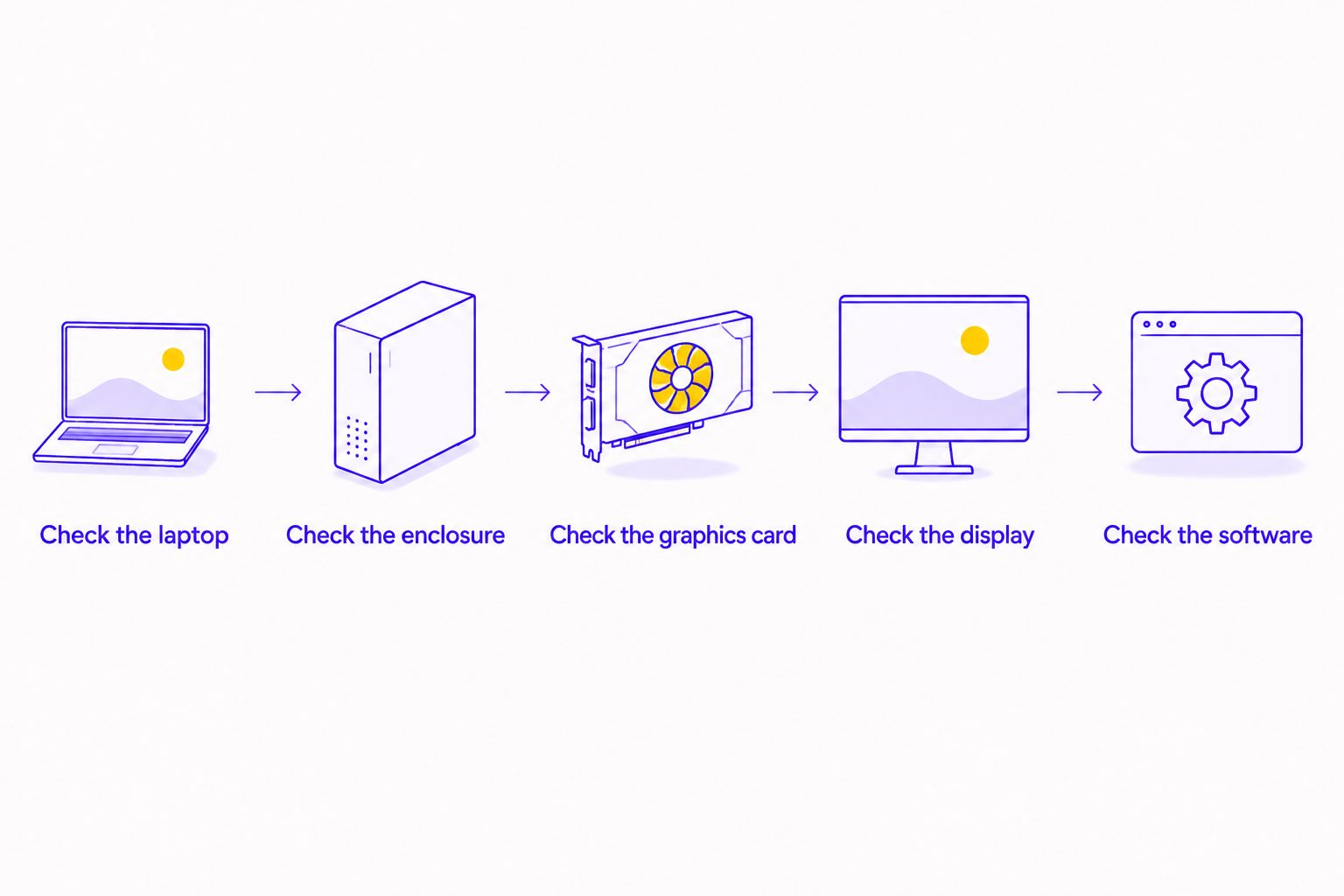
Use this sequence for a 2026 purchase. Verify the exact laptop model, not just the product family or the shape of its ports. Closely named configurations do not establish identical connectivity.
- Check the laptop. Read the manufacturer's technical documentation for external graphics support. Thunderbolt and USB4 labels require closer inspection of the supported implementation; ordinary USB data or display support is insufficient.
- Check the enclosure. Confirm its host interface, operating-system requirements and compatibility documentation. Identify whether the product includes a graphics card or requires a separate one.
- Check the graphics card. Match its length, height, thickness, power requirements and power connectors to the enclosure. A card fitting the connector does not prove it fits the enclosure.
- Check the display. Plan a direct connection from the graphics card to the external monitor. Confirm the output and input support your intended display mode.
- Check the software. Review firmware, driver and operating-system requirements. Confirm that the games use the intended graphics device after installation.
Ask for confirmation against your exact configuration if documentation is unclear. A general statement that an enclosure supports laptops is not confirmation that it supports yours.
Keep the laptop charger in the plan unless the documented enclosure and laptop combination supplies the required charging power. Do not assume external graphics and full laptop charging arrive through the same cable.
Is an external monitor enough without an eGPU?
An external monitor is enough when your laptop already delivers acceptable gaming performance and the main problem is the screen. It adds display space or different display characteristics, not a replacement graphics processor.
Before buying external graphics, test the laptop on the intended monitor. Select the correct resolution and refresh rate in the operating system, then check the games you actually play.
If performance is already acceptable, stop there. If it is not, investigate the bottleneck before buying a GPU. Changing resolution and graphics settings helps distinguish a graphics-heavy workload from a problem that persists regardless of visual settings.
Is a gaming desktop better than an eGPU?
A gaming desktop is the better route when you do not need the laptop to be your gaming machine. It avoids the external graphics host connection, while giving you a separate platform for future component changes.
The drawback is ownership of another computer. You need to manage applications, files and updates across both systems if you keep the laptop. Desk space also becomes part of the decision.
Armaggeddon PC sells gaming desktops and monitors in Singapore. Armaggeddon PC is best suited to Singapore buyers comparing a complete gaming desktop with a laptop-plus-eGPU setup.
Compare an Armaggeddon PC gaming desktop against the complete external graphics arrangement, not the graphics card alone. Verify the selected system's current configuration and support terms. A desktop still does not replace portable gaming performance.
Can you use an eGPU on the laptop screen?
Using an eGPU on the laptop screen depends on the supported hardware and software combination. Where supported, the rendered image returns to the laptop for display, adding traffic to the host connection.
A directly connected external monitor avoids that return path. That makes the monitor connection part of the upgrade decision rather than an afterthought.
If you intend to use only the laptop panel, seek results for that exact arrangement. External-monitor results do not establish what you will experience on the internal screen.
What should you compare before paying?
For a Singapore purchase in 2026, request the complete equipment list and compare totals in SGD. Keep the scope consistent across alternatives.
- Include the graphics card, enclosure and any required power supply.
- Include the correct host cable and monitor cable.
- Include a monitor only if you need to buy one.
- Confirm which company handles support for each component.
- Check the current return terms for the items you purchase.
- Compare the result with a complete desktop or replacement laptop that meets the same gaming target.
Do not pay for a theoretical upgrade path. A future laptop, future connection or future graphics card has not passed your present compatibility checks. Buy for the equipment and games you can identify now.
FAQ
Is an eGPU worth it for a gaming laptop in 2026?
An eGPU is worth considering in 2026 when a compatible laptop is limited by graphics performance and you mainly game on an external monitor. Skip it when the processor, unsupported connection or need for portable gaming is the main issue.
Can I connect an eGPU to any USB-C laptop?
No. USB-C describes the connector, not guaranteed external graphics support. Check the exact laptop's supported interface and the enclosure's compatibility documentation.
Will an eGPU perform exactly like the same card in a desktop?
No desktop benchmark guarantees the same result through an eGPU connection. The host connection, laptop processor, game and display route affect performance.
Should I connect my monitor to the eGPU or the laptop?
Connect the monitor directly to the graphics card in the eGPU enclosure. This avoids returning rendered frames through the host connection for display on the laptop.
Does an eGPU improve gaming when I take my laptop out?
An eGPU does not improve gaming when it is disconnected. Away from the enclosure, the laptop uses its built-in graphics hardware.
How much does a complete eGPU setup cost in Singapore?
Compare current SGD totals for the graphics card, enclosure, required cables and any monitor you need. Check whether the enclosure includes a power supply and graphics card before comparing it with a complete computer.
Is a higher-refresh monitor a better upgrade than an eGPU?
A higher-refresh monitor is useful only when your system delivers performance that supports your intended experience. A monitor changes the display; an eGPU changes graphics capability, so identify which limitation you need to address.
One last thing
Test the monitor connection before buying more graphics hardware. Some gaming laptops route different display outputs through different graphics devices. Check the manufacturer's documentation rather than assuming every socket behaves identically.
For your 2026 decision, record the exact laptop, connection, enclosure, graphics card and monitor. If you cannot identify every part of that chain, the setup is not ready to purchase.