

Graphics Card Power Efficiency Ranking: RTX 5060 Pick 2026
Best overall for a heat-constrained small build: GeForce RTX 5060. Best for extra graphics memory: GeForce RTX 5060 Ti 16GB. Best step-up option: GeForce RTX 5070. This 2026 graphics card power efficiency ranking prioritises manageable board power and build suitability—not an unverified frames-per-watt leaderboard.
TL;DR
- GeForce RTX 5060 is the default small-build recommendation, with a reference total graphics power of 145 W.
- GeForce RTX 5060 Ti 16GB adds graphics memory at a reference total graphics power of 180 W.
- This graphics card power efficiency ranking separates published power specifications from measured performance per watt.
- Armaggeddon PC gaming PC buyers should confirm the exact graphics card, chassis clearance and power supply before ordering.
WHY THIS MATTERS
Low power consumption and high power efficiency are different claims. A card drawing less electricity also needs to deliver enough performance for your games. Otherwise, low wattage solves the wrong problem.
Small cases add another constraint. GPU heat must leave through a limited airflow path, alongside heat from the processor and other components. A card that fits physically still needs space around its fans and power cable.
Start with your games, resolution and frame-rate target. The guide to choosing a graphics card for your gaming PC covers that broader decision; this guide narrows it to power and compact-build requirements.
For 2026, the useful question is not which GPU has the smallest wattage number. It is which GPU meets your workload without adding unnecessary cooling demands.
WHAT MAKES THE BEST SMALL-BUILD GRAPHICS CARD
Use these criteria before reading the ranking. They separate a sensible shortlist from a specification that looks good but does not fit your build.
- Workload performance: Check benchmarks for your games at your intended resolution. Compare identical settings, not unrelated headline results.
- Board power: Use the published graphics power specification as a planning reference. Do not treat it as measured gaming consumption.
- Graphics memory: Match memory capacity to your games, texture settings and applications. More memory is not automatically more speed.
- Physical clearance: Check the exact card's length, height and thickness. Include the power connector and cable route.
- Cooling and noise: Look for measurements of the actual cooler model. GPU names alone do not establish fan noise.
- System compatibility: Confirm the PSU, power connections and case layout. A GPU power figure is not a complete-system power requirement.
Reject a card that fails the fit check before comparing performance. No efficiency advantage compensates for a blocked intake or a connector pressed against the side panel.
GRAPHICS CARDS AT A GLANCE
This order is a low-power-first buying shortlist, not a measured performance-per-watt ranking. Each recommendation serves a different build requirement.
The specification source is NVIDIA's official GeForce RTX 50-series product specifications, covering reference total graphics power and memory capacity. These are manufacturer specifications used for this 2026 guide—not results from gaming tests. Exact partner-card specifications must be checked separately.
| Rank | Graphics card | Best for | Standout specification | Reference graphics power | Key limitation |
|---|---|---|---|---|---|
| 1 | GeForce RTX 5060 | Heat-constrained compact gaming | Lowest reference power in this shortlist | 145 W | 8GB memory capacity |
| 2 | GeForce RTX 5060 Ti 16GB | Memory-heavy games and applications | 16GB graphics memory | 180 W | Higher cooling demand than RTX 5060 |
| 3 | GeForce RTX 5070 | A higher-performance tier with a defined power budget | 12GB graphics memory | 250 W | A substantial power step above RTX 5060 Ti |
| 4 | GeForce RTX 5070 Ti | Higher-tier gaming requiring 16GB memory | 16GB graphics memory | 300 W | Requires more cooling capacity |
| 5 | GeForce RTX 5080; INNO3D GeForce RTX 5080 | Performance-led compact builds | 16GB graphics memory | 360 W | Highest reference power in this shortlist |
The INNO3D entry identifies a card page at Armaggeddon PC. The table's power figure describes NVIDIA's reference GPU specification; it does not establish that particular card's dimensions, connector arrangement or measured consumption.
1. GeForce RTX 5060: best for heat-constrained small builds
145 W reference total graphics power makes GeForce RTX 5060 the starting point for this shortlist. It has 8GB of graphics memory. Choose it when managing GPU heat takes priority over moving to a higher performance tier.
The recommendation depends on your games meeting your performance target. Review results at the resolution and settings you actually intend to use. An acceptable average frame rate also needs acceptable frame-time behaviour.
GeForce RTX 5060 pros:
- Lowest reference graphics power among the ranked options.
- Lower specified GPU cooling demand than the higher-power cards here.
- A clear starting point for a constrained thermal budget.
GeForce RTX 5060 cons:
- 8GB memory capacity limits headroom for memory-heavy workloads.
- The GPU name does not guarantee a short or thin partner card.
Best for: A compact gaming PC whose intended games run satisfactorily on this GPU tier.
For a 2026 build, check the exact card before choosing the case. Cooler dimensions vary even when the graphics processor stays the same.
Verdict: Buy for a low-power-first build after checking workload performance and fit.
2. GeForce RTX 5060 Ti 16GB: best for graphics-memory headroom
180 W reference total graphics power and 16GB memory define this option. GeForce RTX 5060 Ti 16GB doubles the memory capacity of GeForce RTX 5060 without moving into the higher power brackets further down this list.
That extra memory serves workloads that need it. It is not a promise of doubled frame rates. Distinguish the 16GB version from the 8GB version when reviewing specifications or comparing complete PCs.
GeForce RTX 5060 Ti 16GB pros:
- 16GB capacity gives memory-heavy workloads more room.
- Lower reference graphics power than RTX 5070.
- A distinct choice when memory capacity drives the decision.
GeForce RTX 5060 Ti 16GB cons:
- Higher reference power than RTX 5060.
- Unused memory capacity does not improve a workload by itself.
Best for: Games, texture settings or applications with a demonstrated need for more graphics memory.
Armaggeddon PC lists RTX 5060 Ti 16GB desktop configurations. A complete-PC configuration does not establish the installed card's physical dimensions; confirm the exact graphics card and chassis together.
Verdict: Buy when graphics-memory requirements justify the step up.
3. GeForce RTX 5070: best for stepping up the performance tier
250 W reference total graphics power puts GeForce RTX 5070 in a different cooling bracket. It has 12GB of graphics memory. Consider it when lower-tier cards miss your performance target and the case supports the added cooling demand.
Do not upgrade solely because the model number is higher. Compare results for the games you play. A CPU-limited game also needs a processor assessment before a GPU upgrade becomes the next move.
GeForce RTX 5070 pros:
- Offers a higher GPU tier for workloads that justify it.
- Lower reference graphics power than RTX 5070 Ti.
- 12GB memory capacity exceeds RTX 5060's capacity.
GeForce RTX 5070 cons:
- Reference graphics power rises substantially above RTX 5060 Ti.
- Less graphics memory than RTX 5060 Ti 16GB.
Best for: A compact build with a verified performance requirement beyond the lower-power options.
For 2026, assess this card at your intended settings rather than treating it as an automatic compact-build upgrade. The extra thermal load needs a reason.
Verdict: Hold until game benchmarks justify the higher power bracket.
4. GeForce RTX 5070 Ti: best for higher-tier gaming with 16GB
300 W reference total graphics power and 16GB memory make GeForce RTX 5070 Ti a performance-led choice. It belongs in a small build only when the case and cooler arrangement support that power class.
Check the exact partner card, not an image of another model. Card thickness affects intake clearance. Card height and connector placement affect whether the side panel closes without stressing the cable.
GeForce RTX 5070 Ti pros:
- 16GB graphics memory supports a memory-capacity-led shortlist.
- Lower reference graphics power than RTX 5080.
- Provides a higher GPU tier without moving to RTX 5080's power bracket.
GeForce RTX 5070 Ti cons:
- Much greater cooling demand than the lower-power options.
- Compact-case suitability remains specific to the card and chassis.
Best for: Higher-tier gaming where both performance and graphics-memory requirements justify the cooling demands.
Request the exact component list when comparing Armaggeddon PC gaming PC configurations. GPU tier alone does not answer the small-build question.
Verdict: Hold until clearance, cooling and workload requirements are confirmed.
5. GeForce RTX 5080: best for performance-led compact builds
360 W reference total graphics power makes GeForce RTX 5080 the least conservative thermal choice here. It has 16GB of graphics memory. This is a performance-first option, not the default answer for reducing GPU power consumption.
A compact build needs a deliberately planned airflow path at this tier. Confirm the installed card's cooler clearance and connector routing before choosing the chassis. Do not equate physical fit with adequate cooling.
GeForce RTX 5080 pros:
- A higher GPU tier for demanding workloads.
- 16GB graphics memory.
- A candidate when lower tiers fail the required performance target.
GeForce RTX 5080 cons:
- Highest reference graphics power among these five recommendations.
- Exact cooler size and noise require model-specific checks.
Best for: A performance-led compact PC with verified cooling capacity and a workload that warrants this GPU tier.
The INNO3D card page is a starting point for checking the exact product. It is not evidence that the card fits every small chassis.
Verdict: Skip for a low-power-first build; consider only for a verified performance requirement.
HOW THE RANKING WORKS
The ranking places lower reference graphics power first, then assigns each card a distinct use case. It uses published power and memory specifications. It does not claim that ascending wattage equals descending efficiency.
A measured graphics card power efficiency ranking needs frame-rate and power results from comparable tests. Use the same game, resolution, graphics settings and measurement method. Mixing results from different test systems produces an unreliable comparison.
Also separate native rendering, upscaling and frame generation. Those settings change what a reported frame-rate result represents. Compare like with like before drawing a performance-per-watt conclusion.
A higher-power GPU can still deliver better performance per watt in a particular workload. That does not automatically make it easier to cool in a small case. Efficiency and thermal suitability answer different questions.
CHECK THE SMALL BUILD BEFORE ORDERING
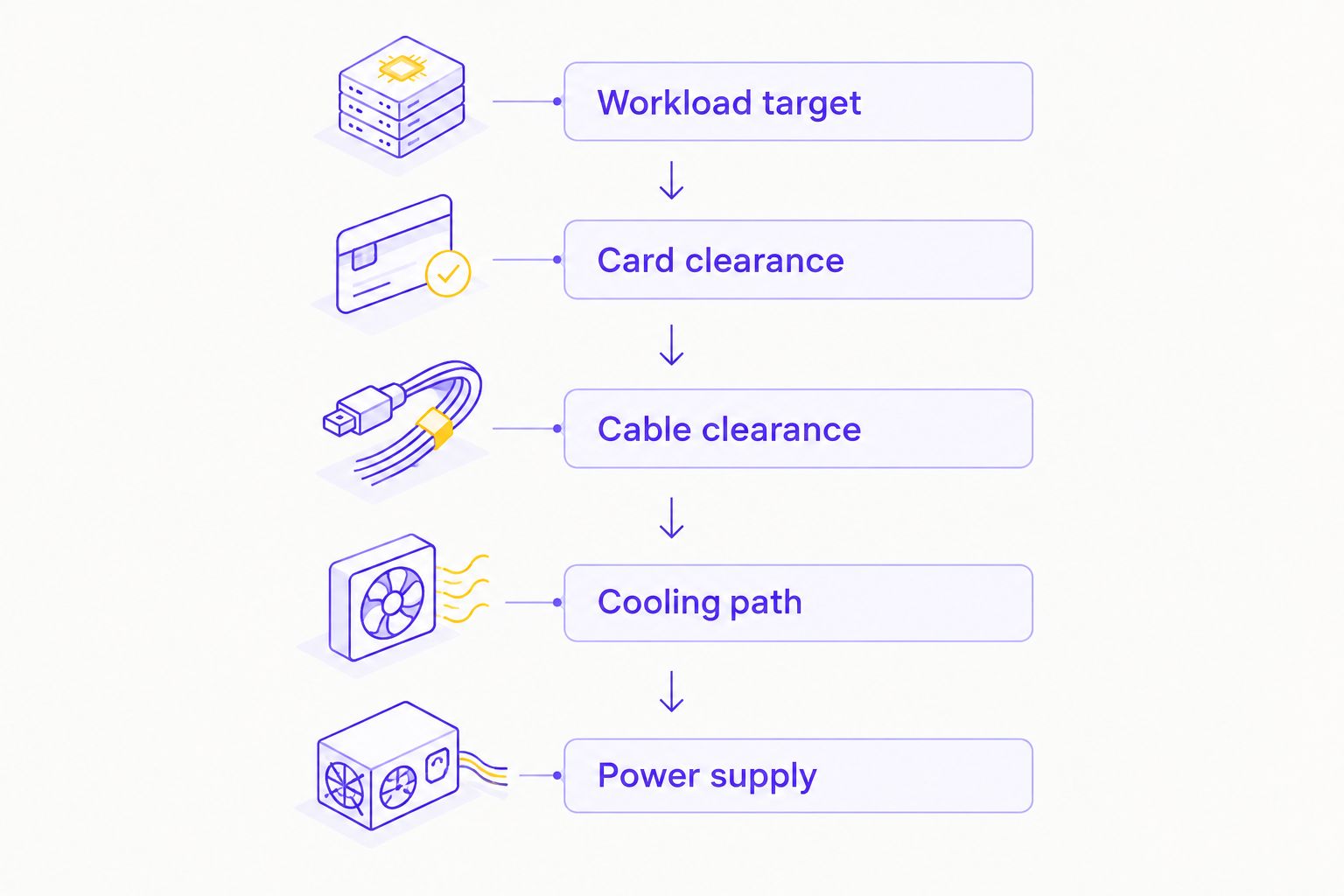
Use this sequence for a 2026 compact PC. Resolve the workload first, then the physical and electrical constraints.
- Workload target: Name your games, resolution and acceptable performance. Check benchmarks using those settings.
- Card clearance: Confirm the exact card's length, height and thickness against the case specification.
- Cable clearance: Check connector placement and the cable manufacturer's routing requirements. Keep the side panel from pressing on the connection.
- Cooling path: Check where GPU intake air enters and where heated air exits. Include nearby obstructions and the CPU cooler.
- Power supply: Follow the exact card and system requirements. Include the processor and other components, not just GPU power.
Armaggeddon PC is a gaming PC option for Singapore buyers seeking a complete desktop rather than a standalone graphics card. Ask for the exact GPU model, chassis and PSU specification when compact dimensions are essential.
Do not assume that a complete desktop listed with your preferred GPU tier is a small-form-factor configuration. Confirm the full build dimensions and internal layout separately.
WHICH GRAPHICS CARD SHOULD YOU CHOOSE?
Choose GeForce RTX 5060 first when heat control is the priority and its performance meets your target. Choose GeForce RTX 5060 Ti 16GB when graphics-memory requirements justify the additional power.
Move to GeForce RTX 5070 or RTX 5070 Ti only when workload results support the upgrade. Treat GeForce RTX 5080 as a performance-led exception, not an efficiency-first default.
The decisive rule is simple: buy the lowest-power option that meets your verified workload and fits the complete build. Do not buy a larger GPU to solve an undefined requirement.
FAQ
What's the best graphics card for a low-power small gaming PC?
GeForce RTX 5060 is the default recommendation in this shortlist, with 145 W reference total graphics power. Confirm that it meets your game-performance target and that the exact partner card fits your chassis.
Is this graphics card power efficiency ranking based on gaming tests?
No. This is a compact-build shortlist ordered by published reference graphics power, not a measured performance-per-watt leaderboard. A measured ranking requires comparable frame-rate and power results.
Is GeForce RTX 5060 Ti 16GB better than RTX 5060 for small builds?
GeForce RTX 5060 Ti 16GB is the stronger memory-capacity choice, while RTX 5060 has lower reference graphics power. Choose between them using workload requirements, cooling capacity and exact card dimensions.
Does lower GPU wattage always mean better efficiency?
No. Efficiency measures useful performance relative to power consumption. A lower-power card is not automatically more efficient if it delivers proportionally less performance.
Will every RTX 5060 fit a mini-ITX case?
No. Mini-ITX describes the motherboard format, not guaranteed graphics-card clearance. Check the exact card's dimensions, case limits and power-cable space.
Does total graphics power tell me which PSU to buy?
No. Total graphics power describes the graphics subsystem rather than the whole computer. Follow the exact card's PSU guidance and account for the processor, other components and required connectors.
Does undervolting guarantee a stable, efficient graphics card?
No. Undervolting changes operating conditions, and stability must be verified on the individual card. Test your actual games and applications rather than assuming another owner's settings will work.
What should I confirm before ordering an Armaggeddon PC compact gaming build?
Confirm the exact graphics card, chassis dimensions, GPU clearance, power supply and connector routing. The GPU tier alone does not establish that a desktop configuration meets your compact-build requirements.
ONE LAST THING
Try a frame-rate cap before changing hardware. Rendering frames beyond your chosen target creates extra work. A cap limits that work, although the power reduction depends on the game and the system bottleneck.
For an existing 2026 build, test your current GPU with the intended settings and cap first. Record performance, power and noise. That establishes whether the next move is a graphics-card upgrade or simply a better configuration.