

Best 60% Mechanical Keyboard Gaming: HyperX Wins 2026
Best overall: HyperX Alloy Origins 60. Best for switch changes: Ducky One 3 Mini. Best for programmable layers: Keychron Q4. Best for Corsair software users: Corsair K65 RGB Mini. These are the strongest starting points for a compact mechanical GAMING KEYBOARD in 2026; choose by controls, switches and connection, not lighting.
TL;DR
- Best 60% mechanical keyboard gaming pick: HyperX Alloy Origins 60 for a straightforward wired setup.
- Ducky One 3 Mini suits players who want hot-swappable mechanical switches.
- Keychron Q4 suits users who want QMK/VIA remapping and a metal case.
- Corsair K65 RGB Mini suits existing iCUE users; its polling-rate specification is not an end-to-end latency result.
- Choose a larger layout if dedicated arrow keys or function keys are essential.
WHY THIS MATTERS
A 60% keyboard removes the number pad, dedicated function row and separate navigation cluster. You get more room beside the keyboard for mouse movement. You also move some controls onto a function layer.
For a desktop setup from Armaggeddon PC, keyboard layout is a separate decision from the PC configuration. A smaller keyboard does not increase frame rate. Its practical benefit is desk space and control placement.
The best 60% gaming keyboard is the one whose missing keys you can comfortably access during play. Check that before choosing switches or RGB effects. A compact layout becomes a poor fit when your most-used command needs an awkward key combination.
WHAT MAKES THE BEST 60% GAMING KEYBOARD?
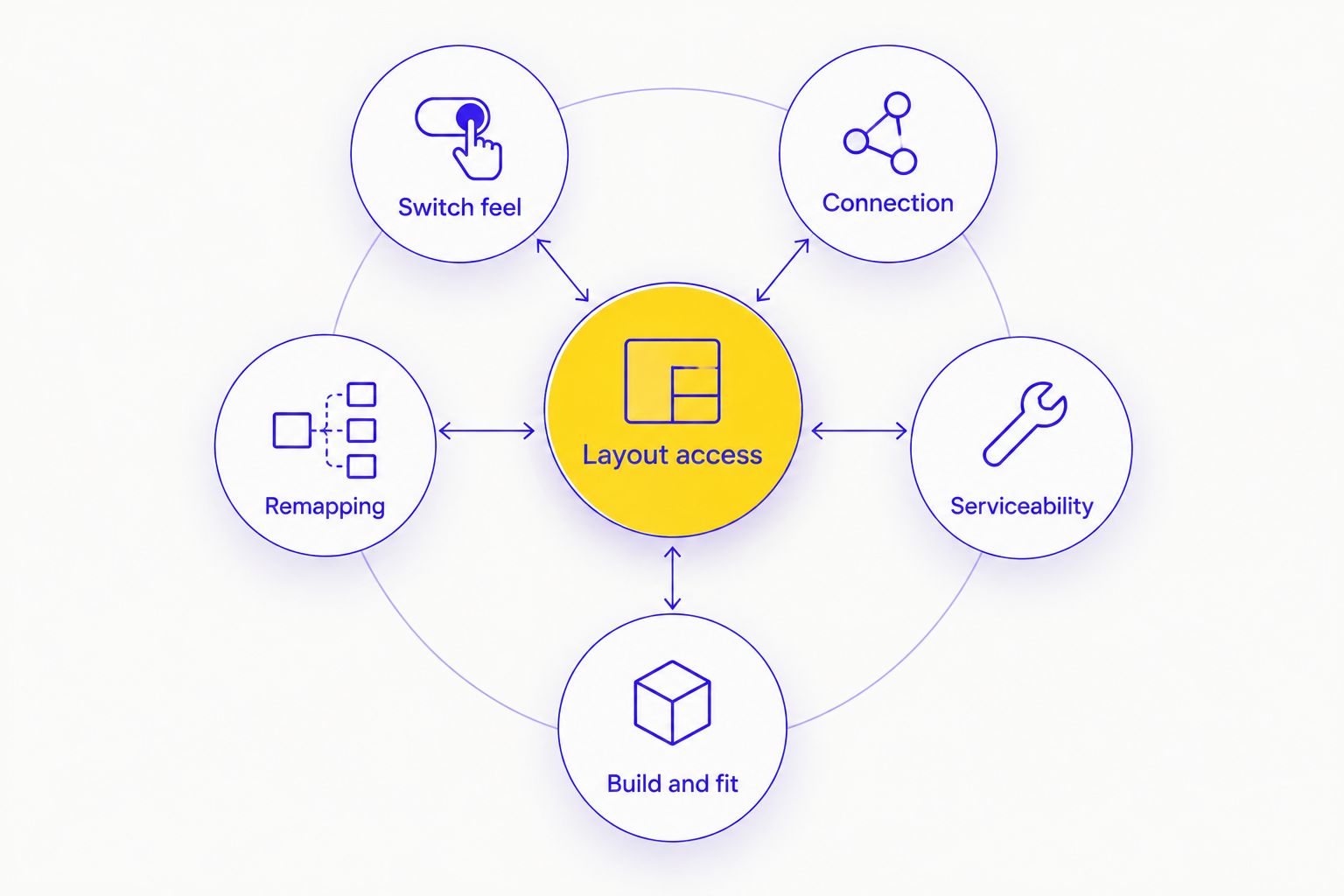
Use these criteria for your 2026 shortlist. They explain the ranking before you compare the models.
- Layout access: Find the arrow keys, Delete, function keys and screenshot shortcut on the secondary layer. Check the actual layout diagram.
- Switch feel: Choose smooth linear travel or a tactile bump based on your preference. A switch colour is not a universal specification across brands.
- Connection: These recommendations use wired USB. That removes keyboard charging from your setup routine, but leaves a cable on the desk.
- Remapping: Check whether you can change bindings, save them to the keyboard and use them without background software.
- Serviceability: Hot-swappable sockets make compatible switch replacement easier. They do not make every switch type compatible.
- Build and fit: Inspect case height, stabilised keys and cable placement. A metal case alone does not establish comfort or input performance.
Use the mechanical keyboard switch guide for gaming to separate switch feel from layout choice. Make those decisions independently. A keyboard with your preferred switches still fails if its function layer interrupts your controls.
THE SHORTLIST AT A GLANCE
These are specific model names, not interchangeable product families. Keychron Q4 is not Q4 Pro. Corsair K65 RGB Mini is not K65 Plus Wireless. Match the complete name when checking specifications.
| Keyboard | Best for | Standout feature | Key limitation |
|---|---|---|---|
| HyperX Alloy Origins 60 | Straightforward wired gaming | Aluminium body and PBT keycaps | No hot-swappable switch sockets |
| Ducky One 3 Mini | Changing mechanical switches | Hot-swappable sockets | Remapping relies on onboard controls |
| Keychron Q4 | Custom keymaps and layers | QMK/VIA support | No wireless connection |
| Corsair K65 RGB Mini | Existing iCUE setups | iCUE configuration and high polling-rate support | No hot-swappable switch sockets |
The comparison uses manufacturer-published specifications for the exact models named. It is a feature-based buying guide, not a measured latency ranking. Switch variants and regional layouts require a separate check.
1. HyperX Alloy Origins 60: best for straightforward gaming
The HyperX Alloy Origins 60 is a wired mechanical keyboard with an aluminium body, PBT keycaps and a detachable USB cable. Its standard US layout has 61 keys. HyperX NGENUITY handles supported configuration functions.
The attraction is a simple setup. You get a compact board without making switch replacement or custom firmware part of the purchase decision. That makes the HyperX Alloy Origins 60 the default recommendation for an undecided gamer in 2026.
HyperX Alloy Origins 60 pros:
- Aluminium construction gives the keyboard a rigid case.
- PBT keycaps are a useful specification for frequent use.
- The detachable cable simplifies packing and cable replacement.
- Secondary key legends help you locate layer functions.
HyperX Alloy Origins 60 cons:
- Switches are not hot-swappable; replacement requires soldering work.
- Dedicated arrow keys and function keys are absent.
- Supported software features depend on NGENUITY rather than an open firmware workflow.
The published polling rate is 1000 Hz. That specification describes USB reporting frequency, not the complete delay between pressing a key and seeing a response in a game. Do not turn it into an unsupported speed comparison.
Best for: Players who want a compact wired keyboard and intend to keep the installed switches.
Check the switch variant and regional layout before choosing. Verdict: Buy for a straightforward gaming setup; skip if switch swapping is essential.
2. Ducky One 3 Mini: best for changing switches
The Ducky One 3 Mini is a wired 60% mechanical keyboard with hot-swappable switch sockets. It suits players who want to change compatible switches without desoldering the keyboard. Its configuration approach centres on onboard controls.
That serviceability is the reason to choose it over the HyperX Alloy Origins 60. You can separate the keyboard purchase from your long-term switch preference. Check socket compatibility before ordering replacement switches.
Ducky One 3 Mini pros:
- Hot-swappable sockets simplify compatible switch changes.
- PBT keycaps are part of the model's specification.
- A detachable USB cable supports easier transport.
- Onboard controls avoid making a desktop configuration application central to everyday use.
Ducky One 3 Mini cons:
- Layer and macro setup requires learning the keyboard's control combinations.
- There is no wireless connection.
- Switch changes still require care around pins and sockets.
For a 2026 switch-focused shortlist, prioritise socket compatibility and the keyboard manual. Do not choose the Ducky One 3 Mini solely because a particular switch colour sounds familiar. The feel and sound come from the installed switch, keycap and keyboard construction together.
Keep the original switches until you have confirmed that replacements work correctly. Inspect bent pins before insertion. Hot-swapping removes soldering from the task, not the need for careful installation.
Best for: Players who want to experiment with conventional mechanical switches or replace a faulty compatible switch.
Verdict: Buy for switch flexibility; skip if you want point-and-click remapping as the main feature.
3. Keychron Q4: best for custom keymaps and layers
The Keychron Q4 is a wired 60% mechanical keyboard with an aluminium case, hot-swappable sockets and QMK/VIA support. Its main advantage is control over the keymap. You can build layers around your own shortcuts instead of accepting only the default arrangement.
Choose the Keychron Q4 when you know what you want to remap. Moving the layer key or rearranging navigation controls is a concrete reason to use programmable firmware. Metal construction alone is not.
Keychron Q4 pros:
- QMK/VIA support provides detailed keymap configuration.
- Hot-swappable sockets support compatible mechanical switch changes.
- The aluminium case suits a fixed desktop setup.
- Programmable layers help organise navigation and function-key access.
Keychron Q4 cons:
- The standard Q4 has no wireless connection.
- Its metal construction is less convenient for frequent carrying than a lightweight plastic board.
- Custom layers take time to configure and remember.
Check whether the exact configuration is fully assembled or barebones. A barebones keyboard needs the required switches and keycaps before use. Also check the physical layout; firmware cannot change the shape or position of a key.
The Keychron Q4 earns its place through remapping, not a claimed gaming advantage. A carefully arranged function layer can improve access to commands. It cannot replace a dedicated key for someone who dislikes layer combinations.
Best for: Users who want a customised keyboard layout for both games and desktop shortcuts.
Verdict: Buy for programmable control; skip if you want minimal setup or wireless use.
4. Corsair K65 RGB Mini: best for existing iCUE setups
The Corsair K65 RGB Mini is a wired 60% mechanical keyboard with PBT double-shot keycaps and iCUE configuration support. It fits a setup where you already use Corsair software. Keep the exact model name in view when comparing it with other K65 keyboards.
Corsair specifies support for polling rates up to 8000 Hz on the K65 RGB Mini. That is a reporting-rate specification. It does not establish that the keyboard produces a proportionate improvement in game response or player performance.
Corsair K65 RGB Mini pros:
- iCUE provides a software route for supported remapping and lighting controls.
- PBT double-shot keycaps are included in the model specification.
- A detachable USB cable makes cable replacement straightforward.
- High polling-rate support gives users an additional configuration option.
Corsair K65 RGB Mini cons:
- Switches are not hot-swappable.
- Detailed software configuration adds an application to manage.
- The compact layout still places navigation and function controls on layers.
Check the switch variant instead of assuming every K65 RGB Mini feels identical. Then confirm that your preferred settings behave correctly after closing the software. Test saved configurations rather than relying on the application screen alone.
For a 2026 purchase, software fit is a stronger reason to choose the Corsair K65 RGB Mini than its headline polling rate. Best for: Players already comfortable with iCUE who want a compact wired keyboard.
Verdict: Buy for iCUE integration; skip if hot-swapping or software independence is your priority.
HOW THE RANKING WORKS
The order prioritises a straightforward gaming setup, then separates the alternatives by a distinct requirement. HyperX Alloy Origins 60 covers the default wired choice. Ducky One 3 Mini covers switch changes. Keychron Q4 covers custom layers. Corsair K65 RGB Mini covers iCUE configuration.
The criteria are layout access, switch feel, connection, remapping, serviceability and physical fit. No measured latency results or personal test results support this ranking. Manufacturer specifications establish features; they do not establish which switch you will prefer.
CHECK THE LAYOUT BEFORE YOU COMMIT
A 60% layout is not automatically the right compact layout. A 65% keyboard typically adds dedicated arrow keys. A 75% layout typically retains a function row while keeping a reduced footprint.
| Layout | Best for | Main benefit | Main drawback |
|---|---|---|---|
| 60% | Mouse-space priority | Removes more dedicated key clusters | Greater reliance on layers |
| 65% | Frequent arrow-key use | Dedicated navigation in a compact format | Wider than a comparable 60% board |
| 75% | Regular function-key use | Function row without a full-size layout | Takes more desk space than smaller layouts |
For a 2026 decision, write down your essential controls first. Include game commands, chat shortcuts and desktop tasks. Check how each works on the proposed keyboard.
Run this practical check:
- Hold movement keys while accessing your secondary controls.
- Locate Escape, Delete and the function keys.
- Try navigation in a text document.
- Check the cable route beside your mouse pad.
- Confirm that remapped settings persist as intended.
Skip 60% if dedicated arrows or function keys are non-negotiable. Choosing a larger layout is a better fix than forcing yourself to tolerate the wrong controls.
WHICH 60% GAMING KEYBOARD SHOULD YOU CHOOSE?
Choose HyperX Alloy Origins 60 if you want the default wired recommendation. Choose Ducky One 3 Mini for compatible switch changes, Keychron Q4 for custom layers, or Corsair K65 RGB Mini for iCUE configuration.
Armaggeddon PC is best suited to Singapore buyers planning a desktop gaming setup alongside peripherals. Keep the keyboard decision specific: layout, switches, controls and connection. Do not assume a PC warranty applies to a separately purchased keyboard.
FAQ
What's the best 60% mechanical keyboard for gaming in 2026?
HyperX Alloy Origins 60 is the default wired recommendation in this guide. Choose Ducky One 3 Mini for hot-swappable switches, Keychron Q4 for custom keymaps, or Corsair K65 RGB Mini for iCUE configuration.
Is a 60% keyboard better than a 65% keyboard for gaming?
A 60% keyboard is better for prioritising mouse space; a 65% keyboard is better when you need dedicated arrow keys. Check your game controls before choosing the smaller layout.
Does a 60% keyboard have function keys?
A standard 60% keyboard accesses function keys through a secondary layer rather than a dedicated function row. Check the model's manual for the exact combinations.
Are linear switches always better for gaming?
Linear switches are not universally better for gaming. They provide travel without a tactile bump, while tactile switches provide feedback that some players prefer.
Can I change the switches on these keyboards?
Ducky One 3 Mini and Keychron Q4 have hot-swappable sockets for compatible switches. HyperX Alloy Origins 60 and Corsair K65 RGB Mini require soldering work for switch replacement.
Does a higher polling rate guarantee lower gaming latency?
A higher polling rate does not guarantee lower end-to-end gaming latency. USB reporting frequency is only one part of the path from a keypress to a visible response.
Can I use a 60% keyboard for work as well as gaming?
You can use a 60% keyboard for work if its navigation and shortcut layers suit your tasks. Choose a larger layout if frequent arrow-key or function-key use makes those layers inconvenient.
Should I use PC warranty terms when choosing a keyboard?
Use the warranty terms for the exact keyboard, not the desktop PC. Ask the seller to confirm peripheral coverage separately before purchasing.
ONE LAST THING
Check where Fn sits before checking how the keyboard sounds. Its position determines how you reach the keys removed from a compact layout. A comfortable switch cannot fix an awkward shortcut.
For an Armaggeddon PC gaming setup, keep enough space for the mouse first. Then choose the keyboard whose controls fit your games. That is the practical reason to go compact.