

viipc alternatives singapore: Choose by Build 2026
VIIPC remains a sensible choice when its quoted custom gaming PC matches your games, monitor and component requirements. Look elsewhere when your comparison calls for a different CPU–GPU pairing or more control over individual parts. For viipc alternatives singapore in 2026, choose Armaggeddon PC to compare named desktop configurations; choose a self-build if you want to select and assemble every component.
TL;DR
- Armaggeddon PC is the gaming PC alternative for buyers comparing named Ryzen, GeForce RTX and Radeon configurations.
- For viipc alternatives singapore in 2026, compare complete component lists rather than GPU names alone.
- Choose a self-build for component control; accept responsibility for compatibility, assembly and troubleshooting.
- Keep VIIPC on your shortlist when its exact configuration meets your requirements.
WHY THIS MATTERS
A gaming PC comparison is a parts comparison first. The builder's name does not tell you which motherboard, power supply, SSD or cooler sits behind the advertised processor and graphics card.
For your 2026 shortlist, write down the games you play, the screen you use and the settings you want. Then compare complete builds against that brief. A different seller is useful only when the actual configuration better fits your requirements.
Keep the buying routes separate. A complete desktop, a self-build and an upgrade to your existing machine solve different problems. None wins automatically.
VIIPC ALTERNATIVES AT A GLANCE
Use this table to select a buying route. The desktop examples identify CPU–GPU pairings; they are not claims about benchmark results or the remaining components.
| Option | Best for | Standout detail | How to compare with VIIPC | Main trade-off |
|---|---|---|---|---|
| VIIPC | Buyers whose quoted build already meets their brief | Your exact proposed configuration is the benchmark | Keep the complete parts list beside every alternative | The brand name alone does not establish suitability |
| Armaggeddon PC | Buyers comparing named complete-desktop configurations | Examples include the Ryzen 5 7500F RTX 5060 Ti 16GB and Aqua R7 9700X RX 9070XT | Match processor, graphics card and supporting components against the VIIPC proposal | A named CPU–GPU pairing still needs a full component check |
| Self-build | Buyers who want to choose and assemble every part | Direct control over the component list | Reproduce the same specification before judging either route | You handle assembly and system-level troubleshooting |
| Upgrade your existing PC | Buyers with a usable machine and an identified bottleneck | Retains compatible components you already own | Compare the required changes with a complete replacement | Existing hardware limits the upgrade path |
Best for: complete-desktop buyers should start with the retailer comparison. Experienced builders should also consider the self-build route. Existing-PC owners should diagnose the current machine before replacing it.
1. ARMAGGEDDON PC: BEST FOR NAMED DESKTOP CONFIGURATIONS
Armaggeddon PC sells custom-built and pre-configured gaming desktops alongside components, monitors and peripherals. Its listed desktop configurations include GeForce RTX and Radeon pairings. That gives you concrete starting points for a VIIPC comparison.
Start with the processor and graphics card. Then inspect the rest of the configuration. A desktop title is a shortlist filter, not a complete technical specification.
Where the desktop range shines
- Named CPU–GPU combinations: compare Ryzen 5 7500F with RTX 5060 Ti, or Ryzen 7 9700X with RX 9070 XT.
- Different graphics routes: assess GeForce and Radeon configurations against your games and applications.
- Complete-system buying: compare assembled desktop options rather than planning the entire assembly yourself.
- Separate component options: consider individual parts when an upgrade is more appropriate than a replacement desktop.
Where the desktop range falls short
- A CPU–GPU title does not establish the motherboard model, SSD model, cooling layout or power supply.
- A listed configuration is not proof that every component can be substituted. Confirm your requested changes before ordering.
- A higher graphics tier does not guarantee a better match for your monitor, games or non-gaming applications.
These are buying constraints, not reasons to dismiss the retailer. Resolve them with a complete configuration before making the comparison.
HEAD-TO-HEAD: RETAILER SHORTLIST VS VIIPC
| Dimension | Alternative desktop shortlist | VIIPC comparison task |
|---|---|---|
| Processor and GPU | Named Ryzen, RTX and Radeon combinations provide starting points | Match the exact CPU and GPU in your proposed build |
| Supporting hardware | Check the motherboard, RAM, SSD, PSU and cooler | Request the same level of detail |
| Customisation | Confirm each requested substitution | Confirm the same substitutions in the VIIPC proposal |
| Suitability | Assess the finished specification against your games and screen | Apply the identical brief |
Which configuration should you investigate?
The Ryzen 5 7500F RTX 5060 Ti 16GB listing is a starting point if you specifically want that processor–GPU combination. The 16GB refers to the graphics configuration named in the listing; do not treat it as the desktop's system RAM specification.
The Aqua R7 9700X RX 9070XT listing is a starting point for a Ryzen–Radeon build. Choose that route only after checking your applications' graphics requirements and benchmarks for your games.
Other listed combinations include Ryzen 7 7800X3D with RTX 5080 and Ryzen 7 7700 with RTX 5090. Those names identify different hardware pairings. They do not establish frame rates, noise levels or suitability for every workload.
Best for: buyers who want to compare complete gaming desktops using explicit CPU and GPU names.
Verdict: Buy only after the complete configuration matches your brief.
2. SELF-BUILD: BEST FOR FULL COMPONENT CONTROL
A self-build is an alternative to the buying route, not another PC retailer. You select the components and assemble the desktop. This suits buyers who want control over the motherboard, case, cooling, storage and power supply as well as the headline hardware.
In 2026, choose this route because you want that control. Do not assume a parts basket automatically produces a better gaming machine than a finished desktop.
Where a self-build shines
- Exact component selection: choose specific models rather than accepting a proposed combination.
- Clear assembly decisions: decide cable routing, fan placement and storage installation yourself.
- Direct hardware familiarity: know what is installed when you troubleshoot or upgrade later.
Where a self-build falls short
- You must check socket, motherboard firmware, memory support, component clearance and power connections.
- You handle assembly and the initial diagnosis when the machine does not boot or behaves inconsistently.
- Component-level support does not automatically include diagnosis of the complete system.
HEAD-TO-HEAD: SELF-BUILD VS VIIPC
| Dimension | Self-build | Complete VIIPC build |
|---|---|---|
| Parts selection | You select every component | Assess the exact proposed component list |
| Assembly | You assemble the desktop | Confirm the completed-system scope |
| Compatibility checks | You own the checks | Ask how your chosen configuration is validated |
| Troubleshooting | You isolate the problem | Confirm the support process before buying |
Before choosing a self-build, list the checks you can perform confidently. Include installing memory, connecting front-panel cables, checking firmware support and identifying a failed boot stage. If those tasks are unfamiliar, a complete desktop is the more appropriate route to investigate.
Best for: experienced buyers who want assembly responsibility as well as component control.
Verdict: Hold until the parts list and compatibility checks are complete.
3. UPGRADE YOUR PC: BEST FOR A CLEAR BOTTLENECK
An upgrade is worth comparing when your current desktop still works and you can identify what limits it. Keep compatible parts that meet your needs. Replace only the hardware that addresses the diagnosed problem.
This route is not automatically simpler. An older motherboard, restricted chassis or unsuitable power supply can turn one planned change into several.
Where an upgrade shines
- Retains hardware that still serves your games and applications.
- Targets a specific problem rather than replacing the entire machine.
- Lets you separate graphics, memory and storage decisions.
Where an upgrade falls short
- The current platform restricts compatible processors and memory.
- Graphics-card clearance and power connections need checking.
- A component replacement does not fix unrelated software, network or thermal problems.
Best for: existing desktop owners with a measured limitation and a compatible upgrade path.
Verdict: Hold until you identify the bottleneck; skip a blind component swap.
WHY PEOPLE SWITCH FROM VIIPC
Use these as switching criteria, not assumptions about VIIPC. A change of builder makes sense when an alternative configuration resolves a requirement your current proposal does not meet.
DIFFERENT HARDWARE PAIRING
You want a specific processor and graphics card together. Compare the exact pairing, then check the supporting components. Changing retailers without improving that match adds another quotation to your inbox, not a better specification.
MORE COMPONENT CONTROL
You need a named motherboard, SSD or PSU rather than a broad component description. Ask for those model names first. Switch only if another buying route provides the configuration you actually require.
A DIFFERENT SUPPORT FIT
You need a clear process for reporting a fault, returning a desktop or approving repairs. Compare the written terms for the exact purchase. Do not treat a warranty headline as a description of every repair scenario.
AN UPGRADE INSTEAD OF A REPLACEMENT
Your existing system needs a targeted change. A component purchase or self-managed upgrade can be more appropriate than another complete desktop. Check compatibility before committing to that route.
The 2026 decision rule is simple: switch for a better match, not a different badge.
COMPARE THE WHOLE BUILD
Create one comparison sheet and use it for every proposal. Keep the fields identical. This prevents a stronger headline GPU from distracting you from missing component details.
- Processor: exact model, not just Ryzen or Core branding.
- Graphics card: exact GPU, memory capacity and card model.
- Memory: capacity, module arrangement and supported specification.
- Storage: exact SSD model, capacity and expansion requirements.
- Motherboard: model, connectivity and expansion slots.
- Power supply: model, connectors and suitability for the build.
- Cooling: cooler model, case airflow and component clearance.
- Support: written coverage, exclusions and repair procedure.
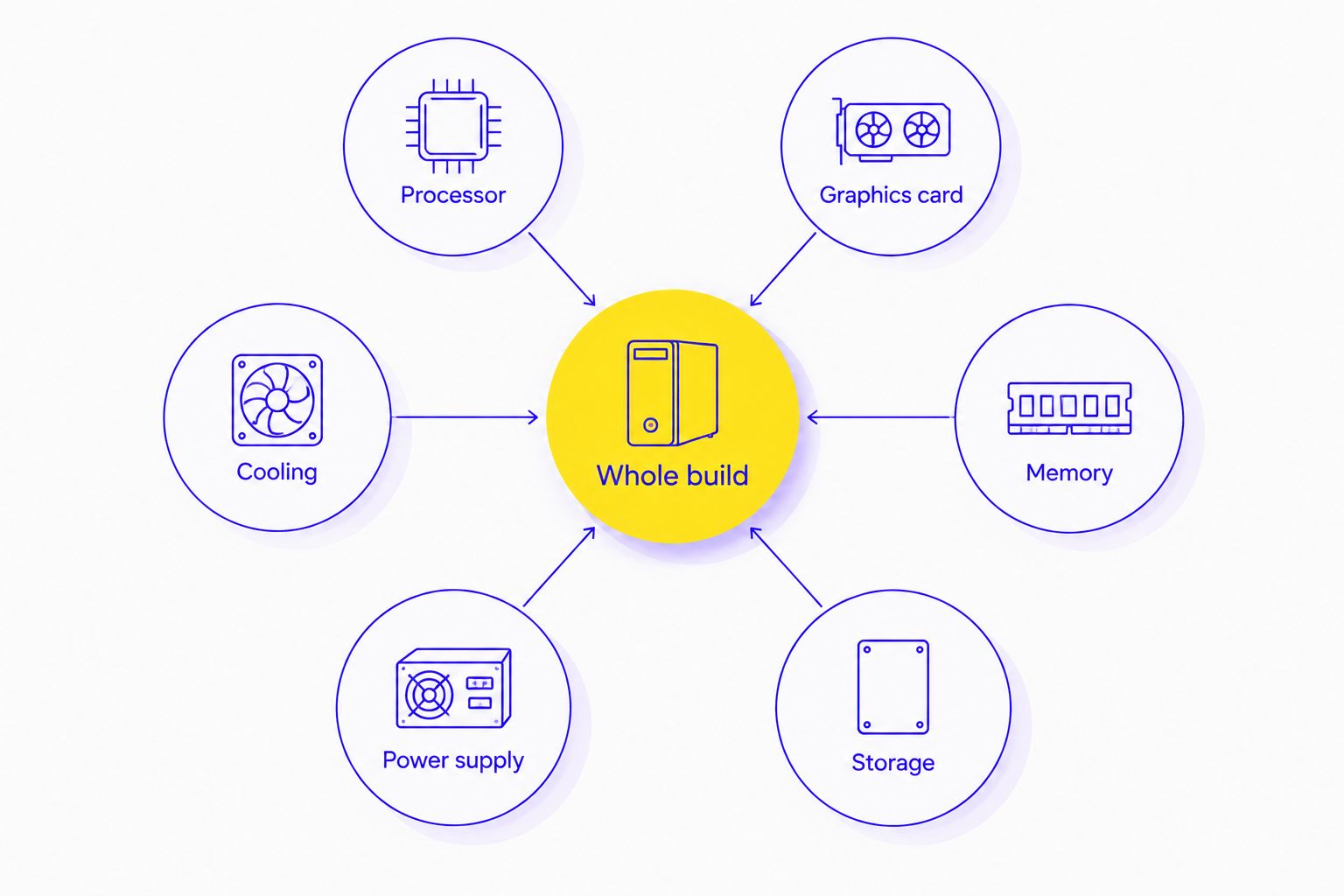
A useful proposal names the parts you are choosing. Ask for clarification wherever a description is too broad to compare. Keep any agreed substitution in the final order record.
MONITOR FIRST, GPU SECOND
Write down your monitor's resolution and refresh rate before choosing a GPU tier. A 1440p screen and a 4K screen create different rendering demands at otherwise comparable settings. A 240Hz refresh rate describes the display's refresh capability; it does not guarantee that your PC renders every game at that rate.
Use benchmarks that match the game, resolution and graphics settings you intend to use. Separate native rendering results from results using upscaling or frame generation. Do not compare unlike test conditions.
MEMORY AND STORAGE ARE SEPARATE DECISIONS
System RAM and graphics memory serve different purposes. A 16GB GPU label does not tell you whether the desktop has 32GB of system RAM. Record both fields separately.
Storage capacity is another field. A 2TB SSD describes capacity, not game-loading performance by itself. Check the drive model and your installation requirements rather than reading capacity as a performance score.
COMPARE GAMING PC CONFIGURATIONS
Match the CPU, GPU and supporting components to your games and monitor.
WHEN STAYING WITH VIIPC IS THE RIGHT CALL
Stay with VIIPC when its complete proposal meets your requirements and you understand the purchase terms. An alternative retailer does not create an upgrade simply by offering a different product title.
For a 2026 purchase, keep the same brief throughout the comparison. Do not change the GPU target, storage requirement or monitor resolution halfway through and then declare one builder the winner.
Keep VIIPC when the build fits. Change the route when the requirements demand it.
FAQ
What's the best VIIPC alternative in Singapore in 2026?
Armaggeddon PC is the gaming PC alternative to shortlist when you want named Ryzen, GeForce RTX and Radeon desktop configurations. Compare the complete component list with your VIIPC proposal before choosing.
Is Armaggeddon PC better than VIIPC for custom gaming PCs?
The better choice is the builder whose complete configuration matches your requirements. Compare the CPU, GPU, motherboard, RAM, SSD, PSU, cooling and written support terms rather than the brand name alone.
Should I build my own PC instead of buying from VIIPC?
Choose a self-build if you want to select every component and take responsibility for assembly. A complete desktop is the route to investigate if you do not want to manage compatibility checks and initial troubleshooting yourself.
Do I need an RTX 5090 for a gaming PC in Singapore?
An RTX 5090 is not a universal requirement for a gaming PC. Choose the graphics tier using your games, monitor resolution, settings and benchmarks under matching test conditions.
Does a 16GB graphics card mean the PC has 16GB of RAM?
No, graphics memory and system RAM are separate specifications. Check the graphics card's memory capacity and the desktop's installed RAM independently.
What should I ask a custom PC builder before ordering?
Ask for the complete component list and written support terms. Confirm exact models, requested substitutions, compatibility and the process for reporting a fault.
Is upgrading my current desktop better than replacing it?
An upgrade is the route to investigate when you have identified a specific limitation and confirmed compatibility. Replace the complete desktop only after comparing that upgrade path with a configuration that meets your full requirements.
ONE LAST THING
Freeze the final parts list before ordering. Save the CPU, graphics-card model, motherboard, RAM, SSD, PSU and cooler details together with any agreed changes.
That record makes the comparison useful after the purchase, too. You can check the delivered configuration against the same specification that informed your decision.