

Best Gaming Laptop Singapore 2026: ROG Strix Wins
Singapore shoppers comparing the best gaming laptop singapore has to offer in 2026 usually land on the same five brands: ASUS ROG, MSI, Lenovo Legion, Acer Predator/Nitro, and Razer, with Mechrevo picking up ground as the value alternative. Best overall: the ASUS ROG Strix G16 for 1440p/165Hz gaming. Best for esports on a tight weight budget: the MSI Katana. Best budget pick: the Acer Nitro V. Best value alternative from Asia's emerging laptop makers: Mechrevo. If you never leave your desk, skip the laptop tax and go with a desktop packing an RTX 5090 or RTX 5080 instead.
TL;DR
- ASUS ROG Strix G16 is the best gaming laptop singapore pick overall for 2026 on thermals and a 165Hz QHD panel.
- MSI Katana wins for esports players who want a lighter chassis without dropping GPU tier.
- Acer Nitro V covers the budget slot; Mechrevo is the value alternative worth checking before you commit.
- A desktop with an RTX 5090 or RTX 5080 beats every laptop on raw performance per dollar.
- Battery life drops fast above an RTX 5070 mobile GPU — plan around a wall socket for serious sessions.
Why this matters
A gaming laptop in Singapore has to do two jobs a desktop never has to: survive daily commutes on the MRT and handle the same GPU-heavy titles your friends run on a tower. That trade-off is why laptops marketed for gaming and business dual-use keep showing up in search — buyers want one machine, not two.
The GPU tier printed on the box matters more than the brand name on the lid. An RTX 5060 mobile chip and an RTX 5080 mobile chip inside the same-looking 16-inch shell perform nothing alike, and Singapore retailers rarely make that distinction obvious on the shelf sticker.
What makes the best gaming laptop in Singapore
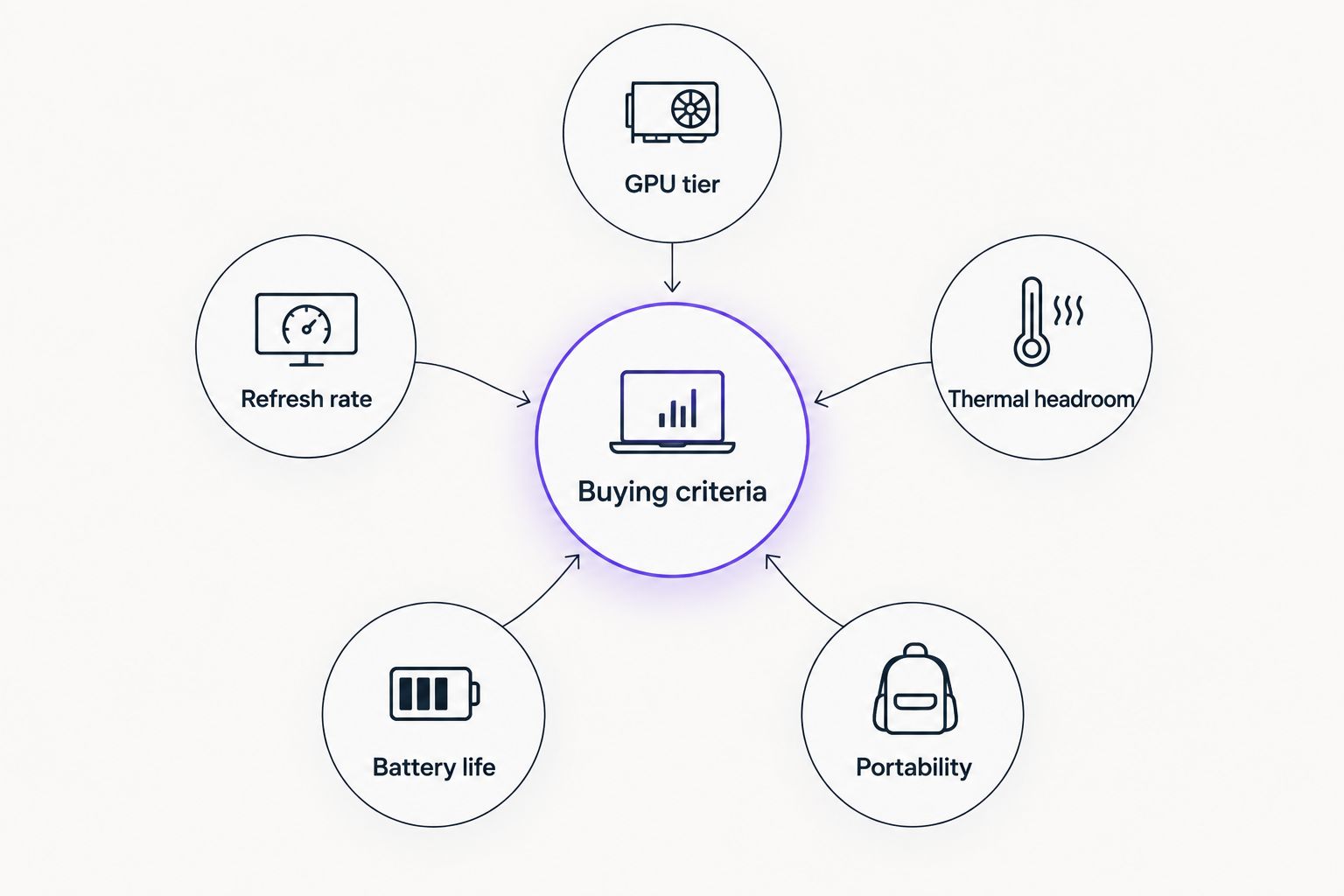
- GPU tier and VRAM — the mobile RTX 50-series tier (5050 through 5090) sets your frame-rate ceiling more than any other spec.
- Panel refresh rate — 144Hz is now the floor for a gaming laptop; 165Hz and 240Hz panels separate esports builds from casual ones.
- Thermal headroom — a laptop that throttles after 20 minutes under load isn't a gaming laptop, it's a laptop that plays games badly.
- Battery life under load — gaming drains a laptop battery in under two hours regardless of brand; check standby life instead.
- Build weight and portability — anything over 2.3kg stops being a laptop you actually carry to a LAN event.
- After-sales service in Singapore — local warranty support matters more here than overseas reviews suggest.
At a glance
| Laptop | Best for | Standout feature | Key limitation |
|---|---|---|---|
| ASUS ROG Strix G16 | Overall 1440p gaming | 165Hz QHD panel, strong thermal design | Heavier chassis for daily carry |
| MSI Katana | Esports, lighter carry | Slimmer body without dropping GPU tier | Battery drains fast under sustained load |
| Lenovo Legion Pro | Sustained thermal performance | Vapor chamber cooling holds clocks longer | Bulkier power brick |
| Acer Nitro V | Budget entry point | Lowest cost of entry into RTX 50-series mobile | Lower-refresh panel on base configs |
| Razer Blade | Portability, commute | Thinnest metal chassis in the category | Runs hotter under the same GPU load |
| Mechrevo | Value alternative | RTX-equipped configs at a lower price tier | Smaller local service network |
1. ASUS ROG Strix G16: best gaming laptop for 1440p, 165Hz gaming
The ROG Strix line pairs AMD or Intel chips with RTX 50-series mobile GPUs and a 165Hz-class QHD panel, which is the sweet spot for competitive and single-player titles alike in 2026. It's built as a daily driver, not a special-occasion machine — the chassis and cooling are sized for hours-long sessions.
ASUS ROG Strix G16 pros:
- 165Hz+ QHD panel handles both esports and story-driven games
- Thermal design holds boost clocks longer than thinner rivals
- Wide port selection, no dongle needed for most setups
ASUS ROG Strix G16 cons:
- Heavier than anything you'd want to carry every day
- Fan noise under full load is noticeable in a quiet HDB room
Best for: gamers who want one laptop that covers 1440p gaming and everyday use. Verdict: Buy.
2. MSI Katana: best gaming laptop for esports on a lighter build
The MSI Katana line trims chassis weight and thickness while keeping the same RTX 50-series mobile GPU options as bulkier rivals, which suits players who bring their laptop to LAN events or esports training setups. It's built around frame rate first, extras second.
MSI Katana pros:
- Noticeably lighter than the ROG Strix at a comparable GPU tier
- High refresh panel keeps input lag low for competitive shooters
- Faster to warm up from sleep than bulkier gaming laptops
MSI Katana cons:
- Battery life under gaming load is short even by gaming laptop standards
- Build materials feel thinner than the Legion Pro or ROG Strix
Best for: competitive players who travel to tournaments or practice sessions. Verdict: Buy.
3. Lenovo Legion Pro: best gaming laptop for sustained thermal performance
Legion Pro models lean on vapor chamber cooling to hold GPU and CPU clocks steady during long sessions, which matters more than peak benchmark numbers once you're two hours into a raid or a render job. It doubles reasonably well as a light creator machine between gaming sessions.
Lenovo Legion Pro pros:
- Cooling holds clocks steady longer than most rivals at the same GPU tier
- Keyboard and trackpad feel closer to a desktop peripheral than most gaming laptops
- Handles mixed gaming and creative workloads without excessive throttling
Lenovo Legion Pro cons:
- Power brick and charger add real weight to a bag
- Pricing sits above the Katana and Nitro V at comparable GPU tiers
Best for: buyers who game hard and also edit video or render 3D on the side. Verdict: Buy.
4. Acer Nitro V: best budget gaming laptop in Singapore
The Nitro V line is Acer's entry point into RTX 50-series mobile GPUs, aimed at students and first-time gaming laptop buyers who don't want to spend Legion Pro or ROG Strix money. It trades panel refresh rate and build polish for a lower cost of entry.
Acer Nitro V pros:
- Lowest-cost route into an RTX 50-series mobile GPU
- Light enough for daily commuting between school or work and home
- Straightforward, no-frills design with easy-to-source parts
Acer Nitro V cons:
- Base panel refresh rate trails the Strix and Katana
- Plastic chassis feels less durable under daily bag use
Best for: students and budget-first buyers. Verdict: Buy.
5. Razer Blade: best gaming laptop for portability and commuting
The Razer Blade line keeps the thinnest metal chassis in this list while still fitting a high-tier mobile GPU inside, which makes it the pick for anyone who genuinely carries a laptop every single day rather than occasionally. That thinness comes with a thermal cost.
Razer Blade pros:
- Thinnest, lightest chassis among the RTX 50-series mobile options here
- Premium build quality that survives daily bag wear better than plastic rivals
- Understated design that doesn't scream gaming laptop in a work setting
Razer Blade cons:
- Runs hotter than the Strix or Legion Pro at the same GPU tier
- Priced above most of this list for the same GPU class
Best for: commuters who need a gaming laptop that also looks fine in an office. Verdict: Hold unless portability outweighs thermal performance for you.
6. Mechrevo: best value alternative from Asia's emerging laptop makers
Mechrevo has built a following in Singapore as a lower-cost way into RTX-equipped gaming laptops, and the Mechrevo gaming laptop lineup is worth checking against the bigger five brands before you commit to a higher sticker price for a similar spec sheet.
Mechrevo pros:
- Lower price of entry for comparable GPU tiers versus the big five brands
- Config options that match mid-tier RTX 50-series mobile GPUs
- Growing presence among value-focused Singapore buyers
Mechrevo cons:
- Smaller local service and warranty network than ASUS, MSI, Lenovo or Acer
- Less third-party review coverage to lean on before buying
Best for: buyers prioritizing GPU tier per dollar over brand recognition. Verdict: Hold — check current local warranty terms before buying.
“If you need more than a couple of hours away from a wall socket, skip anything above an RTX 5070 mobile GPU.”
How we ranked
Every laptop above is scored against the same six criteria: GPU tier, panel refresh rate, thermal headroom, battery life under load, build weight, and local after-sales service in Singapore. No two items compete for the same use case — that's why the ROG Strix wins on all-round 1440p gaming while the Katana wins specifically on esports portability.
The desktop alternative nobody mentions
A gaming laptop always trades performance for portability, no matter the brand. If you're buying a machine that lives on one desk, a desktop with the same GPU tier costs less to reach the same frame rate and runs cooler doing it. Armaggeddon PC's Ryzen 7 7800X3D RTX 5090 build is the direct comparison point: same top-tier GPU as the flagship gaming laptops above, none of the thermal throttling that comes with cramming that GPU into a laptop chassis. Armaggeddon PC doesn't sell gaming laptops, but its desktop lineup is the honest answer for anyone weighing a laptop purely for the GPU number on the box.
Gear that pairs with a gaming laptop
A gaming laptop that leaves the desk needs a bag that actually protects it and a mouse that doesn't need a cable trailing off a train seat. Armaggeddon's own accessory lineup covers both without adding much weight to the bag.

Gear for a gaming laptop on the move

Anti-theft lock, USB-A and USB-C charging ports, shoe compartment.
SGD 59

2.4GHz wireless, Bluetooth 5.0 and USB wired connectivity in one mouse.
SGD 45.90

165g wireless headset with quad-mode connectivity for gaming and calls.
SGD 49.90
Which gaming laptop should you choose?
For most Singapore buyers in 2026, the ASUS ROG Strix G16 is the default pick — it covers gaming, schoolwork and daily carry without forcing a compromise. Go with the MSI Katana if you're chasing esports frame rates in a lighter shell, the Acer Nitro V if budget is the deciding factor, and Mechrevo if you want the lowest price per GPU tier and don't mind a thinner local warranty network. If the laptop never leaves your desk, buy a desktop instead — the GPU-per-dollar math isn't close.
FAQ
What's the best gaming laptop in Singapore for 2026?
The ASUS ROG Strix G16 is the best overall gaming laptop singapore buyers can get in 2026, thanks to its 165Hz QHD panel and stronger thermal design than thinner rivals. The MSI Katana and Acer Nitro V cover esports and budget use cases respectively.
Is a gaming laptop or gaming desktop better value in Singapore?
A desktop delivers more GPU performance per dollar because it doesn't have to fit that GPU into a thin, battery-powered chassis. A build like Armaggeddon PC's Ryzen 7 7800X3D RTX 5090 desktop matches or beats flagship gaming laptop GPU tiers without the thermal throttling.
How much RAM do I need for a gaming laptop in 2026?
16GB is the practical minimum for current games and multitasking; 32GB gives more headroom if you also stream or run creative software alongside games.
Is the Mechrevo gaming laptop worth buying in Singapore?
Mechrevo is worth checking if GPU tier per dollar matters more than brand name to you, since it offers RTX-equipped configs at a lower price than the big five brands. Check current local warranty terms first, since its Singapore service network is smaller.
What GPU tier should I look for in a 2026 gaming laptop?
RTX 5070 mobile is the practical mid-tier for 1440p gaming; RTX 5080 and RTX 5090 mobile push into high-refresh territory but drain battery faster and run hotter.
How long does a gaming laptop battery last during gaming?
Under real gaming load, most gaming laptops last under two hours regardless of brand, since the GPU draws far more power than the battery is sized for. Battery life claims on the box refer to light, non-gaming use.
Is ASUS ROG or Lenovo Legion better for gaming in Singapore?
ASUS ROG Strix wins on panel refresh rate for pure gaming; Lenovo Legion Pro wins on sustained thermal performance for long sessions or mixed gaming and creative work. Neither is a wrong choice at the same GPU tier.
Do gaming laptops need extra cooling accessories in Singapore's climate?
Singapore's ambient heat and humidity make thermal throttling more likely indoors without air conditioning, so a cooling pad helps more here than in cooler climates. It won't fix a laptop with weak internal cooling to begin with.
One last thing
None of the gaming laptops on this list come close to the 5 Years Limited Warranty that Armaggeddon PC backs its desktop builds with — laptop warranties in this category typically run one to two years. If warranty length matters as much as GPU tier to you, that gap alone is reason enough to compare a desktop before signing off on a laptop purchase in 2026.