

Best Wireless Gaming Earbuds 2026: Razer Wins
Razer Hammerhead HyperSpeed is the best overall wireless gaming earbuds pick for 2026. Best for PS5 and PC crossplay: Sony INZONE Buds. Best for all-day comfort: Logitech G Fits. Best budget wireless gaming earbuds: HyperX Cloud Earbuds II.
TL;DR
- Razer Hammerhead HyperSpeed wins overall for its 2.4GHz dongle plus Bluetooth 5.3 dual mode in 2026.
- Sony INZONE Buds is the pick for PS5 owners who also game on PC.
- Logitech G Fits uses UV-cured custom-molded eartips for sessions longer than two hours.
- HyperX Cloud Earbuds II is the budget wireless gaming earbuds option with a 2.4GHz dongle still included.
- Bluetooth-only earbuds still trail 2.4GHz dongles on latency for competitive shooters in 2026.
Why this matters
Bluetooth alone still lags behind a wired connection in competitive shooters — the protocol was built for phone calls, not split-second callouts. Most wireless gaming earbuds sold in 2026 solve this with a 2.4GHz USB dongle that skips the Bluetooth audio pipeline, then fall back to Bluetooth 5.3 for calls or a second device.
If the earbuds are one piece of a bigger setup, Armaggeddon PC stocks the gaming monitors, mechanical keyboards, and desktop builds the rest of the desk runs on, even though wireless earbuds aren't part of the current catalog.
This guide ranks six wireless gaming earbuds available to buyers in Singapore in 2026, judged on latency mode, comfort, and platform support — not brand name alone.
“Bluetooth alone still lags behind a wired connection in competitive shooters — the protocol was built for calls, not callouts.”
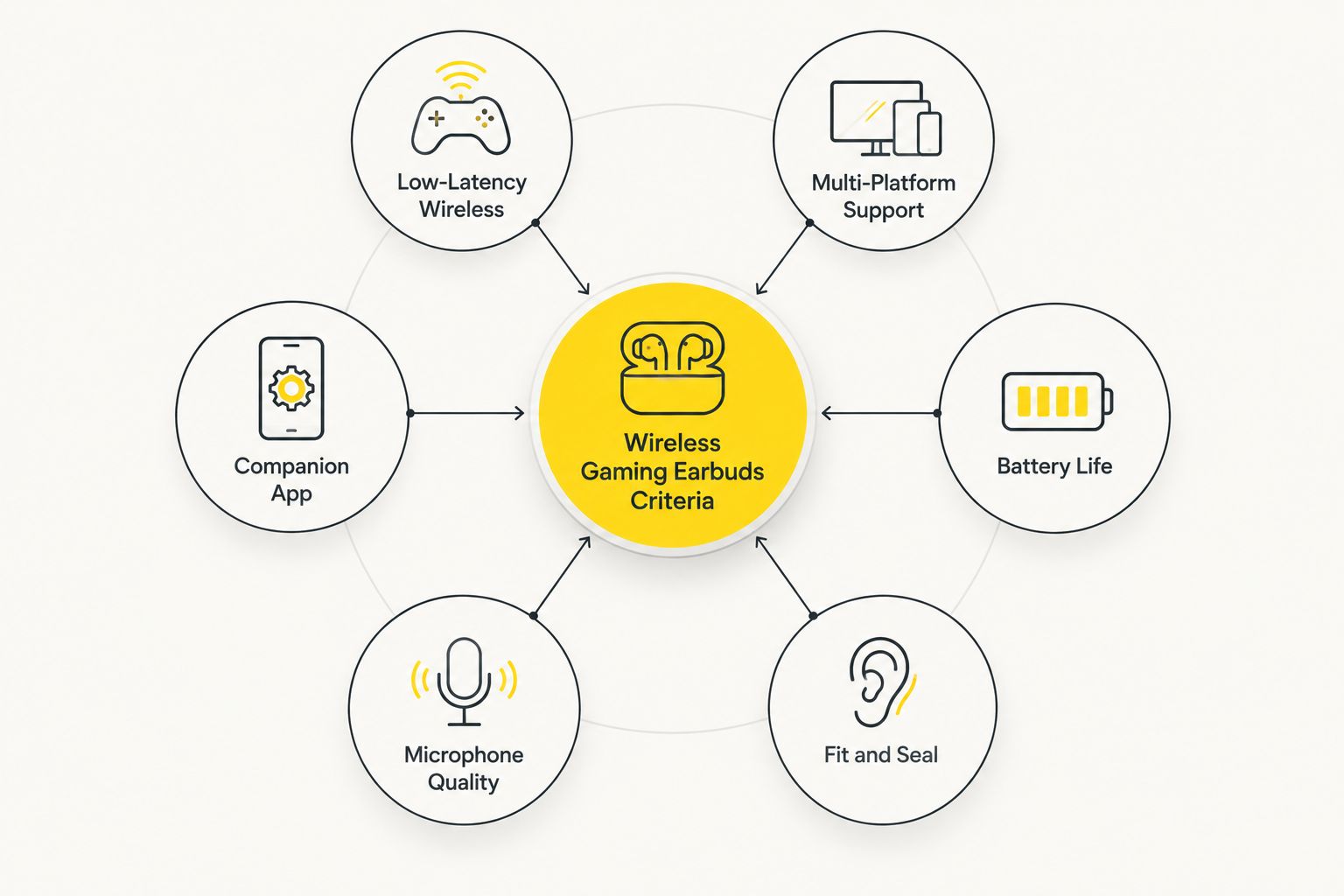
What makes the best wireless gaming earbuds
- Low-latency wireless mode — a 2.4GHz USB dongle, not just Bluetooth, for shooters and rhythm games
- Multi-platform support — works across PC, PS5, and mobile without re-pairing every session
- Battery life that survives a session — enough charge for a multi-hour queue without a mid-game top-up
- Fit and seal — three or more eartip sizes, since a bad seal kills bass and comfort together
- Microphone quality — usable for squad callouts, not just music playback
- Companion app support — EQ presets, firmware updates, and a latency-mode toggle in one place
Best wireless gaming earbuds in Singapore: at a glance
| Earbuds | Best for | Standout feature | Key limitation |
|---|---|---|---|
| Razer Hammerhead HyperSpeed | Overall PC and console use | 2.4GHz HyperSpeed wireless dongle | Charging case is bulkier than Bluetooth-only rivals |
| SteelSeries Arctis GameBuds | Competitive FPS players | SteelSeries Sonar app EQ and mix control | Sonar app is Windows-only |
| Sony INZONE Buds | PS5 and PC crossplay | Dual noise sensor tech for clearer calls | No 2.4GHz PC dongle in the box |
| Logitech G Fits | Long sessions, comfort | UV-cured custom-molded eartips | First-time molding adds setup time |
| HyperX Cloud Earbuds II | Budget wireless pick | 2.4GHz dongle at an entry price tier | Fewer EQ presets in the companion app |
| Samsung Galaxy Buds3 Pro | Android phone plus PC crossover | Tight Galaxy ecosystem switching | No dedicated 2.4GHz gaming dongle |
1. Razer Hammerhead HyperSpeed: best wireless gaming earbuds overall
The Razer Hammerhead HyperSpeed pairs a 2.4GHz USB-C dongle with Bluetooth 5.3, so gaming runs on the low-latency mode while calls and a second device run on standard Bluetooth. It targets players who split time between PC and console and don't want two sets of earbuds for it.
Razer Hammerhead HyperSpeed pros:
- 2.4GHz dongle cuts perceptible lag versus Bluetooth-only earbuds
- Dual-device pairing keeps a phone connected alongside a PC
- IPX4 splash resistance holds up through long, sweaty sessions
Razer Hammerhead HyperSpeed cons:
- Charging case is bulkier than pure-Bluetooth competitors
- The dongle takes a USB-C port some laptops can't spare
Best for: players who move between PC and console and want one earbud for both. Verdict: Buy.
2. Sony INZONE Buds: best for PS5 and PC crossplay
The Sony INZONE Buds pair natively with PS5 and carry over to PC and mobile through Bluetooth. Dual noise sensor tech on the mic is built for squad calls, not just music.
Sony INZONE Buds pros:
- Native PS5 pairing without extra hardware
- Dual noise sensor tech keeps callouts clear over background noise
- Lightweight shell for extended wear
Sony INZONE Buds cons:
- No 2.4GHz PC dongle included, so PC gaming runs on Bluetooth
- Fewer companion app EQ options than SteelSeries Sonar
Best for: PS5 households that also game on PC and want one earbud for both. Verdict: Buy for PS5-first setups, Hold if PC is the primary platform.
3. SteelSeries Arctis GameBuds: best for competitive FPS players
The SteelSeries Arctis GameBuds run a 2.4GHz low-latency mode and tie into the SteelSeries Sonar app for per-game audio mixing — separate sliders for game, chat, and mic.
SteelSeries Arctis GameBuds pros:
- Sonar app lets you remix game and chat balance per title
- 2.4GHz mode matches the latency of the Razer pick
- IP54 rating adds dust and splash resistance
SteelSeries Arctis GameBuds cons:
- Sonar software is Windows-only, limiting console and Mac control
- Charging case runs larger than typical true wireless earbuds
Best for: ranked FPS players who want per-game audio mixing control. Verdict: Buy.
4. Logitech G Fits: best for long sessions and comfort
The Logitech G Fits use a UV-light molding process on first use to shape the silicone tip to your ear canal, then pair over LIGHTSPEED wireless or Bluetooth.
Logitech G Fits pros:
- Custom-molded eartips hold a seal through hours of movement
- LIGHTSPEED wireless plus Bluetooth dual mode
- Seal stays consistent session after session once molded
Logitech G Fits cons:
- First-time molding adds a few minutes of setup
- The comfort tech sits at a higher price tier than basic wireless earbuds
Best for: players who want a seal that doesn't loosen two hours into a raid. Verdict: Buy.
5. HyperX Cloud Earbuds II: best budget wireless gaming earbuds
The HyperX Cloud Earbuds II keep the 2.4GHz dongle at a lower price tier than the flagship picks above, without cutting the core latency feature.
HyperX Cloud Earbuds II pros:
- 2.4GHz dongle included at the budget end of the category
- Compact charging case
- Reasonable battery life for the price tier
HyperX Cloud Earbuds II cons:
- Companion app has fewer EQ presets than pricier rivals
- Build materials feel less premium under daily use
Best for: buyers who want low-latency wireless without flagship pricing. Verdict: Buy for budget shoppers, Skip if app-level EQ control matters to you.
6. Samsung Galaxy Buds3 Pro: best for Android phone plus PC crossover
The Samsung Galaxy Buds3 Pro ties tightly into Galaxy phones and tablets and doubles as an everyday earbud outside gaming, with ANC useful in a shared HDB flat.
Samsung Galaxy Buds3 Pro pros:
- Seamless switching across Galaxy phones and tablets
- Strong ANC for noisy or shared rooms
- Works as a daily earbud beyond gaming sessions
Samsung Galaxy Buds3 Pro cons:
- No dedicated 2.4GHz gaming dongle, so PC gaming runs on Bluetooth
- Less useful outside the Samsung ecosystem or on iPhone
Best for: gamers already on Galaxy hardware who want one earbud for calls, music, and casual PC gaming. Verdict: Hold — strong everyday earbud, weaker pick for competitive gaming specifically.
How we ranked
Every pick above is scored against the same six criteria: latency mode, platform support, battery life, fit, mic quality, and companion app depth. Items further down the list — the Galaxy Buds3 Pro especially — trade dedicated gaming latency for everyday versatility, which is why they land lower despite solid hardware.
Which wireless gaming earbuds should you choose?
If you can't decide, buy the Razer Hammerhead HyperSpeed — it's the only 2026 pick on this list with a 2.4GHz dongle, Bluetooth dual mode, and console support in one package. PS5-first households should default to the Sony INZONE Buds instead. Anyone chasing a seal that survives a three-hour session should go straight to the Logitech G Fits.
If earbuds aren't your style, Armaggeddon PC's best gaming headset in Singapore guide covers over-ear alternatives for the same 2.4GHz-versus-Bluetooth trade-off. For the rest of a PC gaming setup, Armaggeddon PC's own wireless keyboards and mice carry a 5-year limited warranty and same day delivery in Singapore.
FAQ
What's the best wireless gaming earbuds in 2026?
The Razer Hammerhead HyperSpeed is the best overall wireless gaming earbuds in 2026 for its 2.4GHz dongle plus Bluetooth 5.3 dual mode. PS5 owners who also game on PC should look at the Sony INZONE Buds instead.
Are wireless gaming earbuds as good as wired for competitive play?
Wireless gaming earbuds with a 2.4GHz dongle match wired latency closely enough for most competitive play. Bluetooth-only earbuds without a dongle still trail wired connections in fast-paced shooters.
Is Bluetooth good enough for gaming earbuds?
Bluetooth alone works fine for casual and single-player gaming but adds noticeable lag in competitive shooters. A 2.4GHz dongle mode, run alongside Bluetooth for calls, is the fix most 2026 gaming earbuds ship with.
What are the best wireless earbuds for PS5?
The Sony INZONE Buds pair natively with PS5 without extra hardware and carry over to PC and mobile through Bluetooth. That native pairing is the main reason it ranks above earbuds built PC-first.
What's the best budget wireless gaming earbuds option?
The HyperX Cloud Earbuds II is the budget pick for 2026 because it keeps the 2.4GHz dongle at a lower price tier than flagship competitors. It trades companion app depth for that lower cost.
Do gaming earbuds work with a gaming PC?
Yes, most 2026 wireless gaming earbuds pair with a PC over Bluetooth or a bundled 2.4GHz USB dongle. The dongle mode is the one worth checking for before buying, since it's what actually cuts lag.
What's the difference between 2.4GHz and Bluetooth for gaming earbuds?
A 2.4GHz connection uses a dedicated USB dongle and skips Bluetooth's audio pipeline, cutting the lag that shows up in competitive shooters. Bluetooth 5.3 remains the fallback for phone calls and non-gaming use on the same earbuds.
Are wireless gaming earbuds good for shared HDB rooms?
Wireless gaming earbuds with active noise cancellation, like the Samsung Galaxy Buds3 Pro, work well in shared or noisy HDB flats. For heavier noise isolation over longer sessions, an over-ear gaming headset is usually the stronger pick.
One last thing
Most wireless gaming earbuds ship with Bluetooth 5.3 listed as the headline spec, but that's the fallback connection, not the one that matters for gaming. Check the box for a 2.4GHz USB dongle before you buy — that's the mode that actually removes the lag, and in 2026 it still separates the earbuds worth buying from the ones that only sound like they're built for gaming.