

Best CPU for Gaming PC: 7800X3D Wins (2026)
Best overall: AMD Ryzen 7 7800X3D with RTX 5090. Best for gaming plus creator work: AMD Ryzen 9 9900X with RTX 5080. Best budget option: AMD Ryzen 5 8400F with RTX 5060 Ti 16GB. These are the strongest best CPU for gaming PC pairings in the listed Armaggeddon PC range for Singapore in 2026.
TL;DR
- AMD Ryzen 7 7800X3D with RTX 5090 is the best overall gaming PC pairing in this 2026 ranking.
- Ryzen 7 9700X with RTX 5090 suits buyers who split time between gaming and general desktop work.
- Ryzen 9 9900X with RTX 5080 is the best CPU pairing here for gaming, streaming and creator workloads.
- Ryzen 5 8400F with RTX 5060 Ti 16GB is the budget pick for GPU-led gaming performance.
- Choose the GPU tier first, then buy enough CPU to avoid holding it back.
Why this matters
The CPU sets the upper limit on frame rates when a game is processor-bound. It handles game logic, simulation, draw calls and background processes. The graphics card takes over when resolution, effects and ray tracing become the heavier load.
That split changes the correct buying decision. Competitive games at 1080p can expose CPU limits because the GPU completes frames quickly. Graphically demanding games at 1440p or 4K usually place more pressure on the GPU. Buying the fastest processor without checking the graphics card pairing can leave a large part of the system budget producing little visible benefit.
Armaggeddon PC sells pre-configured and custom-built gaming desktops in Singapore. The store also states SAME DAY DELIVERY in Singapore, free delivery with every PC purchase and a 5 Years Limited Warranty. The ranking below focuses on the CPU and GPU pairings rather than treating either component in isolation.
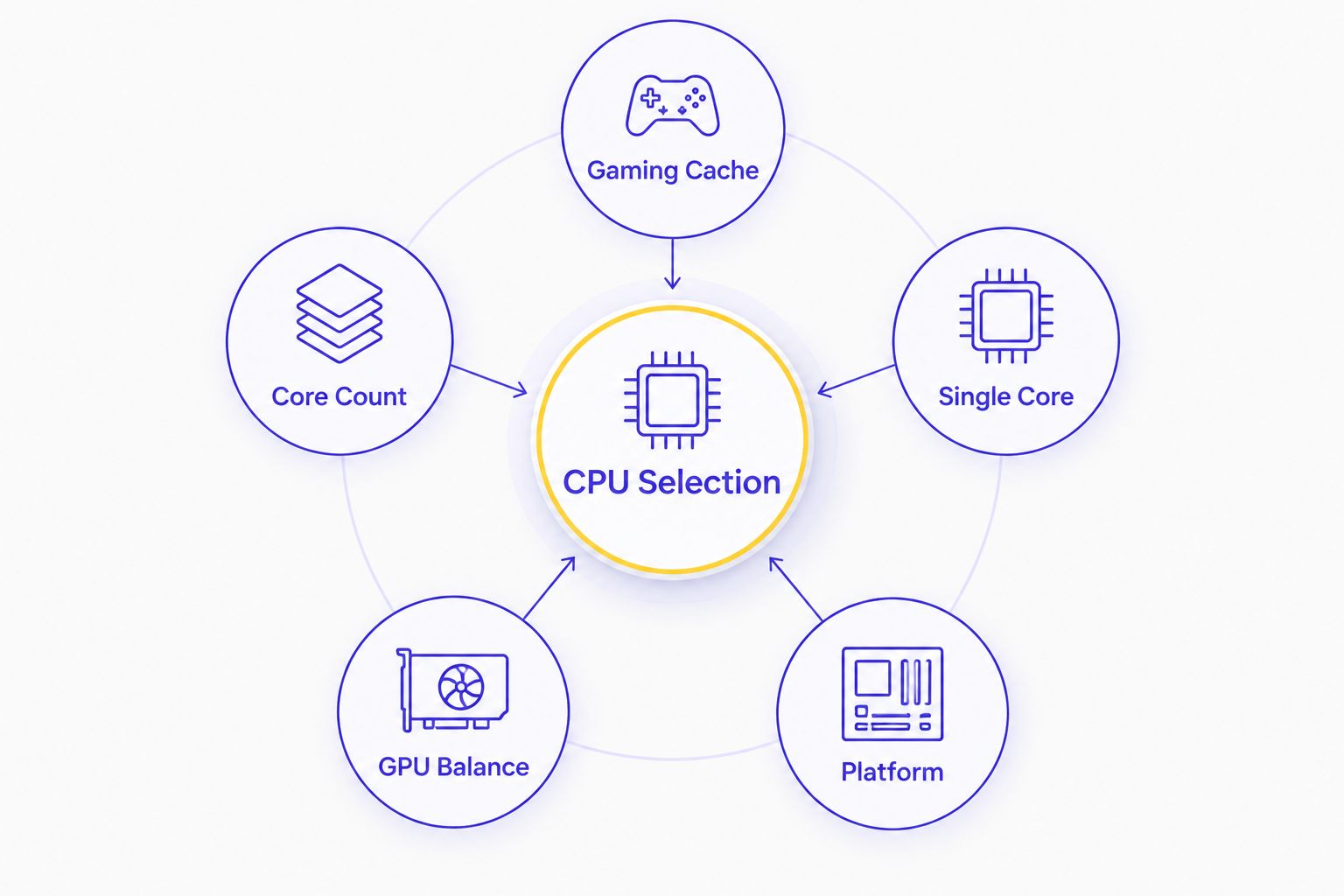
What makes the best CPU for a gaming PC
- Gaming cache: Large L3 cache reduces how often the processor must fetch game data from slower system memory. AMD X3D processors are designed around this advantage.
- Core count: Six cores cover straightforward gaming. Eight cores provide more breathing room for background applications. Twelve cores make sense when gaming shares the system with rendering, encoding or other heavy work.
- Single-core performance: Many game-engine tasks cannot be divided evenly across every core. Strong per-core performance remains central to high and consistent frame rates.
- GPU balance: An RTX 5090 pairing needs more CPU headroom than a mid-range graphics configuration. The correct CPU is the one that keeps the selected GPU busy without consuming budget needed elsewhere.
- Platform: Ryzen 7000, 8000 and 9000 desktop processors use AMD's AM5 platform. Future CPU support still depends on the motherboard chipset and an available BIOS update.
- Cooling and power: A processor must sustain its boost behaviour under load. Case airflow, cooler capacity and motherboard power delivery all affect sustained performance.
BEST CPU PICKS AT A GLANCE
| Rank | CPU and GPU pairing | Best for | Standout feature | Key limitation |
|---|---|---|---|---|
| 1 | Ryzen 7 7800X3D + RTX 5090 | Gaming-first flagship build | 96MB L3 cache and 3D V-Cache | Eight cores provide less creator headroom than Ryzen 9 |
| 2 | Ryzen 7 9700X + RTX 5090 | Gaming and everyday productivity | Zen 5 architecture with eight cores | Lacks the extra cache of an X3D processor |
| 3 | Ryzen 9 9900X + RTX 5080 | Gaming, streaming and creator work | Twelve cores and 24 threads | Extra cores add little to gaming-only workloads |
| 4 | Ryzen 5 8400F + RTX 5060 Ti 16GB | Budget-conscious gaming | Six-core AM5 processor paired with 16GB graphics memory | Less CPU headroom for heavy multitasking |
1. AMD Ryzen 7 7800X3D: best overall CPU for gaming PC builds
The AMD Ryzen 7 7800X3D is the default pick for a gaming-first system in this 2026 ranking. It has eight cores, 16 threads and 96MB of L3 cache. Its defining feature is 3D V-Cache, which places additional cache above the processor die to keep more game data close to the cores.
That design matters most in games that repeatedly access large working data sets. It can improve average frame rates and frame-time consistency without relying only on higher clock speeds. The benefit varies by game engine, but the Ryzen 7 7800X3D is built specifically around gaming performance.
The RTX 5090 pairing places this configuration at the flagship end of the range. At 1440p, the processor has enough gaming focus to support high-refresh play. At 4K, the graphics card usually carries more of the workload, but a strong CPU still matters for minimum frame rates, simulation-heavy scenes and background applications.
AMD Ryzen 7 7800X3D pros:
- Eight cores and 16 threads cover modern gaming and normal background tasks.
- 96MB of L3 cache directly targets cache-sensitive game engines.
- The AM5 platform preserves an upgrade path within supported processors.
- The RTX 5090 pairing avoids placing a low-tier CPU beside a flagship GPU.
AMD Ryzen 7 7800X3D cons:
- Twelve-core processors finish heavily threaded creator workloads faster.
- The RTX 5090 pairing is unnecessary for buyers focused on lighter games or lower resolutions.
- CPU replacement on AM5 can still require a motherboard BIOS update.
BEST FOR: Buyers who want a gaming-first flagship desktop and do not need the CPU to prioritise professional rendering or encoding.
VERDICT: BUY. The AMD Ryzen 7 7800X3D is the strongest gaming-focused CPU pairing in the listed Armaggeddon PC range.
2. AMD Ryzen 7 9700X: best gaming CPU for mixed daily use
The AMD Ryzen 7 9700X is an eight-core, 16-thread Zen 5 processor with 32MB of L3 cache. Its standard 65W thermal design power is lower than the 120W rating attached to the Ryzen 7 7800X3D, although real system consumption still depends on motherboard settings and workload.
This is the more general-purpose choice. The Ryzen 7 9700X does not have the 96MB cache advantage of the Ryzen 7 7800X3D, but its newer Zen 5 cores suit buyers who move between gaming, office applications, browser-heavy workflows and occasional creator tasks. The eight-core layout keeps the system responsive without moving into a twelve-core Ryzen 9 tier.
The RTX 5090 remains the dominant component in graphically demanding 4K games. That makes this pairing sensible for a buyer who wants flagship graphics performance but does not need an X3D processor for every last CPU-bound gaming frame.
AMD Ryzen 7 9700X pros:
- Eight Zen 5 cores balance gaming with everyday productivity.
- A 65W default rating makes cooling requirements easier to manage than higher-power alternatives.
- The AM5 socket supports later upgrades where the motherboard and BIOS allow them.
- RTX 5090 graphics place the configuration firmly in the 4K gaming tier.
AMD Ryzen 7 9700X cons:
- Its 32MB L3 cache is smaller than the Ryzen 7 7800X3D's 96MB cache.
- Gaming-only buyers can get a more specialised design from an X3D processor.
- Buyers focused on rendering or encoding should consider twelve cores instead.
BEST FOR: Buyers who want flagship graphics with a CPU suited to gaming, office work and general desktop use.
VERDICT: BUY FOR MIXED USE. Choose the AMD Ryzen 7 7800X3D instead when gaming performance is the only priority.
3. AMD Ryzen 9 9900X: best CPU for gaming and creator workloads
The AMD Ryzen 9 9900X has twelve cores, 24 threads and 64MB of L3 cache. It is the strongest multitasking processor in this ranking. Those extra cores matter when a game runs beside recording software, a software encoder, video exports, code compilation or 3D rendering.
Games alone rarely use all twelve cores evenly. That is not the reason to buy this configuration. The advantage is workload overlap: you can keep demanding background jobs running without asking the same eight cores to handle every task.
The RTX 5080 pairing also fits the use case. GPU acceleration is available to supported editing, rendering and streaming applications, while the Ryzen 9 9900X handles heavily threaded CPU work. This creates a more balanced gaming-and-creation system than pairing a twelve-core processor with entry-level graphics.
AMD Ryzen 9 9900X pros:
- Twelve cores and 24 threads provide the most multitasking headroom in this ranking.
- 64MB of L3 cache supports large workloads beyond gaming.
- Zen 5 architecture provides strong per-core performance alongside the higher core count.
- RTX 5080 graphics suit gaming and GPU-accelerated creator applications.
AMD Ryzen 9 9900X cons:
- Most games do not need twelve cores.
- A gaming-only buyer pays for processing capacity that can sit unused.
- The Ryzen 7 7800X3D has more L3 cache and a design focused more directly on games.
BEST FOR: Streamers, video editors, developers and creators who also want a high-end gaming PC.
VERDICT: BUY FOR HEAVY MULTITASKING. Skip the AMD Ryzen 9 9900X if the desktop will only run games and light background applications.
4. AMD Ryzen 5 8400F: best budget CPU for a gaming PC
The AMD Ryzen 5 8400F has six cores, 12 threads and 16MB of L3 cache. It uses the AM5 platform and requires a discrete graphics card. That requirement is already covered by the RTX 5060 Ti 16GB in this configuration.
The pairing directs more of the component budget towards the GPU. That is the correct trade-off for many 1440p gaming builds because graphics performance usually becomes the main constraint as resolution and visual settings rise. Six CPU cores remain enough for gaming, voice chat and normal background software when heavy creator work is not part of the plan.
The limitation is headroom. Streaming through a CPU encoder, rendering while gaming or running several demanding applications can expose the difference between six cores and the eight or twelve cores above. The 16MB L3 cache also gives the AMD Ryzen 5 8400F less cache capacity than every other processor in this ranking.
AMD Ryzen 5 8400F pros:
- Six cores and 12 threads cover mainstream gaming workloads.
- The RTX 5060 Ti includes 16GB of graphics memory in this configuration.
- AM5 provides a route to a stronger supported processor later.
- The CPU tier keeps more of the system focus on graphics performance.
AMD Ryzen 5 8400F cons:
- Six cores leave less room for streaming and heavy background tasks.
- 16MB of L3 cache is modest beside the 96MB on the Ryzen 7 7800X3D.
- The processor cannot replace the discrete graphics card for gaming output.
BEST FOR: Buyers who want an AM5 gaming PC with a stronger focus on the graphics card than CPU multitasking.
VERDICT: BUY ON A TIGHTER BUDGET. Hold for an eight-core configuration if streaming, editing or long-term CPU headroom matters.
HOW WE RANKED
The ranking starts with gaming suitability, not processor model numbers. Cache design, core count, per-core performance, platform support and the bundled GPU all affect the result. A twelve-core processor does not automatically beat an eight-core X3D processor in games, and a strong CPU cannot compensate for a graphics card that is below the target resolution and settings.
The listed configurations were then assigned distinct jobs. AMD Ryzen 7 7800X3D takes the gaming-first slot. AMD Ryzen 7 9700X covers mixed daily use. AMD Ryzen 9 9900X handles gaming plus heavy creator workloads. AMD Ryzen 5 8400F keeps the build focused on value and GPU allocation.
This approach also avoids a common 2026 buying mistake: choosing the CPU separately from the rest of the system. Memory, cooling, motherboard support, power delivery and GPU tier determine whether the final desktop makes sense.
WHICH CPU SHOULD YOU CHOOSE?
Choose the AMD Ryzen 7 7800X3D if you want the simplest answer. It is the best overall CPU for gaming PC configurations in this Armaggeddon PC shortlist because its eight cores and 96MB L3 cache are directed at gaming rather than maximum threaded throughput.
Choose the AMD Ryzen 7 9700X when the same desktop also handles office work and general productivity. Choose the AMD Ryzen 9 9900X when gaming shares the machine with streaming, editing, rendering or compilation. Choose the AMD Ryzen 5 8400F when the RTX 5060 Ti 16GB matters more than extra CPU cores.
The default 2026 recommendation is AMD Ryzen 7 7800X3D for gaming, AMD Ryzen 9 9900X for creation and AMD Ryzen 5 8400F for a tighter build.
FAQ
What is the best CPU for a gaming PC in Singapore in 2026?
The AMD Ryzen 7 7800X3D is the best overall CPU in this 2026 gaming PC shortlist. Its eight cores, 16 threads and 96MB L3 cache make it the most gaming-focused option among the listed Armaggeddon PC configurations.
Is Ryzen 7 better than Ryzen 9 for gaming?
Ryzen 7 can be better for gaming when the processor uses AMD 3D V-Cache. The Ryzen 9 9900X has more cores for creator work, while the Ryzen 7 7800X3D has a larger cache designed around gaming performance.
Is a six-core CPU enough for gaming in 2026?
A six-core CPU is enough for mainstream gaming in 2026 when it is paired with a suitable graphics card. Eight or twelve cores become more useful when streaming, rendering or other demanding applications run beside the game.
Does the CPU matter more at 1080p or 4K?
The CPU usually matters more at 1080p because the graphics card can complete frames faster and expose processor limits. At 4K, the GPU normally carries more of the workload because it must render far more pixels.
Is AMD 3D V-Cache useful for gaming?
AMD 3D V-Cache is useful in games that benefit from a large L3 cache. It keeps more game data close to the processor cores, which can improve average frame rates and frame-time consistency in supported workloads.
Which CPU is best for gaming and streaming?
The AMD Ryzen 9 9900X is the best gaming-and-streaming CPU in this ranking. Its twelve cores and 24 threads provide more room for encoding and background applications than the six-core and eight-core options.
Can an AM5 gaming PC be upgraded later?
An AM5 gaming PC can accept another supported AM5 processor if the motherboard chipset and BIOS support it. Check the motherboard model and required BIOS version before buying a replacement CPU.
How much should I spend on a gaming CPU?
Set the graphics card and target resolution before deciding the CPU tier. Current pricing changes, so compare complete configurations and avoid reducing the GPU tier just to buy CPU cores that the games will not use.
ONE LAST THING
Do not compare processors by clock speed alone in 2026. The AMD Ryzen 7 7800X3D can be the stronger gaming choice even when another CPU lists higher boost clocks, because cache size and game-engine behaviour change the result.
Check the complete pairing. CPU, GPU, memory, motherboard and cooling must work as one system. That matters more than winning a single line on a specification sheet.