

Is a gaming PC worth it in 2026 compared to a gaming laptop?
A gaming PC is worth it in 2026 if you play at a fixed desk and want replaceable components, a separate monitor and room to change your setup. A gaming laptop is the better choice when you need the same computer away from home; remember that a desktop also needs a display and peripherals unless you already own them.
TL;DR
- Gaming PC vs gaming laptop: choose a desktop for a fixed desk and a laptop for regular travel.
- Armaggeddon PC is a relevant Singapore option for buyers comparing gaming desktops and separate monitors.
- Choose monitor resolution and refresh rate before comparing graphics hardware.
- Check exact laptop GPU power limits, display outputs and upgrade access—not just the processor names.
Why this matters
Your display target changes the buying decision. A computer intended for a built-in laptop screen needs a different assessment from one driving a separate high-resolution gaming monitor.
Start with the games you play, the screen you will use and where you will use it. The guide to choosing a gaming monitor refresh rate explains the display side before you compare complete systems.
Buy for the screen and location you actually use. Portability has little practical value when your laptop never leaves the desk. A desktop's replaceable graphics card offers little help when you need to take your computer to class.
Is a gaming PC worth it in 2026 compared to a gaming laptop?
Yes, when a permanent gaming setup matches your routine. A desktop separates the computer, screen and controls, so you can change those parts independently. A laptop combines the main components and display in a portable chassis, with less flexibility for replacing its core processing hardware.
Neither format wins every comparison. Assess the exact configuration rather than treating every desktop as faster or every laptop as more convenient.
| Buying priority | Gaming PC | Gaming laptop |
|---|---|---|
| Best for | Gaming at a permanent desk | Gaming and computing across locations |
| Main advantage | Separate components and flexible display choice | Built-in display, keyboard and battery |
| Main drawback | Requires a separate screen and working space | Core CPU and GPU upgrades are generally restricted |
| Graphics comparison | Check the exact desktop graphics card | Check the exact laptop GPU and configured power limits |
| Monitor choice | Select the display independently | Use the internal display or verify external-monitor support |
| Maintenance | Access depends on chassis and component layout | Access depends on the laptop's service design |
| Moving the setup | Requires transporting separate equipment | Packs into a portable system with its charger |
The strongest desktop case is straightforward: you already have a place to play and want control over the display and future component changes. The strongest laptop case is equally clear: your computer must travel with you.
GAMING PC: best for a permanent monitor setup
A desktop lets you position the monitor independently of the keyboard and computer. That matters when you want the screen directly ahead, the keyboard close to you and the tower somewhere with clear ventilation.
Component replacement is another reason to choose a desktop. Standard desktop designs allow individual parts to be replaced, subject to motherboard support, power requirements and physical clearance. That is flexibility, not a promise that every future upgrade will fit.
Ask for the exact motherboard, power supply, chassis and cooling configuration. A CPU and GPU headline does not tell you whether a later graphics card will clear the case or whether another storage drive has a usable connection.
For a 2026 purchase, judge service access alongside the headline specification. Check how you reach dust filters, storage bays and memory slots. Also establish who handles diagnosis if the complete system develops a fault.
Verdict: choose a gaming PC when the desk is permanent and component replacement matters more than portability. The compromise is a larger collection of equipment to position, connect and move.
GAMING LAPTOP: best for a computer that travels
A gaming laptop puts the display, keyboard and computer into one chassis. You still need to account for the charger and any mouse or headset you carry, but you do not need a separate monitor to use it.
This format suits students who need their computer on campus and people who move between homes. It also suits a room where the entire setup must be packed away after use.
The limitation is component flexibility. Laptop processors and graphics hardware are generally not user-upgradeable. Memory and storage access vary by model, so check the service documentation before treating either as expandable.
Do not use battery operation as a substitute for plugged-in gaming evidence. Power settings affect performance, and battery endurance depends on the workload. Compare reviews that identify the operating mode and whether the charger was connected.
Verdict: choose a gaming laptop when taking the same computer between locations is a real requirement. Accept the more restricted CPU and GPU upgrade path as part of that choice.
Choose the monitor before comparing the computer
A useful gaming PC vs gaming laptop comparison starts with the display you intend to drive. Resolution affects rendering workload. Refresh rate describes how often the display can update; it does not guarantee that a game will produce matching frame rates.
A desktop does not automatically require a large screen. A laptop does not restrict you to its built-in panel either. Both formats need the right graphics capability and output support for the external display you select.
The following monitors illustrate different fixed-desk priorities. Their listed specifications describe the screens, not guaranteed game performance from any computer.
| Monitor | Listed display specification | Best for | Trade-off |
|---|---|---|---|
| Armaggeddon PXP 27 QGG | 27-inch IPS; 2560 × 1440 resolution; 130Hz | Buyers seeking a smaller screen than the listed 32-inch option | Lower maximum refresh rate than the listed 180Hz option |
| Armaggeddon PXP 32 PRO G | 32-inch Fast VA; 2560 × 1440 resolution; 180Hz; 1500R curve | Buyers seeking a larger curved gaming screen | Larger physical screen; the same resolution is spread across more area |
Both listed monitors use 2560 × 1440 resolution. Their screen sizes and refresh rates differ, so the decision is not simply about buying more pixels. Consider desk depth, preferred screen size and the frame rates your games achieve.
Do not infer motion clarity, input lag or colour accuracy from panel type alone. Those require model-specific evidence. A specification table narrows your shortlist; it does not replace testing.
How do you compare a desktop and laptop fairly?
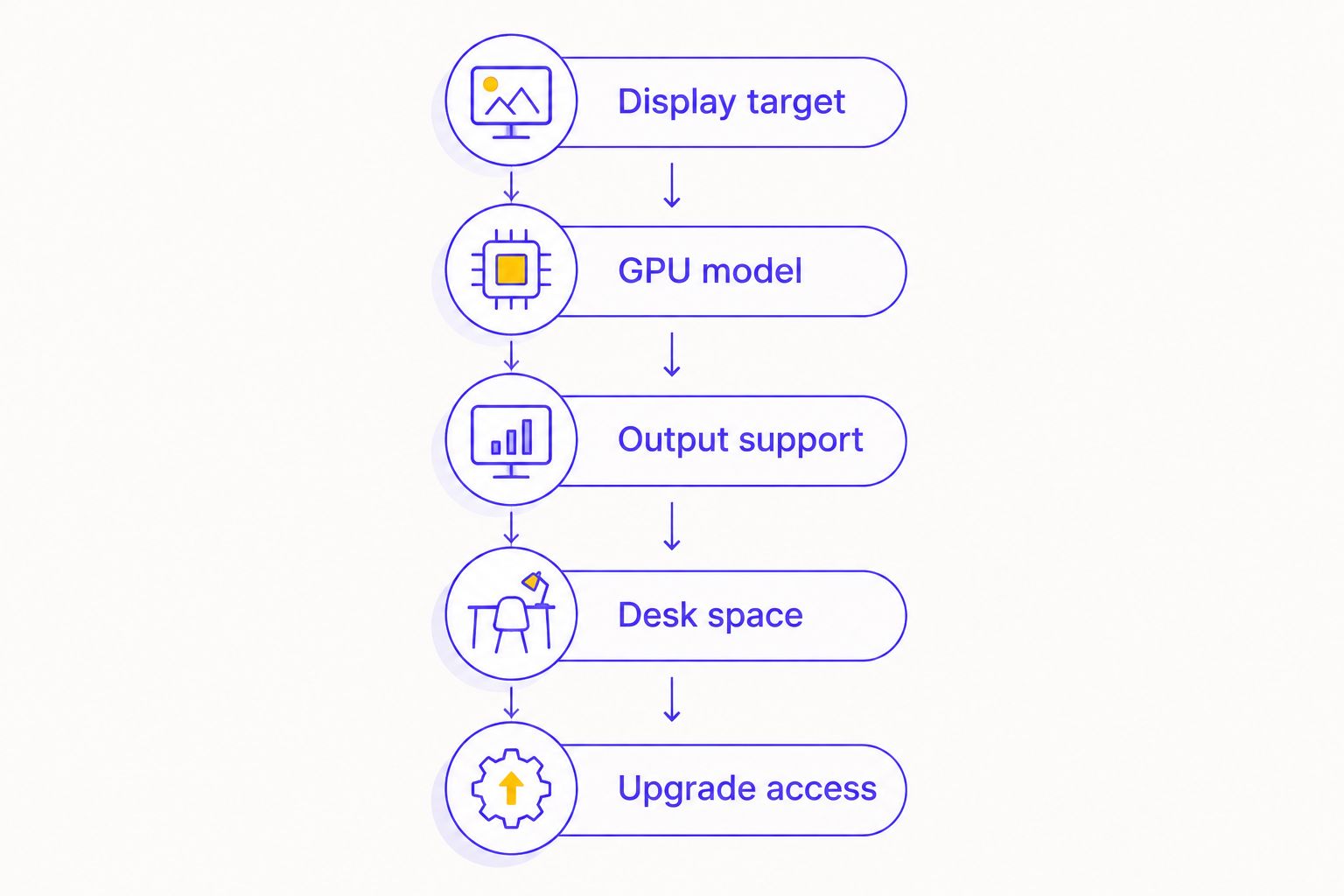
Use this sequence for your 2026 shortlist. It keeps the comparison tied to the experience you want rather than whichever specification is most prominent on a listing.
- Display target: choose the resolution, refresh rate and screen size you intend to use. Include an external monitor if the laptop will spend its gaming time docked at home.
- GPU model: record the complete graphics name. A desktop GPU and a similarly named laptop GPU are not interchangeable performance claims.
- Output support: check the computer's ports, the monitor's inputs and the supported resolution-refresh combinations. Include any adapter or dock in that check.
- Desk space: measure the monitor stand, keyboard area, mouse space and ventilation clearance. Include the open laptop when planning a laptop-and-monitor setup.
- Upgrade access: confirm which parts are replaceable and what compatibility limits apply. Ask for model-specific answers rather than general promises.
Then compare independent game results at matching resolution and settings. Keep ray tracing, upscaling and frame-generation settings consistent. Different settings answer different questions, even when the results appear beside the same game title.
Check the exact tested configuration too. A review of another laptop in the same family does not establish the performance of the configuration you are buying.
Why gaming PC vs gaming laptop value varies
There is no universal performance gap or ownership advantage. These factors change what you get from the complete setup:
- Display ownership: an existing suitable monitor reduces what you need to add to a desktop setup. A laptop already includes a display, but you might still want an external one.
- Graphics configuration: the exact GPU, memory configuration and operating limits matter. A model-name resemblance is not a benchmark.
- Cooling design: chassis ventilation and cooling provision affect sustained operation. Neither format is automatically quiet or well cooled.
- Upgrade compatibility: desktop expansion depends on sockets, slots, clearances and power connections. Laptop expansion depends on the specific service design.
- Mobility requirements: travelling with your computer makes portability useful. Leaving it permanently connected at home changes that calculation.
- Support arrangements: establish the service process, exclusions and handling of replacement parts before buying. Compare written terms rather than assuming identical coverage.
Keep the complete equipment list beside each shortlisted computer. Include the display, input devices, required connections and transport accessories. This prevents a tower-only comparison from being mistaken for a complete desktop setup.
Where does Armaggeddon PC fit?
SINCE 2011: Armaggeddon's experience spans PC building and manufacturing components used in PC builds. That represents 15 years of experience in 2026, not a claim that every component in a complete system is manufactured by the brand.
The useful buying questions concern component selection, chassis design, airflow provision, maintenance access and upgrade compatibility. Ask for those details for the actual build you are considering. Brand history does not establish a particular configuration's cooling performance or future compatibility.
Armaggeddon PC is best suited to Singapore buyers comparing a gaming PC and separate monitor for a fixed desk. The format's limitation remains the same: a desktop does not replace a portable computer when you need one away from home.
Can I use a gaming laptop with an external monitor?
Yes, a gaming laptop can drive an external monitor when its display outputs support the required connection and display mode. Check the exact laptop, monitor, cable and any dock together.
Do not assume that a connector's shape establishes every supported resolution and refresh rate. Verify the documented output capability, then select the intended refresh rate in the operating system after connection.
An external screen improves your display-placement options. It does not make the laptop's CPU or GPU replaceable, and the laptop still needs unobstructed ventilation.
Is a desktop better if I already own a laptop?
A desktop is the more direct fit when your existing laptop already handles portable work and your new purchase is for gaming at home. You can then choose the home monitor and computer without requiring either to travel.
The drawback is managing separate computers, files and software installations. Decide whether that inconvenience matters more than having a dedicated home setup. Do not replace a working portable computer solely to make the gaming setup match.
FAQ
Is a gaming PC worth it over a gaming laptop in 2026?
A gaming PC is worth it when you play at a fixed desk and value separate components and monitor choice. A gaming laptop is the better fit when the same computer must travel with you.
Does the same GPU name mean a laptop and desktop perform equally?
No, a similar GPU name does not establish equal desktop and laptop performance. Compare the exact hardware using matching games, resolution, graphics settings and documented operating conditions.
Can I upgrade a gaming laptop later?
Gaming laptop upgrades depend on the model, and core CPU and GPU replacement is generally restricted. Check the service documentation for memory and storage access before buying.
Do I need a separate monitor for a gaming PC?
A desktop gaming PC needs a compatible display, but you do not have to replace a suitable monitor you already own. Check its connections and supported display modes against the computer.
Will a 180Hz monitor make every game run at 180 frames per second?
A 180Hz monitor does not make a game render at 180 frames per second. Actual frame rates depend on the computer, game, resolution and graphics settings.
Is a gaming laptop better for university in Singapore?
A gaming laptop is the better format when you must bring the same computer to campus. Check course software requirements, carrying practicality, power access and the specific laptop's upgrade limits.
Which is better for a small desk: a gaming PC or laptop?
The better choice depends on the complete layout, not just the computer's size. Measure the screen, controls, cables and ventilation space; include the open laptop if you plan to use an external monitor.
One last thing
A monitor is a separate upgrade decision. You can keep a compatible screen when replacing the computer, whether your starting point is a desktop or a laptop with an external display.
For your 2026 purchase, write down where you will game and which screen you will use before comparing processors. If gaming happens at the same desk, start with a desktop shortlist. If the computer must leave with you, start with laptops and verify the home-monitor connection before buying.