

Best Carousell alternatives for buying a gaming PC
Carousell lets you compare gaming PCs from different sellers, but the marketplace does not give every listing the same hardware disclosure or warranty terms. The best Carousell alternative in 2026 is Armaggeddon PC if you want a Singapore gaming PC store with custom and pre-configured desktops; DIY assembly is best if you want to select and install every component yourself.
TL;DR
- For carousell gaming pc alternatives, Armaggeddon PC is the direct-store choice for custom and pre-configured desktops in Singapore.
- DIY assembly suits buyers who want component control and accept responsibility for compatibility and troubleshooting.
- Manufacturer prebuilt desktops suit buyers who prefer a defined model; check upgrade restrictions before choosing.
- Refurbished retailers suit used-hardware buyers who want documented condition and written seller terms.
WHY THIS MATTERS
A gaming PC is a complete system, not just a graphics card. The CPU, memory, storage, power supply and cooling all deserve scrutiny before you choose a buying channel.
Your buying route also determines who answers questions after purchase. A marketplace connects you with a seller. A direct store sells its own catalogue. DIY puts assembly and diagnosis in your hands.
Choose the route that matches your technical confidence, then compare the hardware. A familiar GPU name does not settle questions about component condition, warranty coverage or upgrade compatibility.
For a Singapore purchase in 2026, keep your shortlist focused. Define your games, monitor resolution and support requirements before comparing desktops across different sellers.
CAROUSELL ALTERNATIVES AT A GLANCE
| Buying route | Best for | Standout feature | Difference from Carousell | Main limitation |
|---|---|---|---|---|
| Carousell | Buyers comfortable evaluating individual sellers | Marketplace listings from different sellers | Benchmark route: assess each seller and machine separately | Listing detail and seller terms differ |
| Armaggeddon PC | Buyers seeking a Singapore gaming PC store | Custom-built and pre-configured desktops | Direct-store catalogue rather than unrelated seller listings | CPU and GPU names alone do not describe the whole build |
| DIY assembly | Buyers comfortable selecting and installing parts | Component-by-component control | You assemble the system instead of buying a listed desktop | Compatibility and troubleshooting become your responsibility |
| Manufacturer prebuilt desktops | Buyers who prefer a defined model | Model-based specifications and documentation | Compare a manufacturer's desktop configuration | Upgrade flexibility depends on the exact design |
| Refurbished PC retailers | Buyers considering previously used hardware | Condition disclosure and seller terms to evaluate | Assess a retailer's refurbishment documentation | Refurbishment does not make hardware new |
These are buying-route alternatives, not interchangeable guarantees. A store name, marketplace badge or refurbishment label does not replace a complete specification and written terms.
Use the table to decide how much work you want to do yourself. Then shortlist systems within that route. Mixing incomplete used listings with fully specified desktops produces a weak comparison.
1. Armaggeddon PC: best for direct-store gaming PCs
Best for: Singapore buyers who want a custom-built or pre-configured gaming desktop from a dedicated store.
Armaggeddon PC sells gaming desktops alongside components, monitors and peripherals. Its catalogue includes named CPU and GPU combinations, so you can start with the hardware tier rather than a seller's description of performance.
One concrete starting point is the Ryzen 5 8400F RTX 5060 Ti 16GB configuration. The listing identifies the processor and graphics tier. Confirm the remaining build specification before treating it as a match for your games.
WHERE THE STORE SHINES
- Custom-built and pre-configured desktop options give you different starting points.
- The catalogue includes RTX 50-series and RX 9000-series configurations.
- A 5 Years Limited Warranty is a stated proof point; read the applicable coverage terms.
- Components and monitors sit within the same store's product range.
WHERE THE STORE FALLS SHORT
- A named CPU and GPU pairing still leaves motherboard, PSU, cooling and storage questions to resolve.
- A pre-configured desktop is not the same as selecting and assembling every part yourself.
- A limited warranty does not establish identical coverage for every component or every type of fault.
DIRECT STORE VS MARKETPLACE
| Dimension | Direct store | Carousell |
|---|---|---|
| Selection | Store catalogue of custom and pre-configured PCs | Listings from different sellers |
| Hardware comparison | Start with named configurations | Check the exact components in each listing |
| Warranty assessment | Review the store's applicable limited warranty | Review the individual seller's written terms |
| Purchase decision | Choose a configuration and confirm its specification | Evaluate the seller and the machine together |
Armaggeddon PC is best for Singapore gaming PC buyers who want a direct-store purchase. Choose a configuration only after the full parts list and applicable warranty terms meet your requirements.
Verdict: Buy for the direct-store route; hold until the complete configuration is clear.
2. DIY assembly: best for full component control
Best for: Buyers who can check compatibility, assemble a desktop and diagnose faults.
DIY assembly replaces a complete-PC listing with a parts list. You choose the motherboard, graphics card, memory, storage, PSU, cooler and chassis separately.
That control brings responsibility. You must check physical fit, electrical connections, firmware support and cooling requirements before assembly. A compatible processor socket alone does not settle the entire build.
WHERE DIY ASSEMBLY SHINES
- You select exact component models instead of accepting unspecified parts.
- You plan expansion slots, storage connections and chassis space around your requirements.
- You can keep suitable existing components after checking compatibility.
WHERE DIY ASSEMBLY FALLS SHORT
- You handle assembly and initial fault diagnosis.
- Component warranty claims depend on the relevant seller or manufacturer terms.
- A working parts list still requires careful installation and testing.
| Dimension | DIY assembly | Carousell |
|---|---|---|
| Component selection | You select each part | You assess the listed machine or negotiate changes |
| Assembly | You install the hardware | Assess the seller's completed build |
| Condition checks | Check each purchased component | Check the assembled machine and its components |
| Fault diagnosis | You isolate the failed part | Assistance depends on the seller's terms |
For a 2026 DIY build, save component model numbers and documentation before opening boxes. Keep receipts with the parts list. Those records make compatibility checks and later warranty enquiries easier to handle.
Verdict: Buy components for DIY only if you accept assembly and troubleshooting responsibility.
3. Manufacturer prebuilt desktops: best for model-based buying
Best for: Buyers who prefer choosing a defined desktop model over specifying a custom build.
A manufacturer prebuilt gives you a model to investigate. Compare the exact configuration and its documentation, not just the product family name.
Check internal expansion before choosing. Motherboard layouts, chassis dimensions and power connections can limit upgrades. These are model-specific checks, not reasons to reject every manufacturer desktop.
WHERE MANUFACTURER PREBUILTS SHINE
- A defined model gives you a clear reference for specifications and documentation.
- You buy an assembled system rather than install separate components.
- You can assess the manufacturer's support terms before purchase.
WHERE MANUFACTURER PREBUILTS FALL SHORT
- Component choices depend on the configurations offered.
- Upgrade options depend on internal space, connections and firmware support.
- A model name does not reveal every component in every configuration.
Ask for the exact CPU, GPU, memory arrangement and storage specification. Check whether the PSU and motherboard support your intended changes. Do not assume a future graphics-card upgrade will fit.
Verdict: Buy when the exact model meets your requirements; hold if upgrade compatibility is unclear.
4. Refurbished PC retailers: best for documented used hardware
Best for: Buyers who accept previously used components and want to assess a retailer's written condition statement.
A refurbished desktop remains a used-hardware purchase. Evaluate what the retailer says was inspected, replaced or tested. The refurbishment label alone does not describe that work.
WHERE REFURBISHED RETAILERS SHINE
- A written condition statement gives you specific claims to check.
- Itemised replacement details help distinguish retained parts from changed parts.
- Written warranty and return terms give you a basis for comparison.
WHERE REFURBISHED RETAILERS FALL SHORT
- Previously used components retain their individual usage histories.
- Refurbishment scope differs between machines and sellers.
- Cosmetic condition does not establish storage health or gaming stability.
Ask whether the graphics card is included in the stated testing. Request the complete parts list and any disclosed faults. Check the operating-system licence and included accessories separately.
Verdict: Buy only with clear condition disclosure and acceptable written terms; skip an unexplained refurbishment label.
WHY PEOPLE SWITCH FROM CAROUSELL
The strongest reason to consider Carousell gaming PC alternatives in 2026 is a mismatch between the buying process and your needs. A marketplace remains useful, but evaluating individual listings is a different task from choosing a direct-store configuration.
Switch buying routes when you want:
- A store catalogue: compare configurations from a dedicated PC seller.
- Component control: choose DIY instead of accepting a completed machine.
- A defined model: assess a manufacturer desktop and its documentation.
- Documented condition: look for explicit refurbishment details rather than infer condition from photos.
These are selection criteria, not claims that Carousell sellers cannot meet them. Some sellers provide detailed specifications and written terms. Assess the actual listing rather than assume the platform determines the outcome.
Switch for a clearer purchase process, not because a different channel automatically makes every desktop better. The same hardware checks apply wherever you buy.
CHECK THE PC BEFORE YOU CHOOSE THE CHANNEL
Use this sequence for every 2026 shortlist. Complete it before deciding which listing or store deserves your order.
MATCH THE DISPLAY
Write down the monitor you will use. The supplied monitor catalogue includes a 27-inch WQHD model with 2560 × 1440 resolution and a 130Hz refresh rate. Those specifications describe the display, not guaranteed game performance.
Choose game settings and performance expectations separately. A monitor's maximum refresh rate does not mean every PC will produce matching frame rates in every game.
VERIFY THE PARTS
Request exact models for the CPU, GPU, motherboard, PSU, memory, SSD and cooler. Record memory capacity and storage capacity separately from graphics-card memory.
An RTX 5060 Ti 16GB label identifies a graphics configuration. It does not establish system RAM capacity. Keep those fields separate when comparing desktops.
CHECK THE TERMS
Read warranty coverage, exclusions and the claim process. Ask who handles a fault and what documentation is required. Do not interpret a warranty duration as a repair turnaround promise.
TEST THE SYSTEM
For a used machine, request a working demonstration where practical. Check that the reported hardware matches the listing and look for visible display faults, crashes or unexpected shutdowns.
A demonstration provides evidence of operation. It does not prove every component's remaining service life or replace written terms.
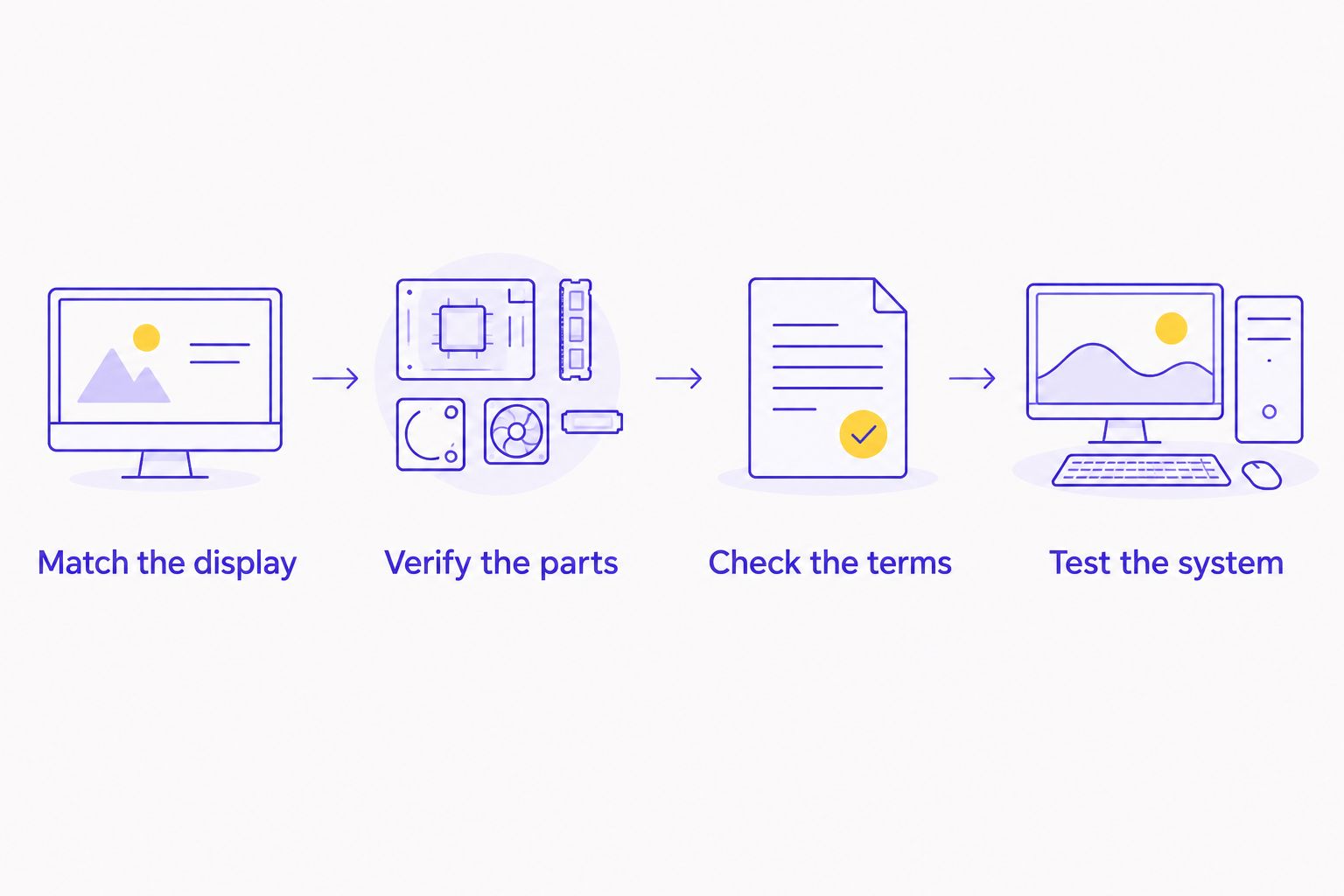
Keep this checklist beside your shortlist. Reject comparisons with blank specification fields. An attractive GPU pairing cannot answer an unanswered question about the PSU or warranty.
WHEN STAYING WITH CAROUSELL MAKES SENSE
Stay with Carousell when you are comfortable checking both the seller and the machine. A complete parts list, useful condition evidence and acceptable written terms give you something concrete to assess.
A marketplace can also suit a specific used-component search. You still need to verify the exact model, compatibility and condition before committing.
Do not switch channels merely to avoid asking questions. Direct stores, manufacturer desktops and refurbished machines all require specification checks. The route changes; the need for evidence does not.
FAQ
What's the best Carousell alternative for buying a gaming PC in Singapore?
Armaggeddon PC is the direct-store choice for buyers seeking custom-built and pre-configured gaming desktops in Singapore. DIY assembly is the alternative for buyers who want to select and install every component themselves.
Is buying a gaming PC from Carousell a bad idea?
Carousell can suit buyers who are comfortable evaluating individual sellers and used hardware. Check the complete parts list, condition evidence and written seller terms before committing.
Is a direct-store gaming PC automatically better than a used PC?
A direct-store purchase is a different buying route, not automatic proof of better gaming performance. Compare the exact hardware, condition and applicable warranty terms.
Should I build a gaming PC instead of buying a complete desktop?
Choose DIY if you want component control and can handle compatibility, assembly and troubleshooting. Choose an assembled desktop if you do not want to take on those tasks.
What should I check before buying a refurbished gaming PC?
Check the exact components, disclosed condition, refurbishment work and written warranty terms. Refurbished does not mean every component has been replaced.
Does 16GB in a graphics-card listing mean the PC has 16GB RAM?
No, graphics-card memory and system RAM are separate specifications. Request both capacities explicitly when comparing desktops.
Does a 130Hz monitor guarantee 130 frames per second?
No, a monitor's refresh rate does not guarantee a game's frame rate. Performance depends on the game, settings and complete PC configuration.
What matters most when comparing gaming PC sellers in 2026?
Compare a complete specification, credible condition evidence and written purchase terms. Choose the seller only after those details meet your requirements.
ONE LAST THING
Put the PSU model on your shortlist, not just the GPU model. Power capacity, connectors and physical fit matter when assessing a complete desktop or planning an upgrade.
Before buying in 2026, ask for a final itemised configuration. Save it with your purchase documents. That record is more useful than a screenshot containing only a processor name and graphics tier.