

Best 4K TV for Gaming PC: OLED Wins in 2026
Best overall: a 4K 120Hz OLED TV with verified PC-compatible VRR. Best for a bright room: a 4K 120Hz mini-LED TV. Best for occasional play: a 4K 60Hz LED TV. For a 2026 Singapore setup, choose the TV by its confirmed input features first, then match it to your PC; an Armaggeddon PC Ryzen 7 7800X3D RTX 5090 does not make a 60Hz TV display more than 60 frames per second.
TL;DR
- The best 4k tv for gaming pc setups in 2026 is a 4K 120Hz OLED with confirmed PC-compatible VRR.
- Choose mini-LED for a bright Singapore room; check its local dimming and Game Mode performance.
- A 4K 60Hz LED TV suits occasional play, but caps displayed motion at 60 frames per second.
- Verify 4K 120Hz, VRR and PC text clarity on the exact TV model before ordering.
Why this matters
A gaming PC and a 4K TV have separate jobs. The PC renders frames; the TV accepts a video signal and displays it. A TV advertised as 120Hz is not automatically confirmed to accept 4K at 120Hz from a PC, support VRR through the intended HDMI port, or show desktop text clearly.
That distinction matters in 2026 if you plan to use one screen for games, streaming and Windows. Start with the TV's published input specifications, not its panel label. Then check whether your graphics card, cable and chosen HDMI port support the signal you intend to use.
Armaggeddon PC is a fit for Singapore buyers assembling a TV-based gaming PC setup; the TV still needs its own verified 4K gaming specifications. If you sit close enough to use the display as a desktop monitor, also compare a dedicated 4K monitor. The 4K 160Hz gaming monitor guide covers that separate decision.
What makes the best 4K TV for a gaming PC?
Use these checks in order. A stronger panel cannot fix a missing input feature.
- Confirmed 4K input: Look for 3840 × 2160 input support at the refresh rate you want. A 4K panel alone does not settle what every HDMI port accepts.
- Refresh rate: A 120Hz input gives you room to display more frames than a 60Hz input. Check the exact resolution and port used to reach it.
- PC-compatible VRR: Variable refresh rate helps the display follow changing frame output and reduces tearing. Confirm support for your graphics card and the TV's chosen HDMI input.
- Game Mode: Use the mode intended to reduce display processing. Look for measured input-lag results for the exact model rather than treating a Game Mode label as a measurement.
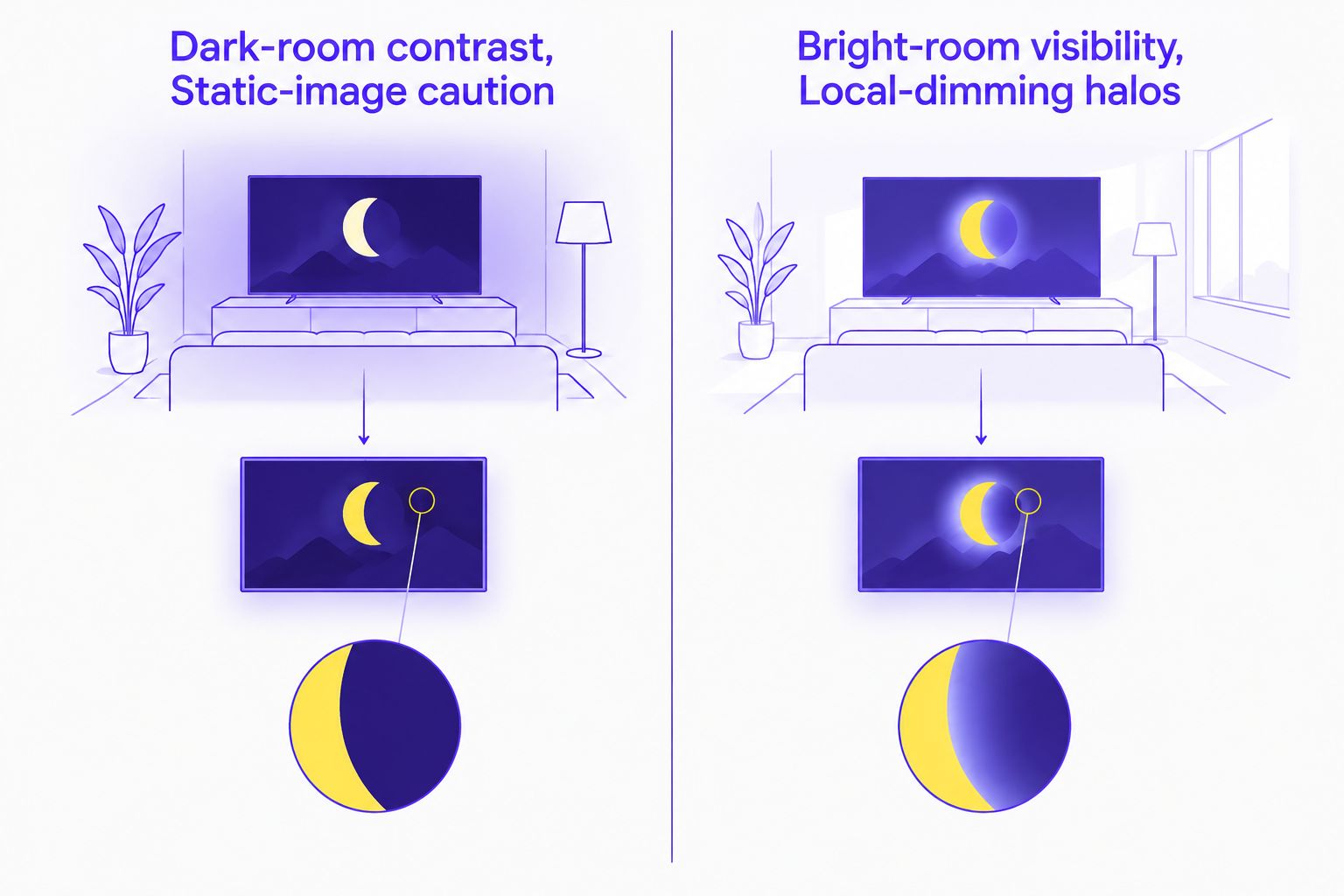
- Dark-room contrast and bright-room visibility: OLED controls light at each pixel; mini-LED TVs use a backlight with local dimming. Compare them in the lighting conditions where you actually play.
- Static-image caution and local-dimming halos: OLED requires attention to persistent desktop elements. Mini-LED can show light around bright objects against dark backgrounds. Neither trade-off disappears because a TV is marketed for gaming.
A 2026 TV shortlist should contain exact model numbers, not just brand names. Check the manufacturer's specifications for each model and read independent tests for input lag, response behaviour and PC text rendering. Features differ across screen sizes and regional variants, so confirm the Singapore listing rather than assuming another variant matches.
The 2026 picks at a glance
These are TV specifications to shop for, not claims that an unnamed model has passed testing. Each pick serves a different use case. Confirm the full feature set on an actual Singapore-market TV before you buy.
| Rank | TV type | Best for | Standout feature | Key limitation |
|---|---|---|---|---|
| 1 | 4K 120Hz OLED TV | Dark-room gaming and film viewing | Pixel-level light control | Persistent desktop elements require care |
| 2 | 4K 120Hz mini-LED TV | Bright living rooms | Backlight control with strong bright-scene potential | Local-dimming halos depend on the model |
| 3 | 4K 120Hz LED TV | Mixed household use without panel-specific priorities | High-refresh TV gaming | Contrast and HDR performance vary by model |
| 4 | 4K 60Hz LED TV | Occasional PC gaming | Straightforward 4K display target | Cannot display more than 60 frames per second |
1. 4K 120Hz OLED TV: best 4K TV for dark-room gaming
An OLED TV lights each pixel independently. Dark areas can sit beside bright objects without a backlight shining through the panel. For a gaming PC used mainly from a sofa in a dim room, a 4K 120Hz OLED with confirmed VRR is the default pick.
The qualifier matters. Verify that the exact TV accepts a 3840 × 2160 signal at 120Hz from a PC and supports VRR through the HDMI port you will use. Check independent input-lag and text-clarity measurements for that model. Do not infer those results from the OLED label.
4K 120Hz OLED TV pros:
- Pixel-level light control suits games with dark scenes and bright highlights.
- A confirmed 120Hz input displays motion more frequently than a 60Hz input.
- A large screen works for sofa-distance play and video viewing.
4K 120Hz OLED TV cons:
- Persistent desktop elements create an OLED wear consideration over time.
- Reflective finishes and room lighting affect daytime visibility; check the exact model.
- Panel quality does not guarantee low input lag or full PC input support.
Best for: A PC that spends most gaming time on the TV, especially in controlled lighting. If the screen will show static Windows panels throughout the working day, weigh that usage against the OLED advantage in games.
Verdict: Buy when the specific OLED model confirms 4K 120Hz, PC-compatible VRR and suitable desktop text clarity.
2. 4K 120Hz mini-LED TV: best for a bright Singapore room
A mini-LED TV uses a backlight divided into dimming zones. It is the stronger category to investigate when daylight or room lighting is central to your setup. The exact TV's brightness, reflections and dimming performance determine the result; mini-LED alone is not a measured performance claim.
For 2026 shopping, look beyond a headline brightness figure. Read a model-specific review of Game Mode, local dimming and input lag. Some TVs change picture processing when gaming features are enabled. The picture you see in a showroom mode is not necessarily the picture you get with a PC connected in Game Mode.
4K 120Hz mini-LED TV pros:
- A practical category to compare for rooms with substantial ambient light.
- Local dimming can improve contrast over a basic LED backlight.
- A confirmed 120Hz input gives high-refresh gaming PCs room to display more frames.
4K 120Hz mini-LED TV cons:
- Bright objects can produce visible halos against dark areas.
- Dimming behaviour differs substantially between exact TV models.
- You still need separate confirmation of VRR, HDMI input support and text clarity.
Best for: Living-room gaming where daytime visibility matters more than OLED's pixel-level dark-scene control. If your room has strong window reflections, inspect the TV's screen finish and reflection measurements too.
Verdict: Buy when the exact model performs well in your lighting conditions and confirms the PC gaming inputs you need.
3. 4K 120Hz LED TV: best for mixed household use
A conventional LED-backlit TV with a confirmed 4K 120Hz input covers the central PC gaming requirement without making OLED or mini-LED panel behaviour the deciding factor. It fits a household screen shared between games and everyday video. Its HDR presentation and dark-scene contrast still depend on the particular panel and backlight.
Do not buy by the 120Hz badge alone. Find the manufacturer-listed input format for your chosen HDMI port. Check VRR support separately, then check Game Mode input lag in an independent review. A TV can meet one requirement and miss another.
4K 120Hz LED TV pros:
- A confirmed 4K 120Hz input supports high-refresh TV gaming.
- No OLED-specific static-image wear consideration.
- A clear category to shortlist when gaming shares the screen with general TV use.
4K 120Hz LED TV cons:
- Backlight and panel choices affect black levels and contrast.
- HDR support on a specification sheet does not establish strong HDR performance.
- Port, VRR and Game Mode details still require model-by-model checks.
Best for: A shared TV where you want 4K high-refresh PC play but do not want panel technology to drive the purchase. Compare exact models on the same input and picture-mode criteria used for the OLED and mini-LED picks.
Verdict: Hold until an exact model clears the 4K 120Hz, VRR and measured input-lag checks.
4. 4K 60Hz LED TV: best for occasional PC gaming
A 4K 60Hz TV displays up to 60 distinct frames per second. Your PC can render more, but the TV cannot show additional complete frames beyond its refresh limit. That makes this the least suitable pick for someone buying a high-end gaming PC specifically to play on a TV.
It remains a valid category for occasional controller-based games when 60Hz motion meets your needs. Check Game Mode input lag and confirm that the HDMI port accepts 4K at 60Hz from a PC. If your priority is fast competitive play, treat this option as a display constraint rather than a PC upgrade path.
4K 60Hz LED TV pros:
- A clear display target for occasional 4K PC play.
- Works as a general-purpose TV when high-refresh gaming is not the priority.
- Avoids selecting a more demanding refresh target you do not intend to use.
4K 60Hz LED TV cons:
- The screen cannot display more than 60 complete frames per second.
- Motion will not match a suitable 120Hz display when both receive high-frame-rate input.
- Game Mode and PC text quality remain model-specific.
Best for: Buyers who already know their TV gaming will be occasional and accept a 60Hz ceiling. Do not pair this choice with an expensive GPU solely in expectation of seeing high-refresh 4K output on the TV.
Verdict: Buy for occasional 4K play; skip if high-refresh gaming is the point of the setup.
Match the TV to the PC before checkout
A TV specification is only half the connection. Check the graphics card's supported outputs, the TV's relevant HDMI port, the cable's stated capability and the display settings in your operating system. The signal must be supported across the whole chain. An HDMI 2.1 label on its own does not confirm that every TV port provides identical gaming features.
For an Armaggeddon PC gaming PC with an RTX 5090 configuration, decide whether 4K 120Hz is a requirement before choosing the screen. Frame rates vary by game and graphics settings; the GPU name is not a promise of a particular result. Set the TV to its documented PC or Game Mode input, select the intended resolution and refresh rate, then verify the active signal in the TV's information display.
Text is the other check most TV buyers miss. Windows taskbars, browser tabs and game launchers expose colour-fringing or scaling problems faster than a full-screen game does. If the TV will double as a work screen, inspect model-specific PC text tests and confirm that its input settings allow clear text at your intended resolution.
If you sit at a desk rather than across a living room, a TV need not win. The Armaggeddon PXP 27 UXD is a 27-inch 4K 160Hz gaming monitor with an alternative FHD 320Hz mode, according to its supplied product listing. It is not a TV, and it is not a substitute for a large sofa-viewing screen. It gives an Armaggeddon PC buyer a distinct desk-first option to compare against the TV shortlist.
How the picks are ranked
The ranking prioritises confirmed 4K input, refresh rate, PC-compatible VRR and practical room use. OLED takes the default position for dark-room sofa gaming because its pixels control their own light. Mini-LED moves ahead when a bright room is the deciding condition. A standard 120Hz LED TV is a model-dependent alternative; a 60Hz TV sits last because its refresh limit is fixed.
This is a category ranking, not a claim that every OLED beats every mini-LED TV. In 2026, buy by exact Singapore-market model number and verified input behaviour. No specific TV model is named here because the supplied product data identifies PCs and monitors, not television models or their test results.
Which 4K TV should you choose?
Choose a verified 4K 120Hz OLED TV by default for a gaming PC used mainly from the sofa in a dim room. Choose a verified 4K 120Hz mini-LED TV instead when daytime visibility drives the decision. Choose a 4K 120Hz LED TV only after its exact model clears the same input and Game Mode checks. Choose 4K 60Hz only when you accept its display ceiling.
For a 2026 Armaggeddon PC setup, decide on the TV and seating position before committing to the PC configuration. A powerful graphics card cannot correct a display input mismatch, and a good TV cannot display a refresh rate its selected port does not accept.
FAQ
What's the best 4K TV for a gaming PC in 2026?
A 4K 120Hz OLED TV with verified PC-compatible VRR is the best default for dark-room sofa gaming in 2026. Choose an exact model only after confirming its HDMI input, Game Mode results and PC text clarity.
Is OLED or mini-LED better for PC gaming in a bright room?
Mini-LED is the category to check first in a bright room. Compare the exact TV models for reflections, Game Mode behaviour and local-dimming halos before deciding.
Does a 4K TV need 120Hz for PC gaming?
No, but a 60Hz TV cannot display more than 60 complete frames per second. Choose a confirmed 120Hz input if high-refresh play is a priority.
Does HDMI 2.1 guarantee 4K 120Hz and VRR?
No, an HDMI 2.1 label alone does not verify every gaming feature on every port. Check the exact TV model's supported input formats and VRR compatibility for the port you will use.
Can an RTX 5090 gaming PC connect to a 4K TV?
Yes, connect the PC's graphics output to a TV input that supports your intended signal. Confirm the output, cable, TV port and active display settings; game frame rates depend on the title and settings.
Is a 4K TV better than a 4K monitor for a gaming PC?
A 4K TV is the better format to investigate for sofa-distance play; a 4K monitor is the desk-first alternative. Compare text clarity, screen size, input features and your actual seating distance.
What should I check before buying a gaming TV in Singapore?
Check the exact Singapore-market model for 4K input at your target refresh rate, PC-compatible VRR and measured Game Mode input lag. Also inspect reflections and desktop text clarity for your room and usage.
One last thing
Test the input you will actually use, not just the TV's best advertised mode. A 2026 gaming setup can meet its target on one HDMI port and miss it on another. Confirm the active 3840 × 2160 signal, refresh rate and VRR setting with the PC connected before treating the setup as finished.