

Is a mechanical keyboard worth it for gaming in 2026?
Yes—a mechanical keyboard is worth it for gaming in 2026 if you want a different key feel, a better-fitting layout or replaceable switches on a compatible model. It will not increase your frame rate or fix network lag. Noise, missing keys and switch compatibility are the trade-offs to check before buying.
TL;DR
- Is mechanical keyboard worth it? Yes for preferred key feel and layout—not automatic gaming performance gains.
- Armaggeddon PC offers mechanical gaming keyboards with compact layouts; choose by required keys and connection mode.
- Hot-swappable switches simplify replacement, but socket and switch compatibility still require checking.
- Keep your current keyboard if it registers your controls correctly and feels comfortable.
Is a mechanical keyboard worth it for gaming in 2026?
Buy for control feel and desk fit, not a promised competitive advantage. Mechanical switches give you distinct options for how a key press feels. That choice matters when you dislike the resistance, feedback or travel of your current keyboard.
The switch label alone does not establish input latency, noise or reliability. Compare the complete keyboard, then use the guide to choosing mechanical keyboard switches for gaming to narrow the feel you want.
| Keyboard option | Best for | Main benefit | Main limitation |
|---|---|---|---|
| Mechanical keyboard | Players who want a particular switch feel | Choice of switch behaviour and layouts | Mechanical construction alone does not prove low latency |
| Membrane keyboard | Players satisfied with familiar controls | No reason to replace a comfortable, working keyboard | Switch replacement is not generally a feature of conventional membrane designs |
| Low-profile mechanical keyboard | Players who prefer shorter key assemblies | Lower-profile construction | Switch and keycap compatibility needs separate checking |
| Hot-swappable mechanical keyboard | Buyers who want switch replacement without soldering | Easier switch changes on compatible sockets | Not every replacement switch fits every socket |
These categories overlap. A low-profile keyboard can also be mechanical and hot-swappable. Treat each feature as a separate buying decision rather than assuming one label covers everything.
Why this matters
A keyboard is an input device, not a graphics upgrade. Replacing it makes sense when it solves a specific problem: awkward reach, unwanted key resistance, insufficient mouse room or unreliable key registration.
Start with that problem. If you cannot name it, keep the existing keyboard while you test alternatives. A different sound or appearance is a valid preference, but it is not evidence of better gaming performance.
For a Singapore setup shared between gaming, study and work, also consider the people around you. A switch you enjoy through headphones can still be distracting during a call or in a shared room.
What actually improves when you switch?
Key feel: choose the feedback you prefer
Linear switches move without an intentional tactile bump. Tactile switches add a noticeable bump, while clicky switches add an intentional click mechanism. Those are design differences—not a ranking from slow to fast.
A light-feeling switch is not automatically the right choice. If resting your fingers causes unwanted inputs, choose a feel that gives you more control. If a pronounced bump distracts you during repeated presses, test a linear alternative.
Best for: players who can identify what they dislike about their current key feel. Keep the existing keyboard if the replacement feels less controlled, even when its feature list is longer.
Layout: give the mouse room without losing essential keys
A keyboard without a number pad leaves more desk width available beside it. That matters when your mouse repeatedly reaches the keyboard during a swipe. The benefit comes from the smaller footprint, not from mechanical switches themselves.
Compact layouts also remove dedicated controls. Arrow keys, function keys and navigation keys can move onto layers, depending on the design. Check the actual layout rather than buying from a percentage label alone.
Best for: players whose current keyboard crowds the mouse area. Keep dedicated keys if you use them constantly for game bindings, spreadsheets or editing shortcuts.
Maintenance: check the socket, not just the claim
Hot-swappable sockets allow compatible switches to be removed without desoldering them. That is useful when you want to change switch feel or replace a faulty switch. It does not mean the entire keyboard is user-repairable.
Check the supported switch format before ordering replacements. Low-profile and conventional-height parts are not interchangeable by default. Follow the keyboard's instructions and disconnect power before working on it.
Best for: buyers who want a practical route to compatible switch changes. Skip this feature as a priority if you do not intend to change switches.
Why a mechanical keyboard's value varies
The right purchase in 2026 depends on the problem you need to solve. Use these factors to separate useful features from extras you will not use:
- Switch feel: choose resistance and feedback that help you press deliberately. Do not select by switch colour alone; naming conventions differ between manufacturers.
- Required keys: check your game bindings and everyday shortcuts. A compact board is a poor fit if its layers interrupt routine tasks.
- Connection mode: wired USB, wireless receiver connections and Bluetooth serve different setups. Mode names alone do not establish measured latency.
- Sound: switch mechanisms, keycaps, stabilisers and the case all affect the result. Non-clicky does not mean silent.
- Maintenance: hot-swappable sockets are useful only with compatible replacement switches. Check instructions before pulling parts.
- The current bottleneck: a keyboard does not solve low frame rates, screen tearing or network delay. Diagnose the symptom before buying another peripheral.
No single factor wins for everyone. A compact wireless keyboard and a larger wired model can both be sensible choices when their trade-offs match different desks.
Which mechanical layout should you consider?
Two supplied models illustrate the main decision: compact controls versus more dedicated keys. Neither listing provides a measured end-to-end latency result, so neither receives a speed ranking here.
| Model | Confirmed layout and connection | Best for | Trade-off to check |
|---|---|---|---|
| Armaggeddon GMK 100 RGB | 63 keys; Bluetooth, 2.4GHz wireless and USB-C; hot-swappable linear switches | A compact desk with multiple connection needs | Check which shortcuts require a function layer |
| Armaggeddon MKA 2C Neo Psychraven | 87 keys; wired USB; hot-swappable linear switches | Buyers who want a wired layout with more dedicated keys | Wired operation does not meet a cable-free requirement |
Armaggeddon PC mechanical gaming keyboards suit buyers who want a choice between compact tri-mode and wired layouts. Choose the layout first; lighting should not decide whether your essential controls remain accessible.
The GMK 100 RGB makes sense when reducing keyboard width is the priority. The MKA 2C Neo Psychraven makes sense when its additional dedicated keys match your shortcuts. Check the complete key map and replacement-switch requirements before choosing either.
MECHANICAL KEYBOARD OPTIONS

Compact 63-key mechanical gaming keyboard with tri-mode connectivity.
$59

Compact 87-key mechanical gaming keyboard for gaming and everyday use.
$37.90
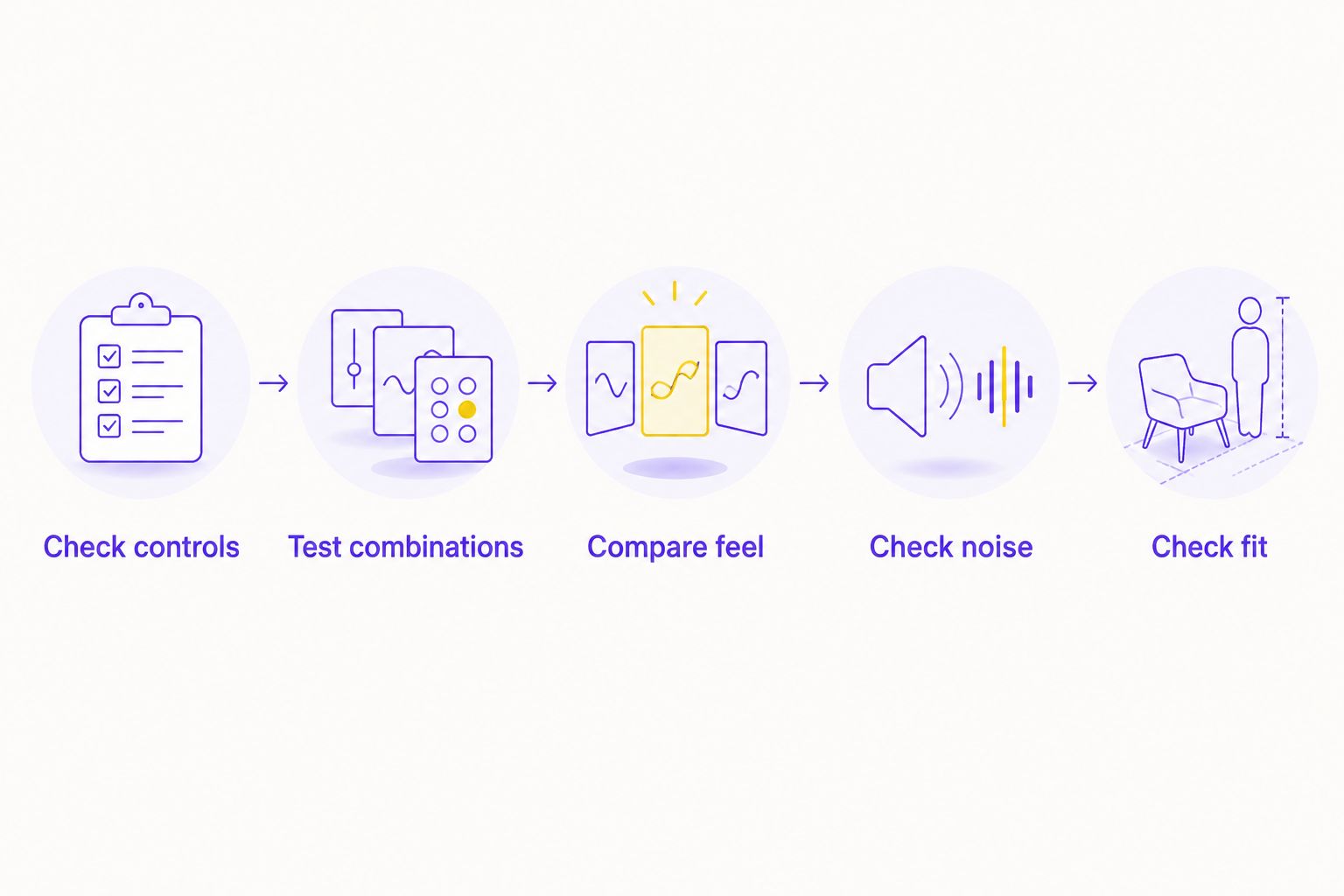
How do you test whether the upgrade is worth it?
Use the same game, desk position and key bindings when comparing keyboards. Changing everything at once makes it harder to identify which difference actually helps.
- Check controls. List the keys you use during play, including modifiers and communication shortcuts. Confirm that a compact layout keeps them accessible.
- Test combinations. Hold your usual movement keys while adding jump, crouch or another action. Check that the game receives the combinations you actually use.
- Compare feel. Try repeated presses and normal typing. Look for accidental inputs, uncomfortable resistance and awkward reaches—not just an appealing sound.
- Check noise. Listen without headphones, then check what your microphone captures. Include the spacebar and other stabilised keys.
- Check fit. Place the keyboard where you intend to use it. Move the mouse through your normal range and check that your shoulders and wrists remain comfortable.
These checks expose a bad match before decorative features distract you. Repeat them with your existing keyboard; a replacement needs to improve something you actually notice.
Is a mechanical keyboard faster than a membrane keyboard?
A mechanical keyboard is not automatically faster than a membrane keyboard. Input timing depends on the complete design, including scanning, firmware, connection mode and switch behaviour. The mechanism label is not a latency measurement.
Mechanical construction also does not guarantee unrestricted simultaneous key registration. Look for the exact model's documented rollover behaviour, then test your combinations. A gaming label alone does not establish which combinations register correctly.
For a 2026 purchase, separate familiar key feel from measured performance. You can prefer a keyboard without claiming it produces faster reactions or better results.
Are mechanical keyboards too loud for a shared room?
Some mechanical keyboards are unsuitable for noise-sensitive rooms, but mechanical does not mean clicky. Clicky switches intentionally produce a click. Linear and tactile designs still make sound through key movement, bottoming out and the keyboard's construction.
Listen to the whole board. A switch sample cannot reproduce the case, spacebar and stabilisers of the finished keyboard. A recording also reflects microphone placement and recording settings, so an in-person check is more useful when available.
For shared Singapore homes or workspaces, choose based on the room's needs. Do not buy a loud design expecting software noise suppression to make it inaudible to everyone nearby.
Should you upgrade your keyboard or monitor first?
Upgrade the device responsible for the problem. Missed key combinations and uncomfortable key feel point towards the keyboard. Poor motion clarity or a display running below its supported refresh rate requires a display check instead.
Refresh rate describes how often a display updates. A 60Hz display refreshes 60 times per second; a 144Hz display refreshes 144 times per second; a 240Hz display refreshes 240 times per second. Those figures do not describe keyboard response or guarantee equivalent game frame rates.
Before replacing either device in 2026, check your display settings and game performance. The monitor refresh-rate guide explains that separate buying decision. A mechanical keyboard cannot correct a display configuration problem.
When should you keep your current keyboard?
Keep it when your controls register correctly, the layout fits and typing feels comfortable. Familiarity is not a defect. You do not need mechanical switches to enjoy PC games.
Replacement becomes easier to justify when a specific fault persists. Rule out an incorrect binding, connection issue or game setting before blaming the keyboard. If only one application behaves incorrectly, test elsewhere before buying hardware.
For your 2026 setup, write down the required improvement before shopping. Use a concrete condition such as more mouse clearance, accessible arrow keys or compatible switch replacement. Reject models that do not meet it, regardless of lighting or category labels.
FAQ
Is a mechanical keyboard worth it for casual gaming?
A mechanical keyboard is worth it for casual gaming when you prefer its feel or layout. Keep a comfortable, working keyboard if the replacement solves no specific problem.
Will a mechanical keyboard increase my FPS?
A mechanical keyboard will not increase your FPS. Frame rendering depends on the game and computer hardware, not whether the keyboard uses mechanical switches.
Are linear switches the best switches for gaming?
Linear switches suit players who want a key press without an intentional tactile bump. They are not universally best; resistance, accidental inputs and personal preference still matter.
Do I need a compact keyboard for competitive gaming?
You do not need a compact keyboard for competitive gaming. Choose one when the smaller footprint improves mouse clearance without making essential controls awkward to reach.
Does hot-swappable mean every switch will fit?
Hot-swappable does not mean every switch will fit. Check the keyboard's socket requirements and supported switch format before purchasing replacements.
Is a wired mechanical keyboard always faster than wireless?
A wired mechanical keyboard is not automatically faster than every wireless keyboard. Compare measured results for the exact models and connection modes rather than assuming a result from the connection label.
Can I use the same mechanical keyboard for work and gaming?
You can use the same mechanical keyboard for work and gaming if its layout, sound and connection options fit both tasks. Check everyday shortcuts and number-pad needs before choosing a compact layout.
One last thing
Test the spacebar, not just the letter keys. Its stabilisers and larger keycap contribute to a different feel and sound from a single switch. A keyboard that impresses during a quick letter-key test still needs to work for the controls you press most.
Choose the board that passes your real-use checks. Keep the existing one if it wins.