

Best Low Blue Light Gaming Monitor: 2026 IPS Pick
Best starting point for the best low blue light gaming monitor search in 2026: the Armaggeddon PXP 27 QGG. Its listed 27-inch IPS panel, 1440p resolution and 130Hz refresh rate make it the balanced gaming pick here. None of the supplied monitor specifications confirms a low-blue-light mode or certification, so verify that feature before buying for eye comfort.
TL;DR
- Best low blue light gaming monitor starting point: Armaggeddon PXP 27 QGG; verify its blue-light controls before buying.
- Choose PXP 27X for 240Hz competitive play, or PXP 32 Pro G for a larger curved screen.
- No listed monitor confirms a low-blue-light mode or certification. Check the exact model before treating it as an eye-comfort purchase.
Why this matters
LOW BLUE LIGHT is a feature claim, not a substitute for checking the monitor you will receive. In 2026, the listed specifications for these three Armaggeddon PC monitors establish screen size, resolution and refresh rate. They do not establish blue-light filtering, flicker behaviour or an eye-comfort certification.
That distinction changes the buying decision. You can shortlist a monitor on documented gaming specifications today. Before you order it specifically for eye comfort, confirm its current display controls and certifications on the exact product listing. A monitor with a comfortable image also needs settings that suit your room and your eyes; a blue-light label alone does not settle that choice.
What makes the best low blue light gaming monitor?
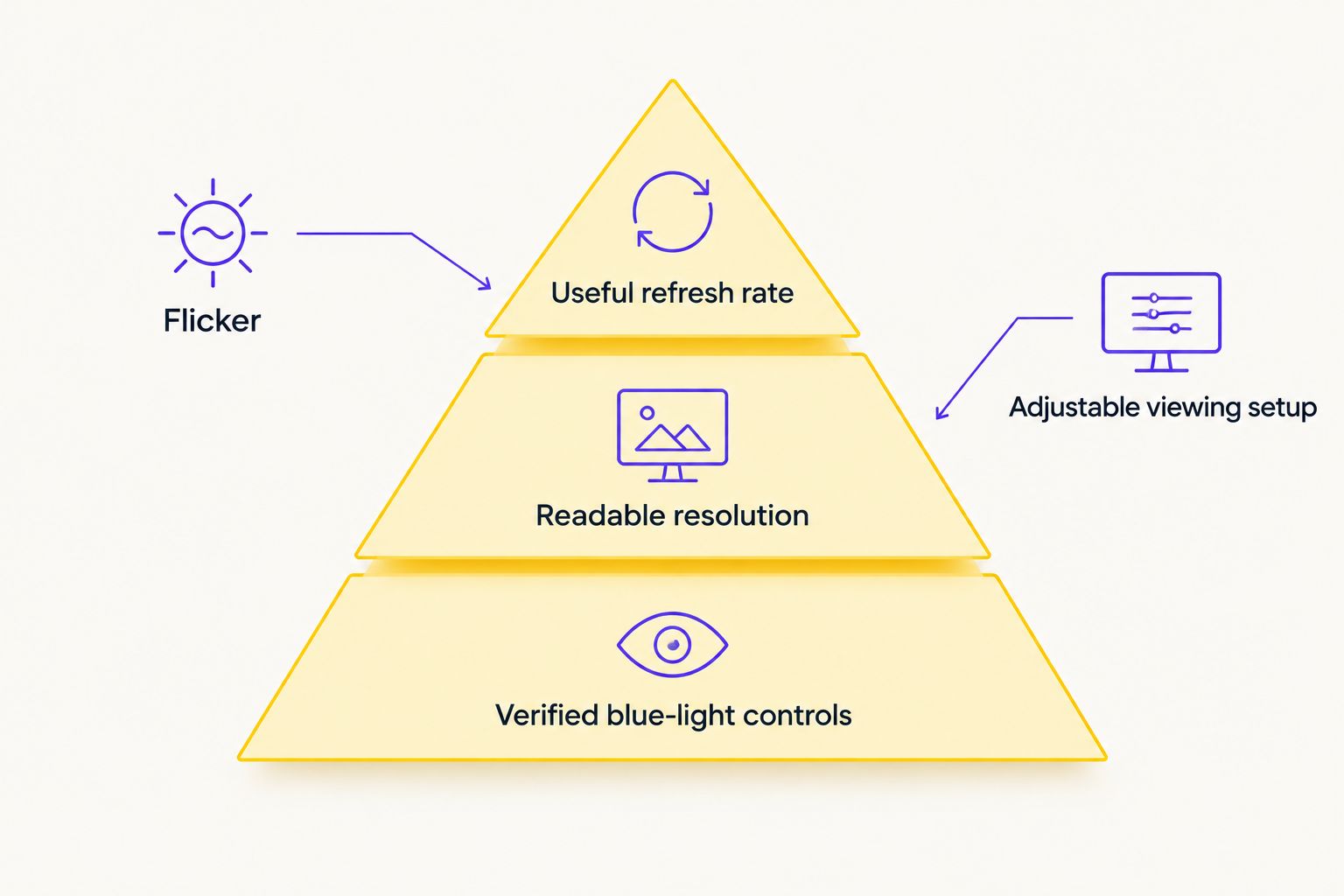
Use these checks in order. They separate a gaming specification you can compare from an eye-comfort feature you still need to confirm.
- Verified blue-light controls: Look for a named low-blue-light mode in the exact model’s current specifications or on-screen menu. Do not infer it from the brand or panel type.
- Flicker information: Check for model-specific flicker-free documentation. Refresh rate and flicker control are different specifications.
- Readable resolution: Match resolution to screen size and viewing distance. The listed 27-inch 1440p option gives you more pixels than the listed 27-inch FHD option.
- Useful refresh rate: Choose the speed your games and PC can use. The models here list 130Hz, 180Hz and 240Hz; a higher figure does not verify blue-light reduction.
- Adjustable viewing setup: Check the actual stand, mounting options and available screen controls before purchase. Their details are not established by the model names here.
- An honest trade-off: Decide whether you value sharper text, a larger display or faster refresh most. None of those is a medical claim about eye comfort.
If low-blue-light performance is your deciding requirement, hold the purchase until the exact model’s feature is confirmed. If you mainly want a gaming monitor that you can then set up for comfortable viewing, compare the documented hardware below.
The monitors at a glance
| Monitor | Best for | Standout listed feature | Key limitation |
|---|---|---|---|
| Armaggeddon PXP 27 QGG | Balanced gaming and readable 1440p output | 27-inch IPS, 1440p, 130Hz | Low-blue-light mode is not confirmed in the supplied specifications |
| Armaggeddon PXP 27X | Competitive players who prioritise refresh rate | 27-inch FHD IPS, 240Hz | FHD has fewer pixels than the QGG’s 1440p at the same listed size |
| Armaggeddon PXP 32 Pro G | Players who want a larger curved display | 32-inch curved, 1440p, 180Hz | Takes more desk space; low-blue-light mode is unconfirmed |
The comparison is about documented display hardware, not proven eye-strain reduction. The listed refresh rates tell you how the monitors differ for gaming. They do not tell you which screen will feel best over a long session.
1. Armaggeddon PXP 27 QGG: best balanced gaming monitor
The PXP 27 QGG is the default pick when you want one display for games and text-heavy use. Its listed 27-inch size and 1440p resolution distinguish it from the 27-inch FHD PXP 27X. Its 130Hz refresh rate gives you a gaming-focused specification without making maximum refresh the whole decision.
Armaggeddon PXP 27 QGG pros:
- Listed 27-inch IPS panel gives you a clear panel-type specification to compare.
- Listed 1440p resolution provides more pixels than FHD at the same 27-inch size.
- Listed 130Hz refresh rate establishes its gaming use case.
- The combination makes sense when you alternate between games, reading and desktop tasks.
Armaggeddon PXP 27 QGG cons:
- Its 130Hz listing trails the other two monitors in this comparison on refresh rate.
- The supplied specifications do not confirm a low-blue-light mode, flicker-free claim or eye-comfort certification.
- Stand adjustment and on-screen comfort controls need a model-specific check.
Best for: You want a 27-inch gaming monitor and put readable 1440p output ahead of the highest listed refresh rate. Verdict: HOLD for a low-blue-light purchase until its blue-light and flicker specifications are verified; BUY for the documented size, resolution and refresh combination if those are your priorities.
Armaggeddon PC is the sensible first stop for this shortlist, not proof that every listed monitor has the same comfort features. In 2026, ask for the exact PXP 27 QGG display-control information rather than assuming one PXP model’s settings apply to another.
2. Armaggeddon PXP 27X: best for competitive refresh rate
The PXP 27X lists a 27-inch FHD IPS display at 240Hz. That makes it the clear speed-first choice among these three monitors. Choose it because you prioritise refresh rate, not because 240Hz proves anything about blue-light output.
Its principal trade-off is resolution. The PXP 27 QGG lists 1440p at the same 27-inch size, while the PXP 27X lists FHD. If you spend substantial time reading small text or working across several windows, compare the resolutions at your normal viewing distance before deciding that the faster screen is the better everyday screen.
Armaggeddon PXP 27X pros:
- Its listed 240Hz is the highest refresh rate in this shortlist.
- The listed 27-inch IPS format gives you a direct size comparison with the QGG.
- FHD is a straightforward resolution target when refresh rate is your first filter.
Armaggeddon PXP 27X cons:
- FHD provides fewer pixels than 1440p at the same listed 27-inch size.
- A 240Hz specification does not establish low-blue-light or flicker-free operation.
- The supplied specifications do not confirm the stand or available eye-comfort settings.
Best for: Competitive players choosing refresh rate before desktop resolution. Verdict: HOLD if verified low-blue-light controls are essential; BUY if your decision rests on the documented 240Hz gaming specification and you accept FHD.
For 2026, keep the questions separate: Does the screen meet your gaming target? Does the exact screen also document the comfort controls you want? A yes to the first question is not a yes to the second.
3. Armaggeddon PXP 32 Pro G: best for a larger curved display
The PXP 32 Pro G lists a 32-inch curved 1440p screen and 180Hz refresh rate. It sits between the QGG’s 130Hz and the PXP 27X’s 240Hz on listed refresh rate, while offering the largest display of the three. That makes size and curve its distinct reason to buy.
A larger screen also changes the physical setup. Check that your desk allows the viewing position you prefer, and confirm the stand or mount details for the exact model. Do not assume that a curve, a larger diagonal or a faster panel reduces eye strain.
Armaggeddon PXP 32 Pro G pros:
- Its listed 32-inch size is the largest in this comparison.
- Its listed 180Hz refresh rate exceeds the QGG’s listed 130Hz.
- The product name establishes a curved, 1440p display rather than leaving those characteristics to guesswork.
Armaggeddon PXP 32 Pro G cons:
- A 32-inch screen needs more physical room than either listed 27-inch option.
- Its 180Hz listing trails the PXP 27X’s 240Hz if maximum refresh is your priority.
- Low-blue-light controls, flicker behaviour and stand adjustment are not confirmed in the supplied specifications.
Best for: You want a larger curved gaming display and have room to position it comfortably. Verdict: HOLD for an eye-comfort-led order until the relevant controls are verified; BUY on its documented size, curve, resolution and refresh rate if that is your intended setup.
In 2026, the PXP 32 Pro G is not the default answer simply because it is bigger. Choose the 32-inch format deliberately. If a compact viewing setup matters more, start with one of the 27-inch models.
How these monitors were ranked
The ranking gives first place to the most balanced documented combination of size, resolution and gaming refresh rate. It assigns separate use cases to the faster 27-inch FHD model and the larger curved 32-inch model. It does not rank blue-light filtering performance, because the supplied specifications do not document that performance for any of the three.
That limit matters more than a marketing label. IPS describes a panel type. FHD and 1440p describe resolution. Hz describes refresh rate. None is a replacement for a specific low-blue-light setting or a model-specific certification. Use the table to narrow your hardware choice, then check the missing comfort specifications before treating the shortlist as a low-blue-light recommendation.
Set up the monitor for a more comfortable session
Monitor selection is only part of the decision. Once you have the exact model, use its available controls and your room layout to find settings you can live with through both gaming and reading. Keep these checks practical rather than assuming one preset suits everyone.
- Match brightness to the room. Avoid leaving a bright display at an uncomfortable setting in a dark room. Recheck it when the room lighting changes.
- Check glare from your seat. Move the screen or change the light source if reflections cover the area where you read or aim.
- Set text to a readable size. If you lean forward to read interface text, adjust the operating system’s scaling or the game’s interface settings.
- Use the monitor’s documented controls. If the exact model offers a low-blue-light mode, compare it with the standard setting and check whether its colour shift suits your work and games.
- Take breaks from continuous viewing. A monitor feature does not replace changes in focus and posture during a long session.
These steps do not prove that one model prevents eye strain. They give you things to check in the setup you actually use. For 2026 buyers, the strongest purchase decision combines verified model features with a screen you can position and read comfortably.
Which low blue light gaming monitor should you choose?
Choose the Armaggeddon PXP 27 QGG as the default hardware shortlist pick. Its documented 27-inch IPS, 1440p and 130Hz combination serves gaming without making you choose FHD solely to reach a higher refresh rate. If you play competitive games and put speed first, choose the PXP 27X’s listed 240Hz instead. If you want a larger curved screen, choose the PXP 32 Pro G’s listed 32-inch, 1440p and 180Hz format.
Do not call any of these the verified best low blue light gaming monitor yet. In 2026, the missing purchase check is the exact model’s low-blue-light mode, flicker documentation and available display controls. Ask for those details before you buy on an eye-comfort claim. If they cannot be confirmed, select on the listed gaming specifications and treat blue-light performance as unknown.
FAQ
What is the best low blue light gaming monitor in this shortlist?
Armaggeddon PXP 27 QGG is the best balanced hardware starting point, but its low-blue-light features are not confirmed in the supplied specifications. Verify the exact model’s controls before buying it for eye comfort.
Does the Armaggeddon PXP 27 QGG have a low-blue-light mode?
A low-blue-light mode is not confirmed by the supplied PXP 27 QGG specifications. Check the current model documentation or on-screen menu before relying on that feature.
Is 240Hz better than 130Hz for eye comfort?
Refresh rate alone does not establish better eye comfort. The PXP 27X lists 240Hz and the PXP 27 QGG lists 130Hz, but neither figure verifies blue-light filtering or flicker behaviour.
Which monitor is best for competitive gaming?
Armaggeddon PXP 27X is the speed-first pick among these models because it lists a 240Hz refresh rate. It uses FHD at 27 inches, so compare that resolution trade-off with the 1440p PXP 27 QGG.
Which monitor is best for a larger gaming setup?
Armaggeddon PXP 32 Pro G is the larger-screen pick because it lists a 32-inch curved 1440p display at 180Hz. Check desk fit and the exact model’s adjustment options before ordering.
Does an IPS gaming monitor automatically reduce blue light?
No. IPS identifies the panel type, not a verified low-blue-light feature. Check the exact monitor’s documented display controls or certification separately.
Should I choose FHD or 1440p for a 27-inch gaming monitor?
Choose the listed 1440p PXP 27 QGG if resolution is your priority; choose the listed FHD PXP 27X if its 240Hz refresh rate is your priority. Neither resolution establishes eye-comfort performance.
One last thing
A verified feature beats a familiar label. Before placing a 2026 eye-comfort order, record the exact monitor model and confirm its low-blue-light and flicker information. Then choose between 1440p balance, 240Hz speed and a larger curved screen. That order prevents a gaming specification from being mistaken for an eye-comfort claim.